Participant
September 30, 2025
Answered

Photo Quality guidance/advice

  • September 30, 2025
  • 5 replies
  • 564 views

Hello,

I don't have any photography background but have always like taking pictures. I don't have a camera, but thought I would try uploading some of my best photos from my iPhone 12 pro max. My first batch of photos got rejected for quality issues. My question is how far off is the quality? Any tips?


Thanks,


Jonathan Bowden

Correct answer Jill_C

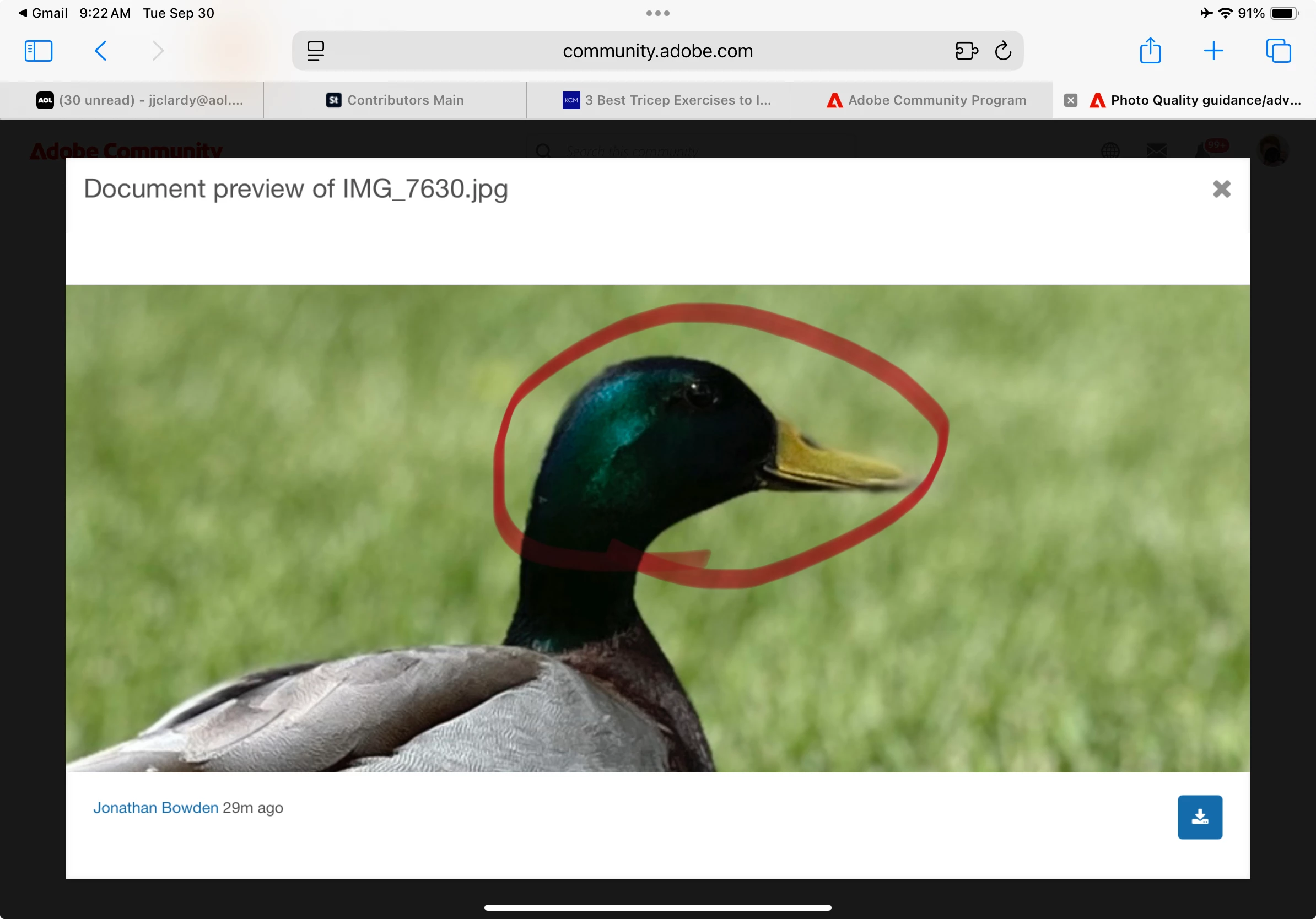
Depth of field is too limited here as well, and the duck's head is out of focus.

5 replies

Nancy OShea
Community Expert
Community Expert
September 30, 2025

You have some fierce competition from other Frog inventory. Examine what they're doing differently, and work on it.

https://stock.adobe.com/searchk=frog+photograph


While convenient to use, phone cameras are very limited in what they can do. To get good results, the conditions & light source must be ideal. If you're serious about pursuing Stock Photography, start saving for a good entry level camera and lenses (new or used). Consider enrolling in some online photography courses to learn the fundamentals of composition, lighting and photo technique.


Hope that helps. 


Nancy O'Shea— Product User & Community Expert
Jill_C
Community Expert
Jill_CCommunity ExpertCorrect answer
Community Expert
September 30, 2025

Depth of field is too limited here as well, and the duck's head is out of focus.

Jill C., Forum Volunteer
Participant
September 30, 2025

The duck picture was taken in portrait mode. It seems to me that portrait mode will almost never allow high quality edges, so I'll probably stop using it. The frog picture was taken RAW. I didn't realize how much there was to improve in the editing. Thanks for the help!

Jill_C
Community Expert
Community Expert
September 30, 2025

I think you might have used the Portrait mode on the iPhone which results in too many areas being out of focuse as noted here.

Jill C., Forum Volunteer
daniellei4510
Community Expert
Community Expert
September 30, 2025

A few appear to be a bit soft or have exposure issues. Cell phone images are sometimes accepted but they always need some post-processing.


Adobe Community Expert | If you can't fix it, hide it; if you can't hide it, delete it.
Participant
September 30, 2025

Thanks for the tips!

daniellei4510
Community Expert
Community Expert
September 30, 2025

Happy to help. Good luck!

Adobe Community Expert | If you can't fix it, hide it; if you can't hide it, delete it.
RALPH_L
Community Expert
Community Expert
September 30, 2025

All photos need to be reviewed at > 100% to check for noise and sharpness. You also need to check exposure to ensure that highlights and shadows are correctly exposed. Try to follow some basic composition rules. Do som type of post processing to correct the photos. That are all the tips I can give you.

Participant
September 30, 2025

Thanks for the feedback!