


Participant
September 2, 2026
Question

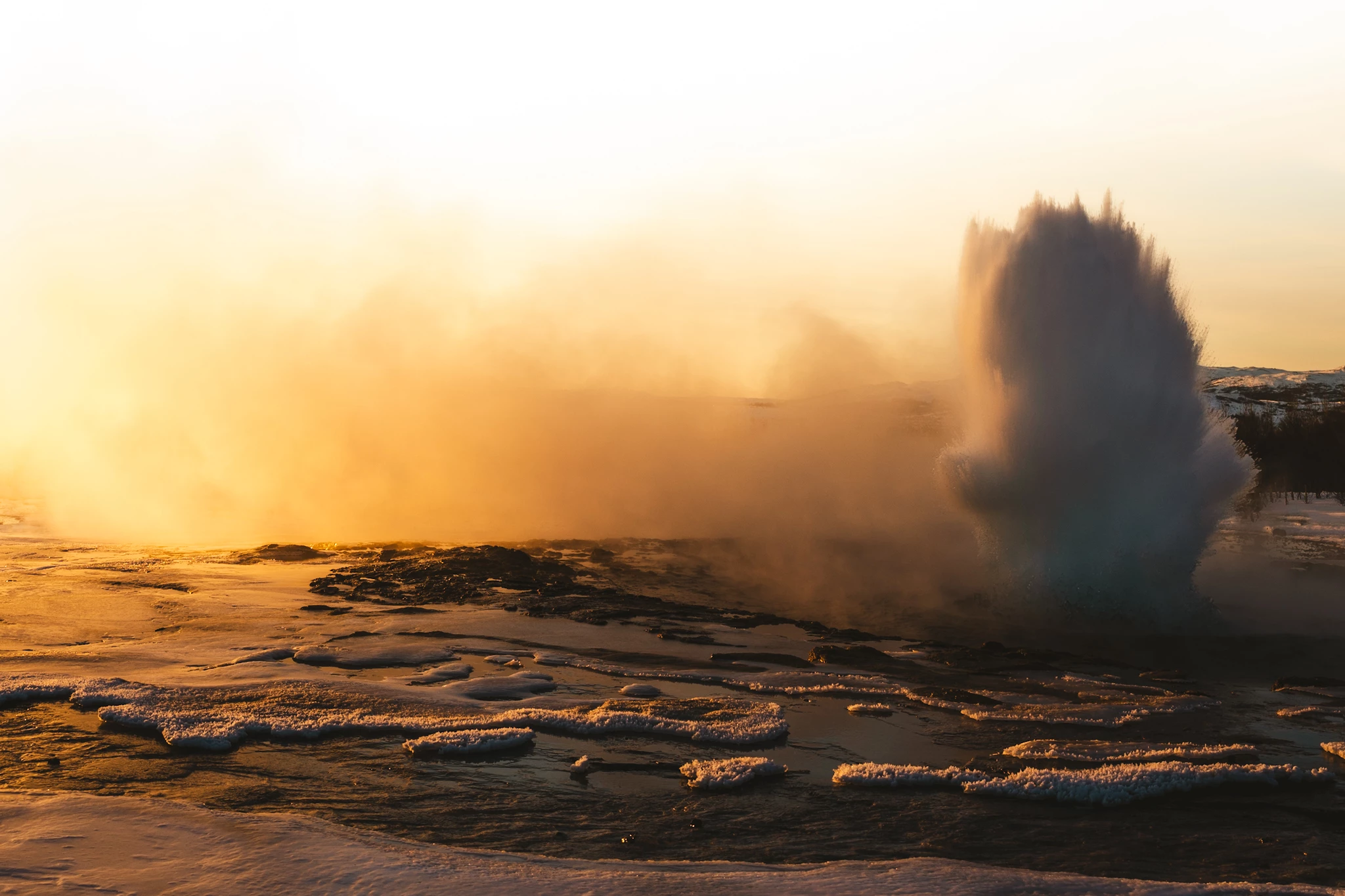
Photo was rejected, looking for feedback to improve
  • September 2, 2026
  • 30 replies
  • 174 views

This photo of a geyser was rejected, any ideas on the reason and how I could improve it? I added some yellow intentionally with lightroom to intensify the sunrise mood. Shot was taken at ISO 100, 1/500, 5.6 and 35mm. 

    30 replies

    daniellei4510
    Community Expert
    Community Expert
    September 2, 2026

    Check your histogram. When it comes to stock, adjusting color balance is best used to fix issues rather than reinterpret the image. That’s not a hard and fast rules, but I think it applies here.


    Adobe Community Expert | I have miles to go before I sleep, but I'm all done on this end.
    Participant
    September 2, 2026

    Thanks, understood. On that image I intentionally wanted to burn out the sky to get that look. That was my creative decision so to say. But umderstood that for stock that might not be the best choice 

    ZALEZPHOTO
    Legend
    September 2, 2026

    What are you editing with? It’s a hard shot given the dramatic intensity of light to dark areas. Lightroom or Photoshop, using Camara Raw would be perfect to help open up the water and sounding dark areas… try fixing that and give it another try… by the way, in my opinion the colors are fine, but reducing the yellow/orange a tiny bit would not hurt.

    In the future put a little more time deciding on the best composition for a time critical shot like this one. The story here is the geyser. Can you see how moving the camera a “few” degrees to the right would have made the composition more balanced, and help reduce all the brightness from the sun?

    You should still be proud, this one is your shot... 

    Live and Learn!

    ZALEZPHOTO
    Ricky336
    Community Expert
    Community Expert
    September 2, 2026

    The OP was editing with Lightroom - “ I added some yellow intentionally with lightroom”.

    ZALEZPHOTO
    Legend
    September 2, 2026

    Good catch Ricky! I bet many people are unaware of the latest AI driven tools to selectively edit an image like this one!

    ZALEZPHOTO
    yamato713108855
    Community Expert
    Community Expert
    September 2, 2026

    Images may be rejected if the white balance is excessively off, resulting in an orange tint.
    Overexposure (blown-out highlights) and underexposure (crushed blacks) are also grounds for rejection.

    Participant
    September 2, 2026

    Thanks, I adjusted the WB and also increased the exposure on the geyser itself

    Ricky336
    Community Expert
    Community Expert
    September 2, 2026

    Hello,

    You have to balance the exposure. You have over and underexposed areas. You have to lighten the geyser but also be careful of noise that will show when making it lighter. I also think the composition can be improved. I would not add the yellow as this interferes with the white balance.

    Participant
    September 2, 2026

    Thanks, I adjusted the WB and also increased the exposure on the geyser itself. Any suggestions on the cropping?

    Ricky336
    Community Expert
    Community Expert
    September 2, 2026

    Taking a few photos from different angles is better than cropping. With this photo, I don’t think cropping will work.