



therippleshow
Known Participant
August 28, 2023
Answered

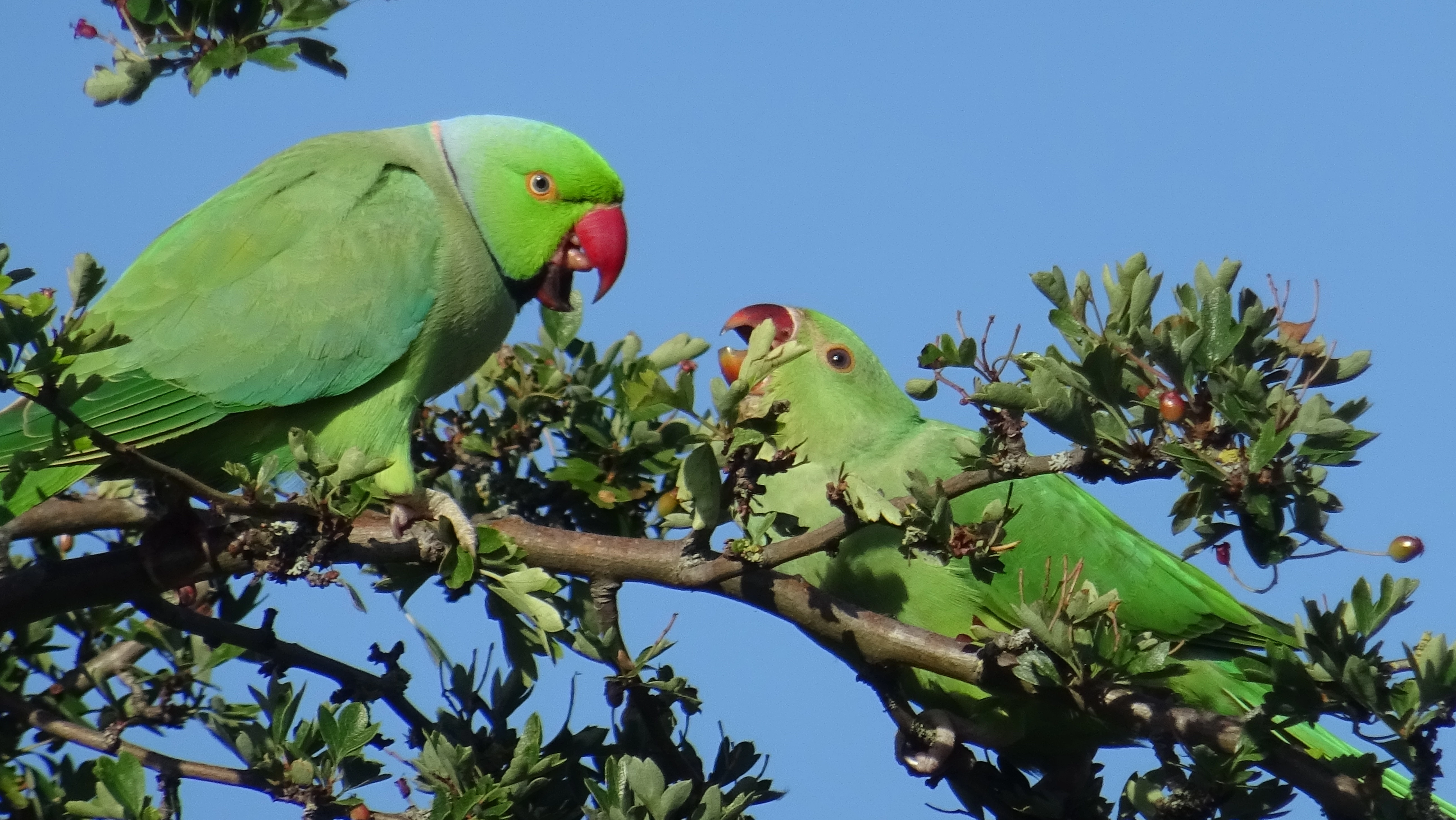
Please let me know what is wrong with this photo?

  • August 28, 2023
  • 4 replies
  • 1780 views

This photo was taken using a compact camera with a 1/2.3 type CMOS sensor. with 20.4 effective megapixel count. No electronic zoom was used as the camera has a 30x optical zoom functionality. The focal length at maximum optical zoom was 129mm.


No filtering, photoshop or lightroom effects have been applied to it at the tim eof submission. 


Please download the original JPEG to view in original quality. I am not forfeighting any copyrights and this file is not be used anywhere else for any other purposes, please! 


Here it is for reference. 
 

This topic has been closed for replies.
Correct answer Jill_C

Chromatic aberration, noise and blur. Hopefully you can fix these with additional editing because it's a nice image!

4 replies

daniellei4510
Community Expert
Community Expert
August 28, 2023

Just a minor personal preference that the moderators may or may not have taken into account. I would eliminate the branch at the top left of the image, along the the little bulb on the right that at first glance doesn't appear to be attached to anything.

Adobe Community Expert | If you aren't submitting your assets in sRGB, you probably didn't read the rules.
therippleshow
Known Participant
August 28, 2023

Honestly did not even pay attentioin to that detail because I wanted to see if the image quality could be made to be acceptable for stock. Valid point though. 


Having said that....


I was under the impression that photos are not meant to be tampered with prior to uploading to stock. Is that not true? 

Jill_C
Community Expert
Community Expert
August 28, 2023

Indeed, that is a misconception. If you shoot in RAW format, which is highly recommended, every image needs at least a minimal amount of editing. Typical issues that are easily correctable in Lightroom Classic or Photoshop include White Balance, noise, over or under-exposure, chromatic aberration, stray elements that need to be removed, lens spots/sensor spots, leaning horizon, leaning vertical elements, etc.

Jill C., Forum Volunteer
therippleshow
Known Participant
August 28, 2023

I have tried to conduct some noise reduction on this image now. 


Please let me know if it is any better?


I don't have high expectations from this image in all honesty, but I just want to know if it is closer to stock quality.


Abambo
Community Expert
Community Expert
August 28, 2023

There is no noise, but you need to understand that noise reduction also destroys detail in your picture, as detail (like the feathers) have the same “pattern” as noise, but are not noise.

ABAMBO | Hard- and Software Engineer | Photographer
therippleshow
Known Participant
August 28, 2023

That makes sense! 


Ah well I guess no point in trying to resurrect the old pictures. I guess theyll be one for the private collection. 


Thank you again. 

Jill_C
Community Expert
Jill_CCommunity ExpertCorrect answer
Community Expert
August 28, 2023

Chromatic aberration, noise and blur. Hopefully you can fix these with additional editing because it's a nice image!

Jill C., Forum Volunteer
therippleshow
Known Participant
August 28, 2023

Thank you. I need to find someone to get the editing done for me to be honest as I am colour blind and it wouldn't produce the best results. 

Abambo
Community Expert
Community Expert
August 28, 2023

Your picture is out of focus/unsharp and contains a lot of noise and some artefacts, as shown in this screenshot at 100%.

You may try if noise reduction helps to get the noise level down (use the new noise reduction tool in Lightroom, if you use Lightroom and shoot raw). It may well be that that solves the biggest problem in the picture, and decent sharpening saves it then. You will modify slightly the developing parameters (lift shadows, lift the whites, …). I used Auto on Lightroom/Adobe Camera Raw, and it improved the image noticeably.

If you are new to stock, you should consider these resources: https://helpx.adobe.com/stock/contributor/tutorials.html
Please read the contributor user manual for more information on Adobe stock contributions: https://helpx.adobe.com/stock/contributor/user-guide.html
See here for rejection reasons: https://helpx.adobe.com/stock/contributor/help/reasons-for-content-rejection.html
and especially quality and technical issues: https://helpx.adobe.com/stock/contributor/help/quality-and-technical-issues.html


ABAMBO | Hard- and Software Engineer | Photographer
therippleshow
Known Participant
August 28, 2023

Unfortunately, the photo is not in RAW and the camera does not support RAW files. I found the AI assisted "denoise" tool in Lightroom, but as you said it only works on RAW. 

Abambo
Community Expert
Community Expert
August 28, 2023
quote

Unfortunately, the photo is not in RAW and the camera does not support RAW files.


By @therippleshow

That's a pity because most of the advanced editing does work best in raw. And that is true for all utilities.

ABAMBO | Hard- and Software Engineer | Photographer
