Participant
September 23, 2020
Answered

Please look and see and decide if this is a bad quality image in a technical issue!.

  • September 23, 2020
  • 5 replies
  • 939 views

Is there really anything wrong with this image!.

This topic has been closed for replies.
Correct answer Ricky336

Hello,

It is best to leave in colour - that is according to Adobe Stock - the buyer can easliy convert to B&W but not the other way round!

From a B&W perspective, your image is underexposed, it lacks contrast, so the result is'muddy'. There are no whites or blacks, just a muddy grey.

Looking at the histogram of your image it shows this:
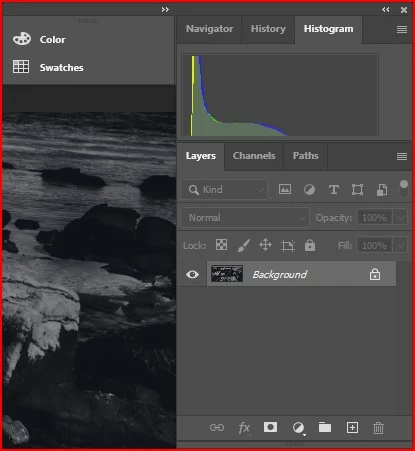
This means it is underexposed.

So, an alternative method instead of levels is to increase exposure in the exposure slider, increase contrast, and decrease the highlights a bit - something like this:
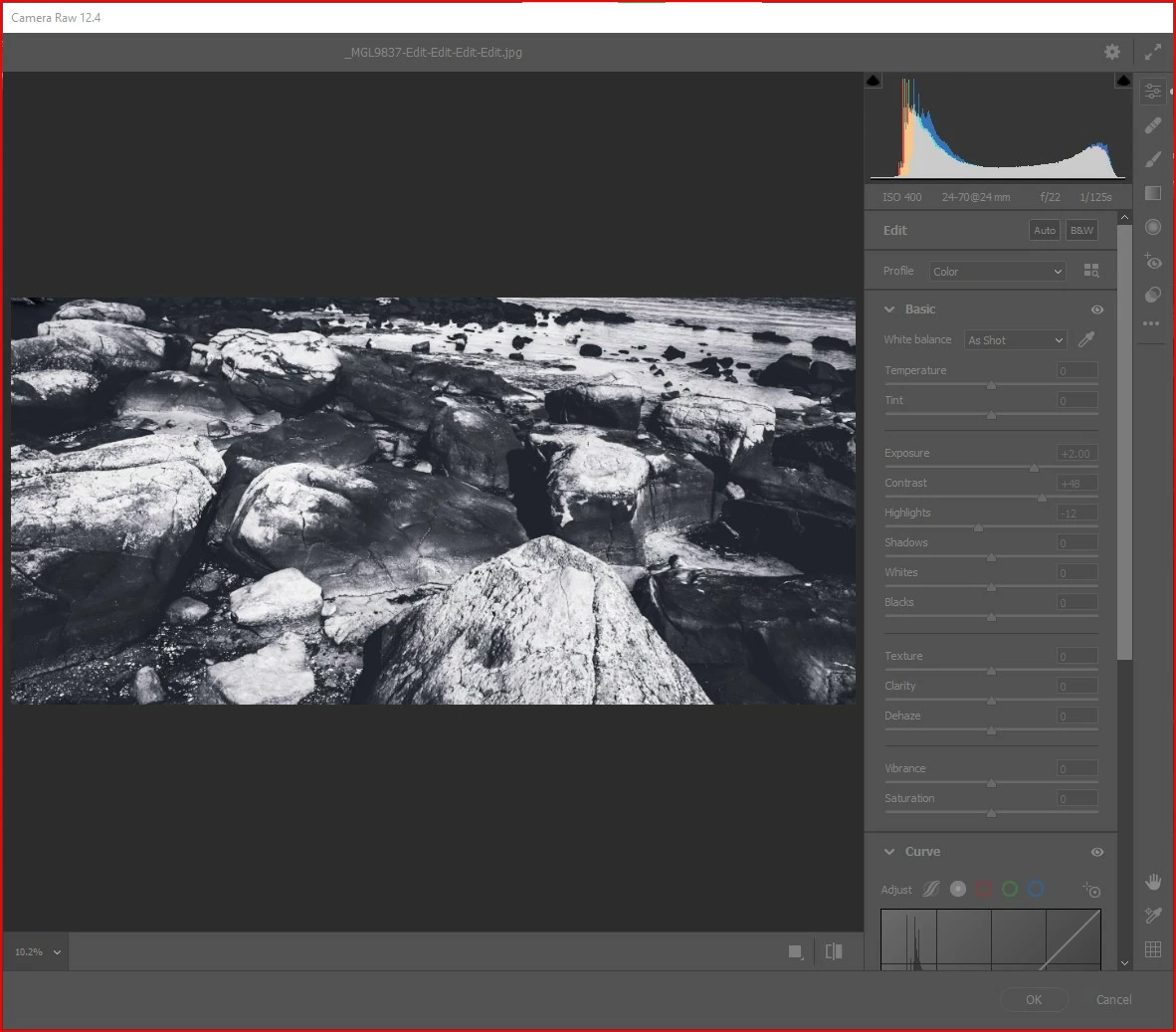
Of course, this is much easier done if you took this in raw, rather than the camera saving to JPEG.

If you don't know about raw, then I would read a lot about it.


So, yes, there are a number of issues with this image.

5 replies

Abambo
Community Expert
Community Expert
September 24, 2020

In addition to the very good analysis that you got here, I recommend some reading:

If you are new to stock, you should consider these resources: https://helpx.adobe.com/stock/contributor/tutorials.html
Please read the contributor user manual for more information on Adobe stock contributions: https://helpx.adobe.com/stock/contributor/user-guide.html
See here for rejection reasons: https://helpx.adobe.com/stock/contributor/help/reasons-for-content-rejection.html
and especially quality and technical issues: https://helpx.adobe.com/stock/contributor/help/quality-and-technical-issues.html

ABAMBO | Hard- and Software Engineer | Photographer
Ricky336
Community Expert
Ricky336Community ExpertCorrect answer
Community Expert
September 24, 2020

Hello,

It is best to leave in colour - that is according to Adobe Stock - the buyer can easliy convert to B&W but not the other way round!

From a B&W perspective, your image is underexposed, it lacks contrast, so the result is'muddy'. There are no whites or blacks, just a muddy grey.

Looking at the histogram of your image it shows this:

This means it is underexposed.

So, an alternative method instead of levels is to increase exposure in the exposure slider, increase contrast, and decrease the highlights a bit - something like this:

Of course, this is much easier done if you took this in raw, rather than the camera saving to JPEG.

If you don't know about raw, then I would read a lot about it.


So, yes, there are a number of issues with this image.

Nancy OShea
Community Expert
Community Expert
September 23, 2020

I might be wrong but I don't think there's a whole lot of demand for B&W photos on Adobe Stock.  Most graphics people know how to convert color to B&W for special use cases.  So that's not something I would be personally interested in purchasing.


The composition is murky. I assume this is some sort of rocky beach or coastline but what the actual subject is, I am not really sure because the image is too dark.  As you can see from this Photoshop graph, the Input Levels need adjustment to bring them into better balance.


After a Levels adjustment, the image becomes noticeably clearer and more detailed.


Hope that helps,


Nancy O'Shea— Product User & Community Expert
Marianne-Deiters
Participating Frequently
September 23, 2020

Well, mainly there are no contrasts in the picture and I can't see any details. You should also use the sRGB ICC profile.

Legend
September 23, 2020

It looks as if it the image has been turned to black and white. If that is really the colours of the world at that point, this is unlucky for you.