
Participant
July 23, 2025
Answered

PNG Image Rejected for Quality Issues – Similar JPG Approved

  • July 23, 2025
  • 4 replies
  • 364 views

Hi Adobe Stock Community,

I recently uploaded a PNG image (3D icon style with a transparent background), and it was rejected for "Quality Issues." However, I’ve uploaded very similar images in JPG format before (same style, same quality), and they were approved without any problems.📎 I have attached the rejected PNG image here for reference.

 

Correct answer Abambo
quote

Hi Adobe Stock Community,

I recently uploaded a PNG image (3D icon style with a transparent background), and it was rejected for "Quality Issues." However, I’ve uploaded very similar images in JPG format before (same style, same quality), and they were approved without any problems.📎 I have attached the rejected PNG image here for reference.
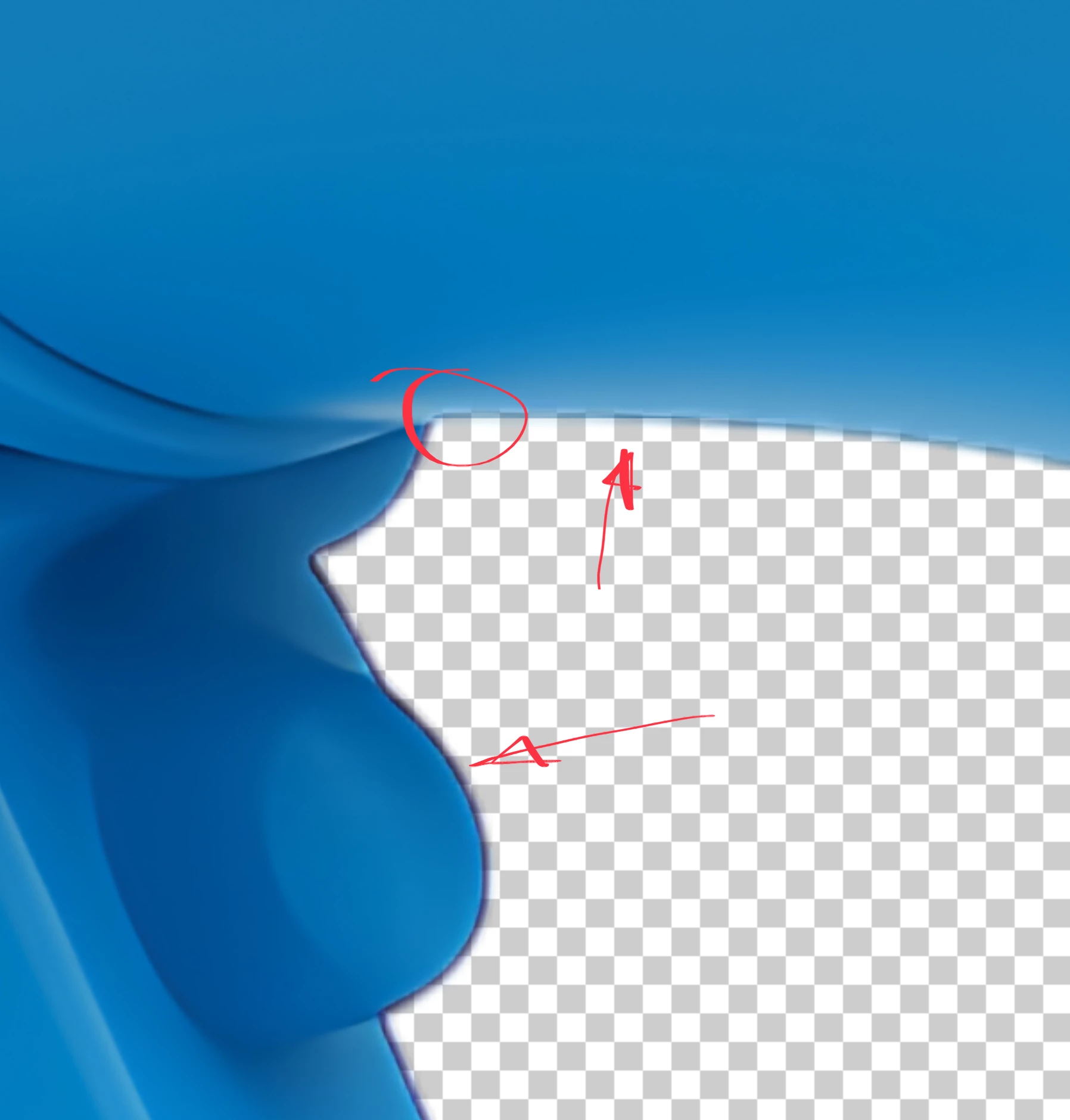


By @smart_responsibility8668

PNG files have an additional level of complexity and similar does not mean error free. 


Besides drawing errors as shown by @daniellei4510 you also have issues with the cut-out, that is inconsitent.

The dark line is not inline with the other edges, and if you look carefully at your cutout, it's quite soft and sometimes it cuts more than it should, also on occasions not shown here in this screenshot. To produce really clean cutouts is still a time consuming manual work, even if the automatic cutouts as provided by different tools are getting better. 

4 replies

Abambo
Community Expert
AbamboCommunity ExpertCorrect answer
Community Expert
July 24, 2025
quote

Hi Adobe Stock Community,

I recently uploaded a PNG image (3D icon style with a transparent background), and it was rejected for "Quality Issues." However, I’ve uploaded very similar images in JPG format before (same style, same quality), and they were approved without any problems.📎 I have attached the rejected PNG image here for reference.


By @smart_responsibility8668

PNG files have an additional level of complexity and similar does not mean error free. 


Besides drawing errors as shown by @daniellei4510 you also have issues with the cut-out, that is inconsitent.

The dark line is not inline with the other edges, and if you look carefully at your cutout, it's quite soft and sometimes it cuts more than it should, also on occasions not shown here in this screenshot. To produce really clean cutouts is still a time consuming manual work, even if the automatic cutouts as provided by different tools are getting better. 

ABAMBO | Hard- and Software Engineer | Photographer
Nancy OShea
Community Expert
Community Expert
July 23, 2025

Vector images (.AI, .EPS or .SVG) containing transparency are automatically offered as transparent .PNG files by Stock. That's not something you have to worry about.


Not sure why you feel the need to submit the same image twice as JPG & PNG, unless you're looking for a strike for 'Similar Content.' 


Nancy O'Shea— Product User & Community Expert
Abambo
Community Expert
Community Expert
July 25, 2025
quote

Not sure why you feel the need to submit the same image twice as JPG & PNG, unless you're looking for a strike for 'Similar Content.' 


By @Nancy OShea

...or getting the account blocked for spamming.


PNG assets can also be downloaded as JPEG files. Submitting both formats will be considered as spamming.

ABAMBO | Hard- and Software Engineer | Photographer
daniellei4510
Community Expert
Community Expert
July 23, 2025

Drawing error.

Adobe Community Expert | If you can't fix it, hide it; if you can't hide it, delete it.
Jill_C
Community Expert
Community Expert
July 23, 2025

Often, an edge cut out issue is what causes PNG's to be rejected.

Jill C., Forum Volunteer