Participant
July 25, 2025
Answered

Quality issue

  • July 25, 2025
  • 4 replies
  • 500 views

Common issues that can impact the technical quality of images include exposure issues, soft focus, excessive filtering or artifacts/noise.  


 Can someone explain the issues with these images?

Correct answer Jill_C

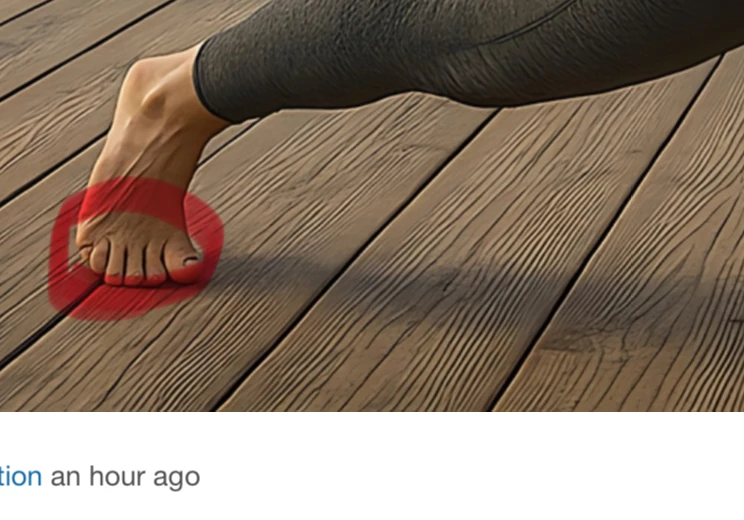
Count the toes.

4 replies

Abambo
Community Expert
Community Expert
July 25, 2025

The text that is part of the refusal is not targeted to your asset. It's simply stock text that is attached to any "Quality issues" refusals. Conclusion: just give us the heading, that is enough for us. 


ABAMBO | Hard- and Software Engineer | Photographer
daniellei4510
Community Expert
Community Expert
July 25, 2025

What are you using to upscale? Or are these just enlargements? The latter would cause a lot of the haloing you are getting.

Adobe Community Expert | If you can't fix it, hide it; if you can't hide it, delete it.
Participant
July 25, 2025

Thanks a lot for pointing these out! I really appreciate you taking the time to mark the rendering issues so clearly. I'll make sure to review my assets at 100–200% zoom before submission next time and fix these artifacts. Your feedback is super helpful! I used to upscale images using Upscayl. I have attached a screenshot here.


Jill_C
Community Expert
Jill_CCommunity ExpertCorrect answer
Community Expert
July 25, 2025

Count the toes.

Jill C., Forum Volunteer
daniellei4510
Community Expert
Community Expert
July 25, 2025

You need to view your assets at 100-200% prior to submission. Lots of rendering errors.

Adobe Community Expert | If you can't fix it, hide it; if you can't hide it, delete it.