Known Participant
June 3, 2025
Answered

quality issues

  • June 3, 2025
  • 3 replies
  • 695 views

The following  photo is rejected for quality issues. Can you help me to understand this issue in details. 

Correct answer RALPH_L

This is your histogram.
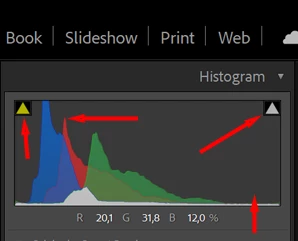
Notice everything is pushed to the left with nothing to the right which indicates overall under exposure.  
The shadow "clipping" indicator on the left side has thrown a warning that some shadows are overexposed. Not necessarily a bad thing because some details are present.

The highlight "clipping" indicator, on the right side, on the otherhand, shows a clipping error. The few highlighted areas are overexposed without any details available. This will result in a "Quality" rejection. 

3 replies

Nancy OShea
Community Expert
Community Expert
June 3, 2025

Examine subject at 100-300% magnification.  You have some focus issues on wings and flowers.


Nancy O'Shea— Product User & Community Expert
Known Participant
June 4, 2025

thank you


ZALEZPHOTO
Inspiring
June 3, 2025

I have some general advice.

-always shoot Raw

-make the habbit of always shooting in manual mode... and you decide what is your priority.

-bracket as much as you can, in this case the butterfly will remain still in the stem, so bracket with your shutter speed one up to 1 stop up and down.

-us a tripod as much and as often as possible, it is probably the most under appreciated tool in your photo kit


Your shot is great and almost there. the background highlights throws the eye off. Edit the raw file again, and make it brighter keeping an eye on the histogram... Using AI denoise software will also help you clean it up, and increase your chances of getting approved...


(Just one more thing... I magine there are already tons of butterfly photos in adobe's library)

ZALEZPHOTO
Known Participant
June 4, 2025

thank you

RALPH_L
Community Expert
RALPH_LCommunity ExpertCorrect answer
Community Expert
June 3, 2025

This is your histogram.

Notice everything is pushed to the left with nothing to the right which indicates overall under exposure.  
The shadow "clipping" indicator on the left side has thrown a warning that some shadows are overexposed. Not necessarily a bad thing because some details are present.

The highlight "clipping" indicator, on the right side, on the otherhand, shows a clipping error. The few highlighted areas are overexposed without any details available. This will result in a "Quality" rejection. 

Known Participant
June 3, 2025

Thank you

