


Participating Frequently
September 22, 2026
Question

Quality issues on several images...

  • September 22, 2026
  • 20 replies
  • 100 views

Hi guys ! 
I’m new here, I’m trying to understand how Adobe judges some images. 
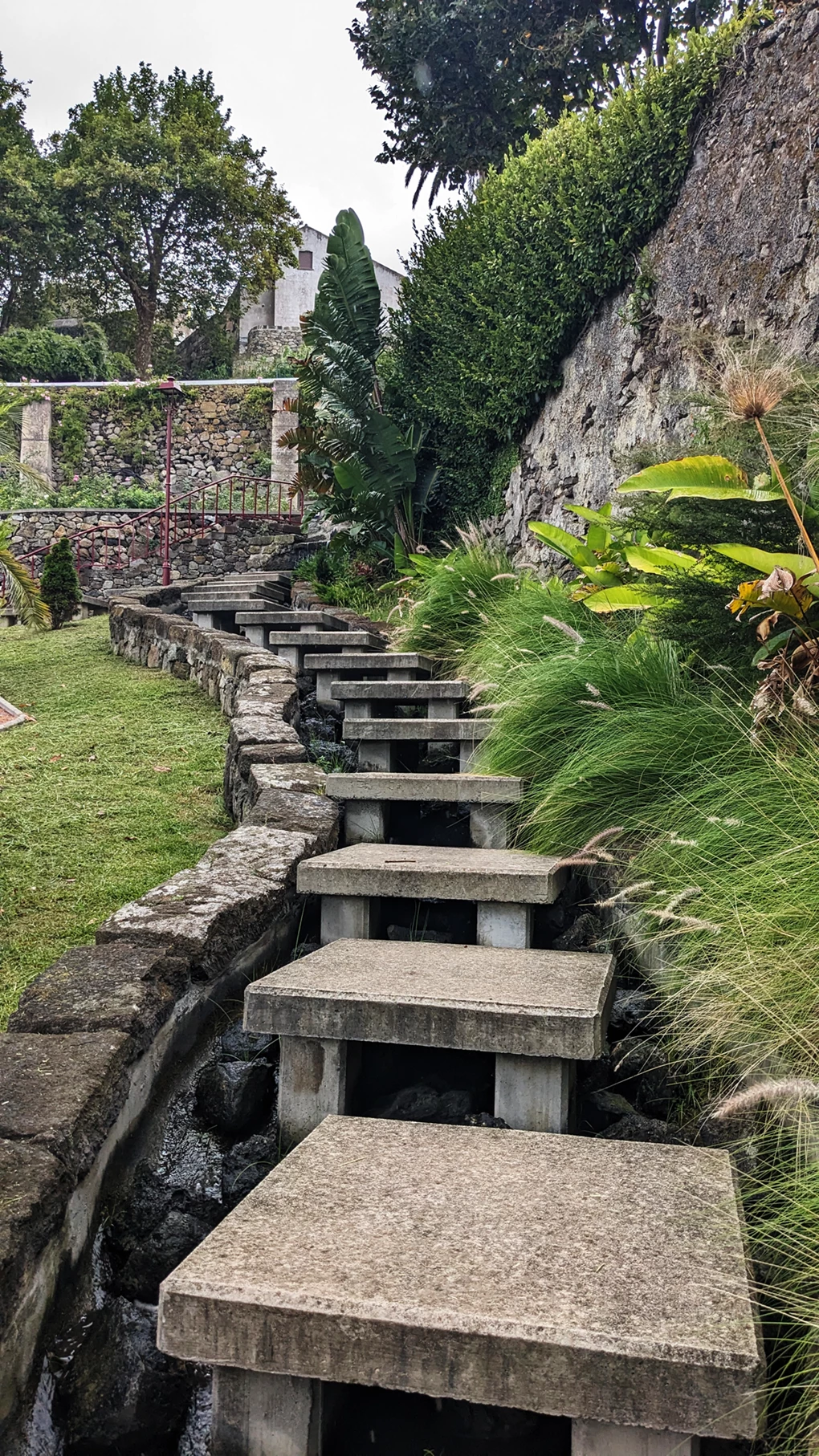
This one got rejected for quality issues and honestly I can’t find why… 

Image is 2268x4032 (around 9mp)
PNG file. (I had other PNG accepted, so can’t be this I guess...)

I did use some filters on Photoshop (brightness, contrast, curves...)

Anyone can help me? 

Thanks a lot ! 
 

    20 replies

    Ricky336
    Community Expert
    Community Expert
    September 23, 2026

    Hello,

    You don’t need the sky - it doesn’t add to the image!

    Composition is an important part; I would do some cropping!

    And remove some distracting elements in the picture - the corner triangle and a few other things. Tidy it up a bit! 

    Participating Frequently
    September 23, 2026

    I do prefer your version of it , indeed ! XD ! 
    I’ll try my best to fix it and submit it again, no pain no gain ! 
    Thanks ! 

    N8.
    Community Expert
    September 23, 2026

    Hey ​@athletic_Laughter1a9b 
    Looks like your stepping up your game. Remember to edit out those little distractions. It doesn’t have to be super clean. Rather remove those bits that don’t really add to the image.


    Cheers

    Nate

    Participating Frequently
    September 23, 2026

    Thanks Nate ! 
    Honestly I don’t see what’s wrong with those details...it’s what makes the picture real… I can spend 1h in photoshop deleting all of it but the picture will not be real… But I guess it’s just how things work… Thanks for your explanations and the time you spent highlighting those imperfections ! 

    yamato713108855
    Community Expert
    Community Expert
    September 23, 2026

    I cannot determine issues like noise or blur without examining the original image that was submitted.
    One of the reasons this image was rejected is that there is debris visible at the top.
    This kind of thing happens when insects, raindrops, or similar objects appear in the shot.


    Participating Frequently
    September 23, 2026

    Hi ! Thanks a lot, that’s actually very helpful ! 

    Nancy OShea
    Community Expert
    Community Expert
    September 22, 2026

    IMO, everything beyond the 6th stair step looks the same.  I would crop this down to the most relevant part of the scene and brighten up the exposure level a tad. 


    For comparison, this is what you’re competing with in Stock:

    https://stock.adobe.com/search?k=stair+steps  6 million results.


    Hope that helps.


    Nancy O'Shea— Product User & Community Expert
    Participating Frequently
    September 22, 2026

    Hey Nancy ,


    I do agree with removing some of the stairs. 


    Then regarding the link, I see mainly just stairs...nothing that can be used for a magazine for instance, or a touristic Instagram post for instance. That's my goal actually: more editorial pictures. At least the first 2 pages are just stairs that you can blend into projects or some IA stuff, obviously... 


    I'll try to crop it as you said, that might be relevant indeed. 

    Thanks ! 

    Nancy OShea
    Community Expert
    Community Expert
    September 22, 2026

    That's my goal actually: more editorial pictures.

    =========

    Be careful what you wish for. Editorial content is restricted to non-commercial use only, which has less appeal to buyers and stricter submission requirements. 

    https://helpx.adobe.com/stock/contributor/submit-your-content/submit-illustrative-editorial-content/illustrative-editorial-content-submission-overview.html


    Nancy O'Shea— Product User & Community Expert
    daniellei4510
    Community Expert
    Community Expert
    September 22, 2026

    You might try making that dead sky look bluer. I’ve seen a couple assets lately getting rejected that also had colorless skies. 

    Adobe Community Expert | I have miles to go before I sleep, but I'm all done on this end.
    Participating Frequently
    September 22, 2026

    I mean the sky was that color on that day, so you telling this is about faking it until you make it? That's really sad... 😂

    daniellei4510
    Community Expert
    Community Expert
    September 22, 2026

    Not sad. It’s called editing in post. It’s simple enough to fix with just a couple of adjustments. But don’t discount other comments about this image in any case.

    Adobe Community Expert | I have miles to go before I sleep, but I'm all done on this end.