Participant
November 18, 2024
Answered

Quality issues rejection

  • November 18, 2024
  • 6 replies
  • 2660 views

Can you help me please, why my file getting rejected due to quality issues, and any advices on how to improve:


Correct answer daniellei4510

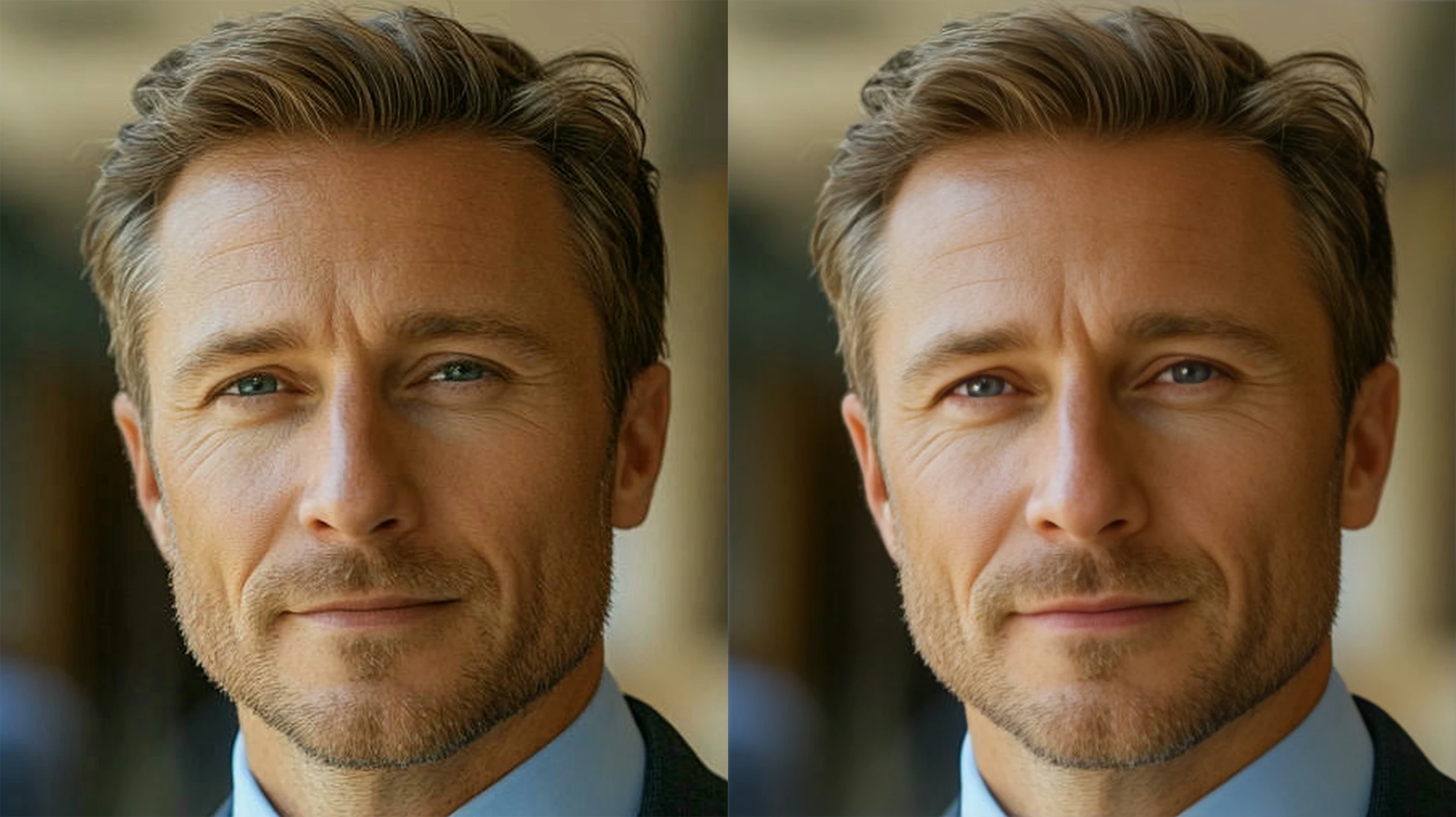
If you enjoy creating people with AI, you might want to consider looking into facial restoration software. This example still needs work but most of the work is done. The kkin is less grainy, there is less of a green cast, the hair is smoother, and his eyes look more finished. Though I would still trade out the irises from a number of them that I've collected on those rare occasions when AI creates some decent ones.
6 replies

jacquelingphoto2017
Community Expert
Community Expert
November 18, 2024

Hi @Akalidz ,

The first file color is not smooth. It is especially noticeable on the jacket where color blotches are visible. There is an overall chromatic noise issue. 

The second photo color is not smooth. Also, it has a white balance issue which is obvious in the skin color. Your picture skin color is aquatic blue, and shows signs of chromatic noise.

The third photo also has chromatic noise and not very sharp.

The fourth file is also with chromatic noise and could be a bit sharper.

The fifth file is with chromatic noise and grainy.


The sixth file is grainy and has what appears to be compression noise. It also has a white balance issue. It has a green tint.


The seventh file has compression noise. 

The eighth file is noisy and not in sharp focus. The colors are not smooth. 

The edges of the ninth file is not smooth.

The clouds of the 10th file are not grey or white. They have an aqua blue appearance.

You need to zoom in on your files at about 200% to look for errors and correct those that can be corrected in post processing. You need adequate depth to capture sharp images. You also need to look at the lighting of your surrounding to make sure you have adequate light or at least enough exposure to crease quality pictures. Avoid using automatic settings to capture your images and capture them in RAW format.

Best wishes

Jacquelin 


Participant
August 12, 2025

Thank you for your valuable information . I will be careful from now on to avoid mistakes

Abambo
Community Expert
Community Expert
August 12, 2025
quote

Thank you for your valuable information . I will be careful from now on to avoid mistakes


By @Logo Contributor


You should always be careful to avoid mistakes. But there is no need to wake up old posts, when you do not have additional information to add. 

ABAMBO | Hard- and Software Engineer | Photographer
daniellei4510
Community Expert
daniellei4510Community ExpertCorrect answer
Community Expert
November 18, 2024

If you enjoy creating people with AI, you might want to consider looking into facial restoration software. This example still needs work but most of the work is done. The kkin is less grainy, there is less of a green cast, the hair is smoother, and his eyes look more finished. Though I would still trade out the irises from a number of them that I've collected on those rare occasions when AI creates some decent ones.

Adobe Community Expert | If you can't fix it, hide it; if you can't hide it, delete it.
Jill_C
Community Expert
Community Expert
November 18, 2024
akalidz_A_tired_businessman_visibly_stressed_and_overworked_i_47e11267-4fa7-4770-aba0-be6a968fc54c_1.jpg
The shirt cuffs don't match, and the buttons aren't properly drawn.
Jill C., Forum Volunteer
Jill_C
Community Expert
Community Expert
November 18, 2024

A_businesswoman_is_sitting_at_her_desk_in_a_modern_of_4bb228bb-cfc6-4bde-9650-

Eyes, fingers, and the stack of books have drawing errors.

Jill C., Forum Volunteer
AkalidzAuthor
Participant
November 18, 2024

Thank you, i get the rules now. They really check every thing...

Jill_C
Community Expert
Community Expert
November 18, 2024

Learning from your rejects will definitely help you achieve a higher acceptance rate with your next batch of images. Zoom in to at least 100% and inspect from corner to corner. If you can't fix the errors with editing tools, delete them and start over!

Jill C., Forum Volunteer
daniellei4510
Community Expert
Community Expert
November 18, 2024

I've highlighted a number of issues, but keep in mind it only takes one to result in a refusal. Inspect your images at 100-200% before submitting.

Adobe Community Expert | If you can't fix it, hide it; if you can't hide it, delete it.
AkalidzAuthor
Participant
November 18, 2024

Thank you very muc, i must be 100% blind xD

Jill_C
Community Expert
Community Expert
November 18, 2024

Two or three rejected files is usually sufficient for the contributor community to provide feedback. No one wants to take the time to look at 10 files !

In this one I see drawing errors. The colors seem quite unrealistic, and the reflection doesn't match the sky.

Jill C., Forum Volunteer
AkalidzAuthor
Participant
November 18, 2024

Understood, Thank you very much ❤️