alejandrom6594753
Known Participant
September 10, 2025
Answered

Rechazado por falta de calidad

  • September 10, 2025
  • 7 replies
  • 811 views

Por favor necesito que me digan donde esta la falta de calidad de estas imagenes

Correct answer Abambo

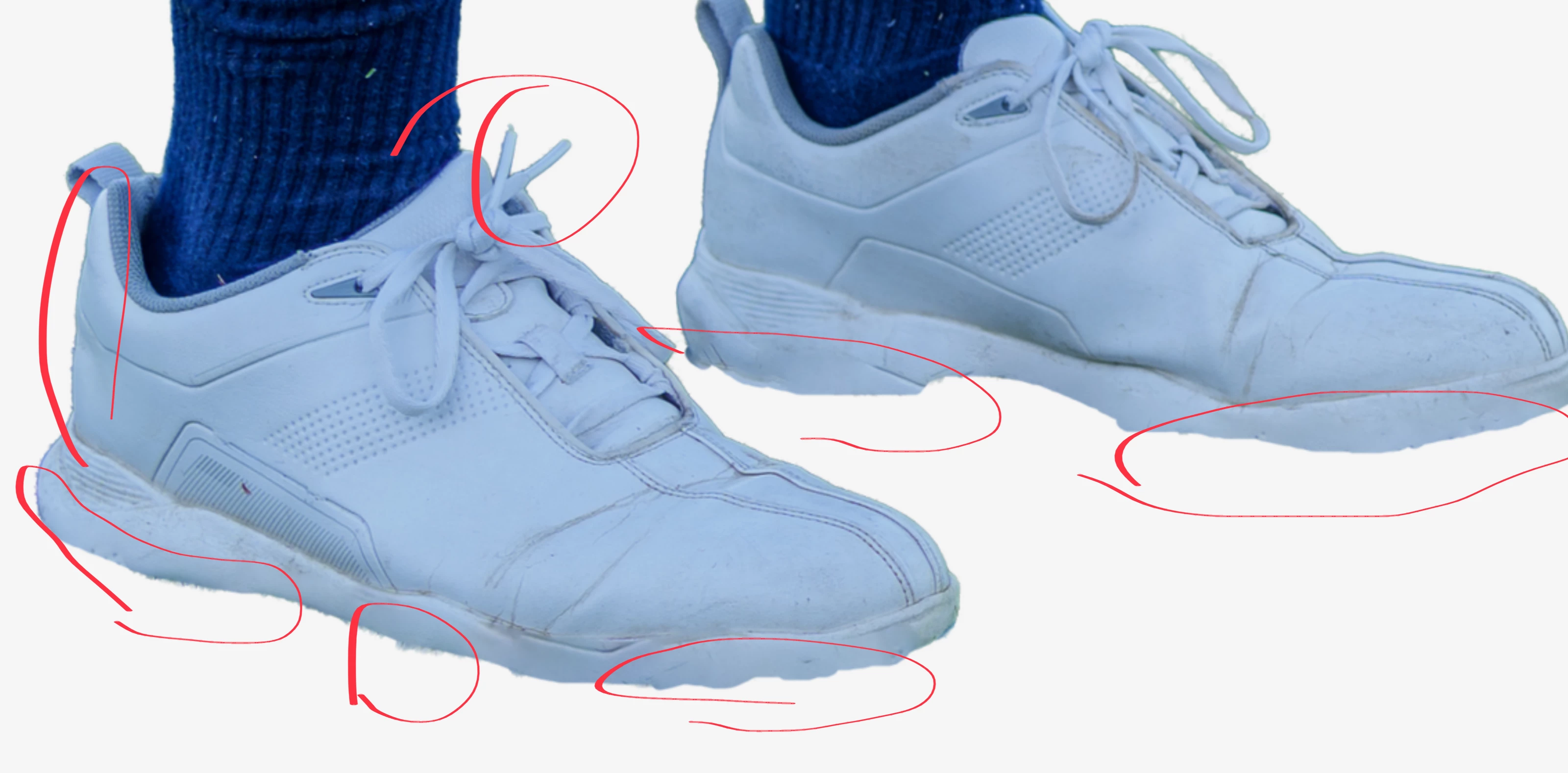
Se pueden ver fácilmente los errores que se cometieron al recortar la imagen: 

Sin embargo, como ya han señalado otros, el tono azulado y la aberración cromática también son errores, por lo que los files JPEG también deberían haberse rechazado.

7 replies

Abambo
Community Expert
AbamboCommunity ExpertCorrect answer
Community Expert
September 11, 2025

Se pueden ver fácilmente los errores que se cometieron al recortar la imagen: 

Sin embargo, como ya han señalado otros, el tono azulado y la aberración cromática también son errores, por lo que los files JPEG también deberían haberse rechazado.

ABAMBO | Hard- and Software Engineer | Photographer
jacquelingphoto2017
Community Expert
Community Expert
September 11, 2025

Hi @alejandrom6594753 ,

Before submitting, zoom in at between 100 and 200% to inspect the files. On zooming in on your first file I observed color fringing on the edges.


The cropping of the second image is not smooth and also the image has a white balance issue. The white is not white.


Color fringing on the third image and the highlights could tone down a little.

Your shutter speed was too slow for the third shot creating a motion blur. That photo too has white balance issue.

The fifth file has white balance and cropping issues. The white is showing blue.

The sixth photo has green and purple color fringing and the highlights could tone down a bit.

The seventh file has color fringing issue and the highlights could tone down a bit.

Your photos need to look as close as possible to what is real.

Best wishes

Jacquelin


Nancy OShea
Community Expert
Community Expert
September 10, 2025


Nancy O'Shea— Product User & Community Expert
RALPH_L
Community Expert
Community Expert
September 10, 2025

They are not cut out very well.

daniellei4510
Community Expert
Community Expert
September 10, 2025

Adobe Community Expert | If you can't fix it, hide it; if you can't hide it, delete it.
Jill_C
Community Expert
Community Expert
September 10, 2025

A7C2738.png - chromatic aberration on the shaft of the club 

A7C2700.png - chromatic aberration on the head of the club 


Jill C., Forum Volunteer
alejandrom6594753
Known Participant
September 10, 2025

Y como estás mismas fotos me las han aprobado en las fotos originales en formato jpg con fondo original en campo de golf sin separar el fondo PNG transparente?? No entiendo.

daniellei4510
Community Expert
Community Expert
September 10, 2025

If I'm reading your response correctly, do not submit the same image twice, even if one is a jpg and the other is a transparent png. It's against policy.

Adobe Community Expert | If you can't fix it, hide it; if you can't hide it, delete it.
daniellei4510
Community Expert
Community Expert
September 10, 2025

A7C281, A7C849, A7C2873: Bluish cast


Adobe Community Expert | If you can't fix it, hide it; if you can't hide it, delete it.