Participating Frequently
January 9, 2025
Answered

Refus constant de photos pour probléme de qualité

  • January 9, 2025
  • 4 replies
  • 1081 views

Bonjour à tous, 


J'ai un petit probléme en ce moment car toutes mes créations sont réfusé pour probleme de qualité et j'avoue ne pas comprendre pourquoi. Est ce que je loupe quelque chose ou il y a t-il un probléme en ce moment ? J'ai eu des images de plus mauvaise qualité qui ont été accepté et j'avoue être dans le flou. 


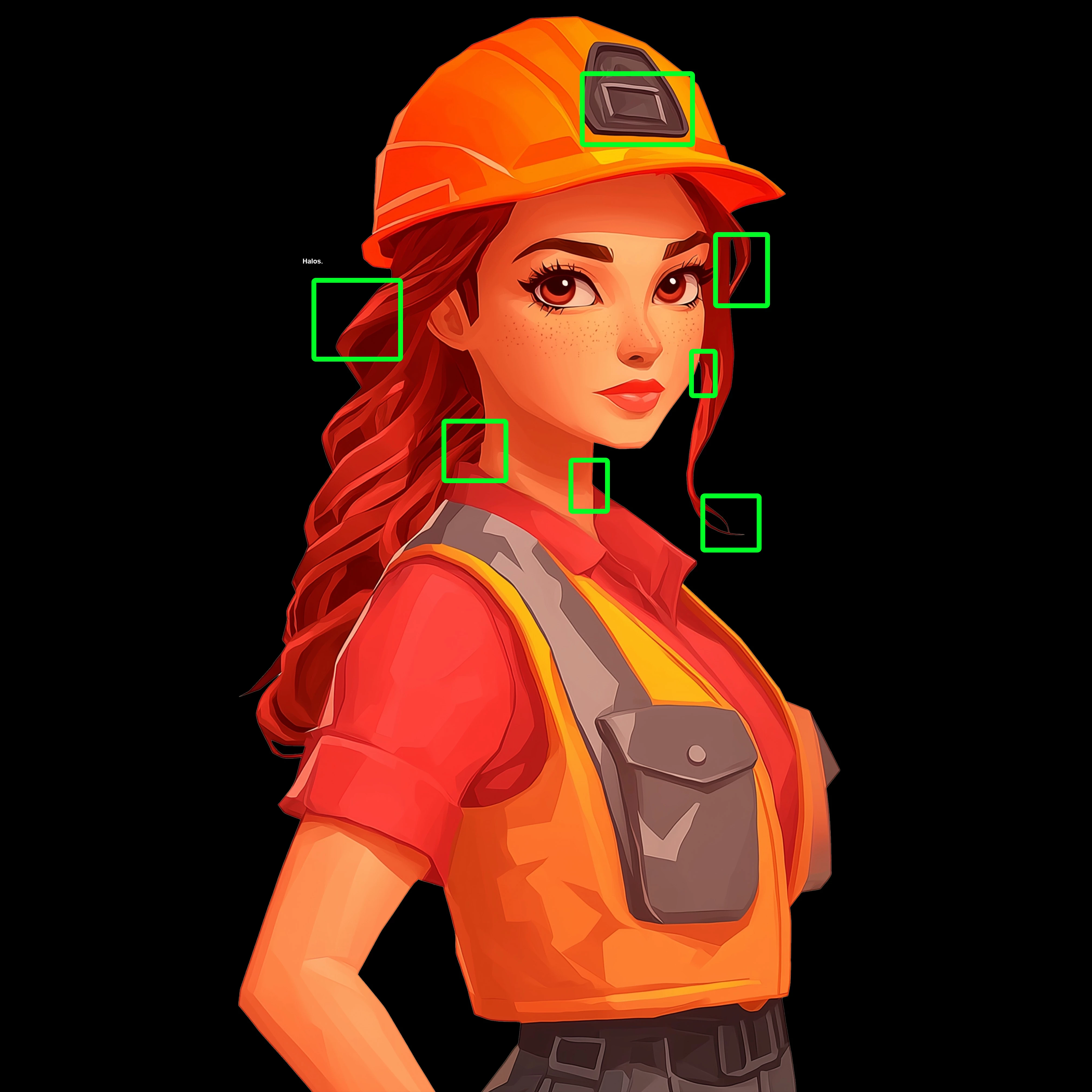
Je met en PJ une image qui m'a été refusé pour exemple mais je parle d'une trentaine d'image en PNG qui m'ont été refusé. 


Merci à vous 

Correct answer daniellei4510

Haloing around your cutout and various drawing errors.


4 replies

Abambo
Community Expert
Community Expert
January 9, 2025

Les plus mauvaises qualitées ont alors été accaptées en erreur. 

ABAMBO | Hard- and Software Engineer | Photographer
ParsanAuthor
Participating Frequently
January 9, 2025

Je pense tout simplement que je n'avais pas de personnages et donc que c étais moins sensible aux erreurs que les autres m'ont montré. Tout simplement le style que j'utilise n'accordent pas trop de détails a ce genre de choses et donc mes créations sont refusé. Merci de ta réponse 

Abambo
Community Expert
Community Expert
January 9, 2025

Je ne crois pas. Je crois plutôt qu'Adobe a augmenté la qualité de la modération. 

ABAMBO | Hard- and Software Engineer | Photographer
Legend
January 9, 2025

This.

Jill_C
Community Expert
Community Expert
January 9, 2025

The emblem on the hat isn't properly positioned, and her lapels don't match.

Jill C., Forum Volunteer
ParsanAuthor
Participating Frequently
January 9, 2025

Merci beaucoup de votre réponse, effectivement je vois ce genre de petite erreur merci à vous je vais repasser tous les dessins et essayer d'avoir l'oeil plus avertis 

Jill_C
Community Expert
Community Expert
January 9, 2025

Yes, they seem like small errors, but it takes only one for a Moderator to reject an asset, and they won't keep looking for more.

Jill C., Forum Volunteer
daniellei4510
Community Expert
daniellei4510Community ExpertCorrect answer
Community Expert
January 9, 2025

Haloing around your cutout and various drawing errors.


Adobe Community Expert | If you can't fix it, hide it; if you can't hide it, delete it.
ParsanAuthor
Participating Frequently
January 9, 2025

Merci beaucoup de votre réponse déja, effectivement maintenant je vois les erreurs de dessins mais pour les halos je ne comprend pas bien, comment définissez vous ce genre d'erreur et comment les corriger ? En vous remerciant encore de votre réponse super utile 


daniellei4510
Community Expert
Community Expert
January 9, 2025

"how do you define this kind of error and how to correct them?"


Painstakingly. And possibly not worth the effort for this particular asset. But you can try searching YouTube for "how to remove haloing in Photoshop" for a tutorial or two.

Adobe Community Expert | If you can't fix it, hide it; if you can't hide it, delete it.