Participant
January 15, 2019
Answered

Rejected for tecnical Issues :(

  • January 15, 2019
  • 4 replies
  • 776 views

Hello to everybody,

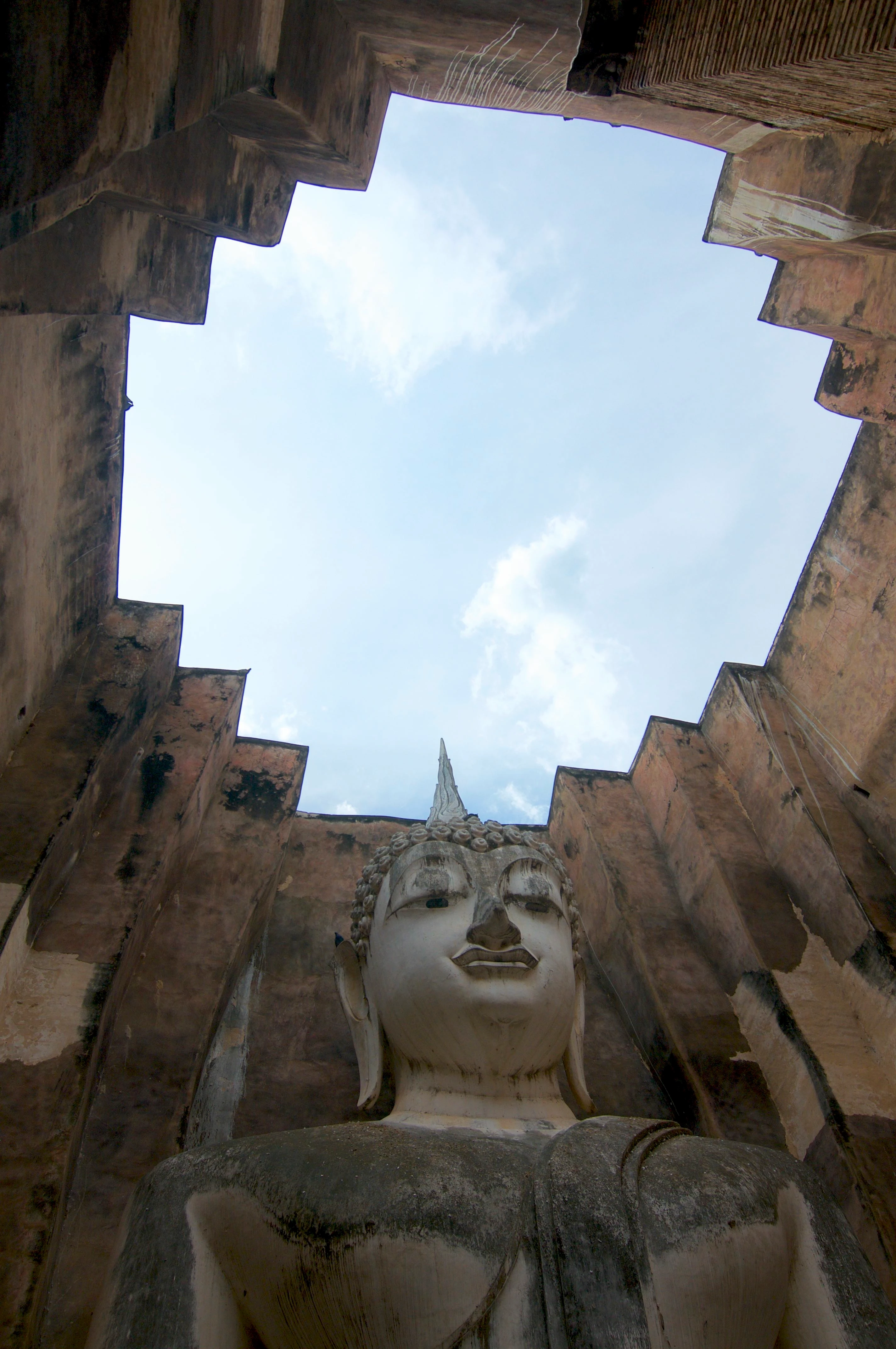
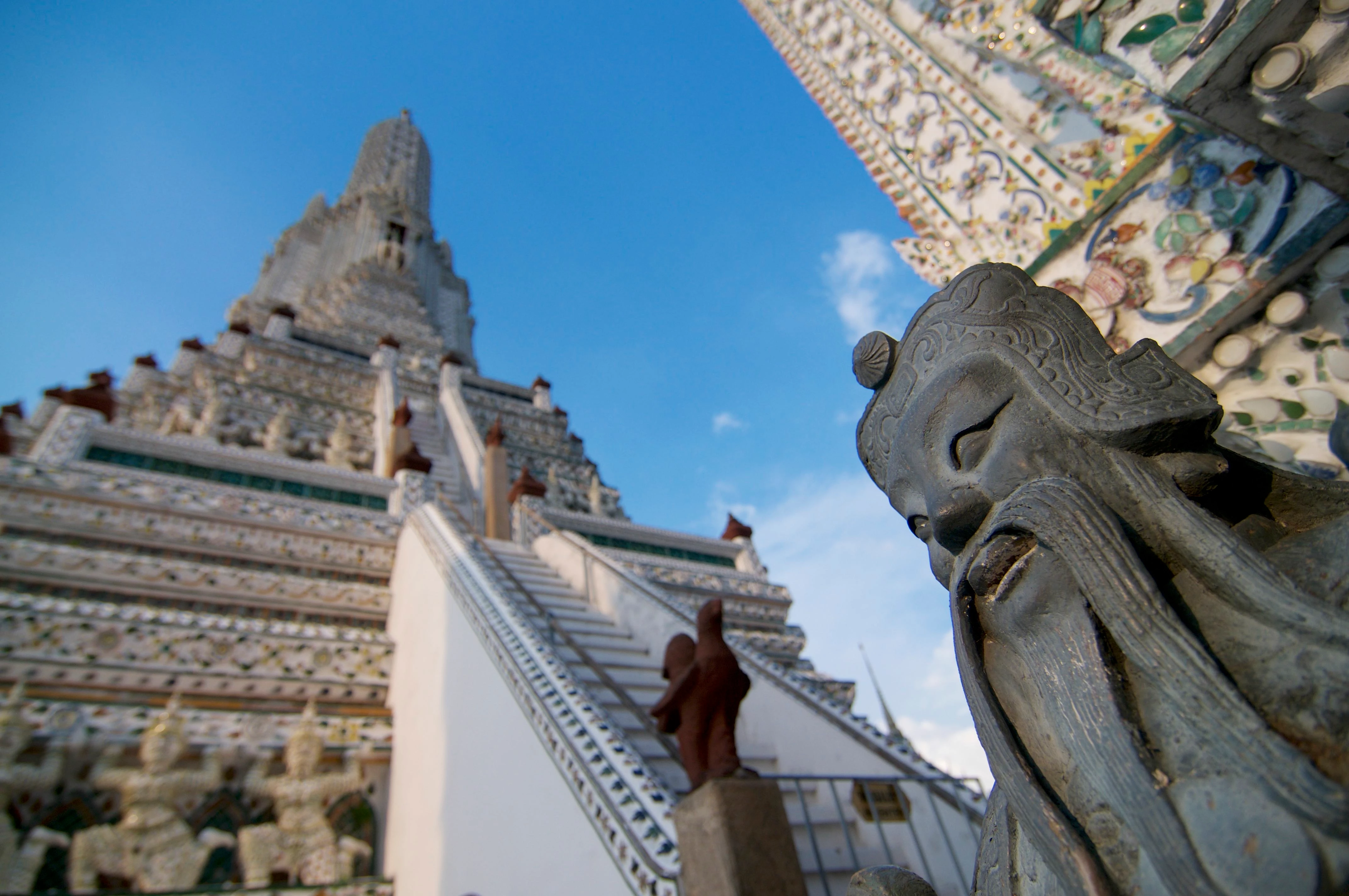
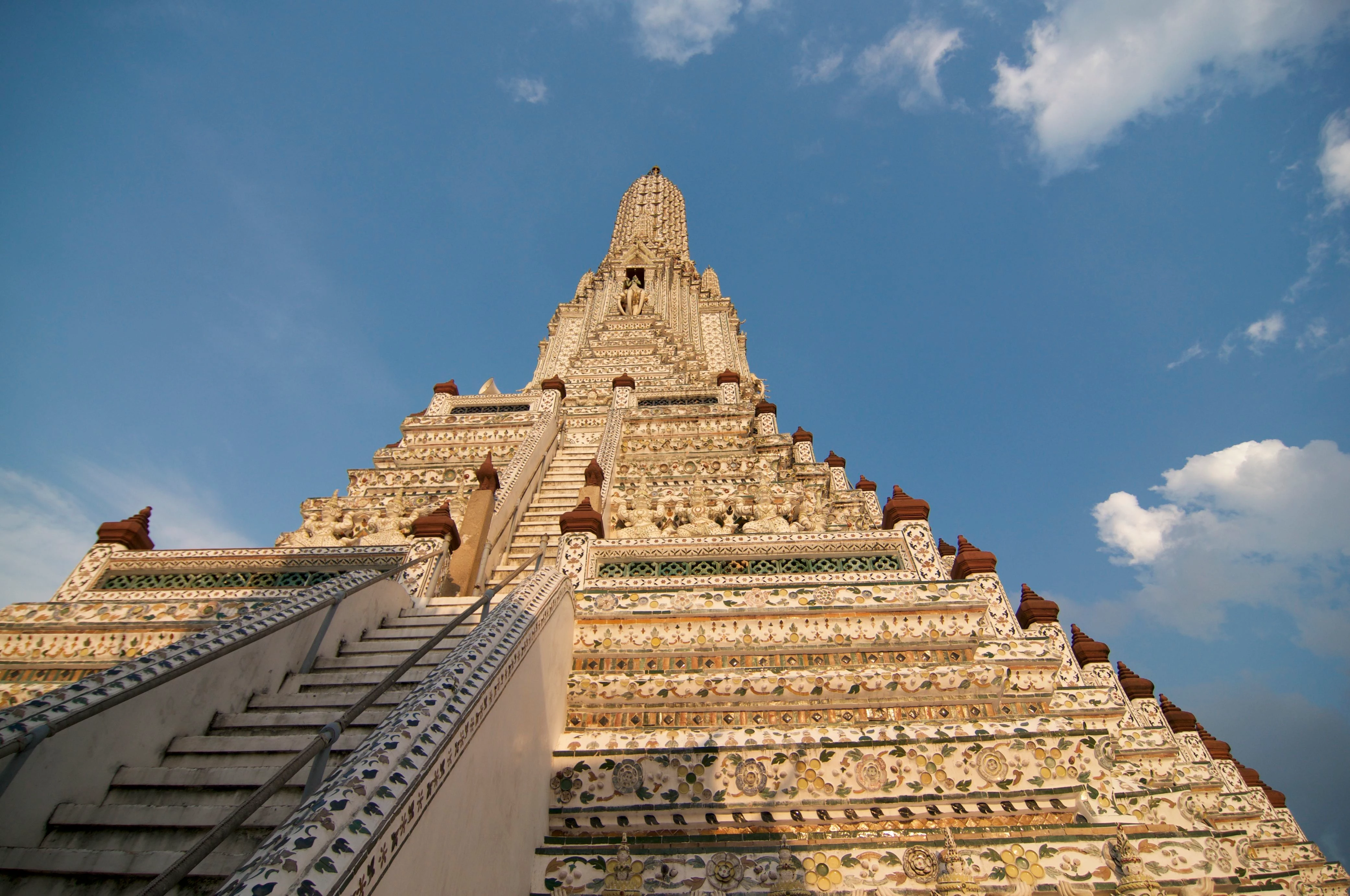
I'm a new Adobe Stock contributor and I've just get the answer on my first upload and there were some picture that was refused because of some tecnical errors... could someone help me to understand the reasons? and how to fix some errors? (by the way all these pictures were accepted by an other Microstock company)

Thank you in advice

This topic has been closed for replies.
Correct answer jacquelingphoto2017

Hi Be.Angeled,

In the case of the first image I observe that there's color fringes around the inner edge of the wall. That can be reduced by making adjustment with the Hue Saturation Luminance (HSL) in Camera Raw of Photoshop. For other editors, I'm not sure what provision there is for that sort of adjustment. I am not sure if the apparent imbalance of the exit might also be a problem. While the statue might seem to be ok, looking at the exit it gives the impression of crookedness, The horizon is not straight across.

The second photo is a cropping issue. The image falls in the right corner. The image should be on the baseline of you crop.

The third might also be cropping. The left side of the subject is cropped off. This I think, you should have reduced the zoom a little, so that you end up with the slope on both sides. In addition For stock photos, its better to include a little of the surrounding in your cropping, and or leave space for label cropping. Remember that customers, many times do not use images as they are taken, they might just want to take an item from the image. There must be allowance for this.

Reasons content is rejected at Adobe Stock gives an overview about the reasons for rejection. Page 2 cover technical issues. Be sure to read all the supporting links.

tagproducts_SG_STOCK-CONTRIBUTOR_i18nKeyHelppagetitle is the link to the Adobe Stock Contributor Guide. You will find all the links helpful.

Create better photos for Adobe Stock with 7 tips for success | also have some useful guidelines you can benefit from.

You will also find Do's and don'ts for selecting and editing photos for Adobe Stock useful.

I hope you find this helpful

Regards

JG

4 replies

Participant
January 15, 2019

Thank you so much for you very kind reply and helpfull advices! In fact I didn't noticed this that problems in the picture but I see clearly now the issues!

Unfortunately I've not Lightroom and I can't get it at the moment because I'm traveling for a while. Can you suggest me a free program that I can download for Mac?

Abambo
Community Expert
Community Expert
January 15, 2019

Probably the program that came with your camera...

ABAMBO | Hard- and Software Engineer | Photographer
Participant
January 15, 2019

I take the picture with my Nikon d300 and when I bought it there wasn't any programm delivered... normally I do some post production with the Iphoto application.

I know it's not the best programm which with

Abambo
Community Expert
Community Expert
January 15, 2019

You want a third opinion: Chromatic aberration:

1)

2)

3)

That may be corrected as indicated in Lightroom or in probably any decent picture editor.

The second picture has also a composition problem, as only a corner is in-focus.

ABAMBO | Hard- and Software Engineer | Photographer
Ricky336
Community Expert
Community Expert
January 15, 2019

You have chromatic aberration - colour fringing in all three photos. This can be removed in Lightroom if you have it, under lens corrections.

l

jacquelingphoto2017
Community Expert
jacquelingphoto2017Community ExpertCorrect answer
Community Expert
January 15, 2019

Hi Be.Angeled,

In the case of the first image I observe that there's color fringes around the inner edge of the wall. That can be reduced by making adjustment with the Hue Saturation Luminance (HSL) in Camera Raw of Photoshop. For other editors, I'm not sure what provision there is for that sort of adjustment. I am not sure if the apparent imbalance of the exit might also be a problem. While the statue might seem to be ok, looking at the exit it gives the impression of crookedness, The horizon is not straight across.

The second photo is a cropping issue. The image falls in the right corner. The image should be on the baseline of you crop.

The third might also be cropping. The left side of the subject is cropped off. This I think, you should have reduced the zoom a little, so that you end up with the slope on both sides. In addition For stock photos, its better to include a little of the surrounding in your cropping, and or leave space for label cropping. Remember that customers, many times do not use images as they are taken, they might just want to take an item from the image. There must be allowance for this.

Reasons content is rejected at Adobe Stock gives an overview about the reasons for rejection. Page 2 cover technical issues. Be sure to read all the supporting links.

tagproducts_SG_STOCK-CONTRIBUTOR_i18nKeyHelppagetitle is the link to the Adobe Stock Contributor Guide. You will find all the links helpful.

Create better photos for Adobe Stock with 7 tips for success | also have some useful guidelines you can benefit from.

You will also find Do's and don'ts for selecting and editing photos for Adobe Stock useful.

I hope you find this helpful

Regards

JG