This topic has been closed for replies.
Correct answer Nancy OShea

Notwithstanding the fact that Adobe Stock already have millions & millions of perfect flowers in their database, yours is not focussed and the edges are not sharp.    See screenshot.
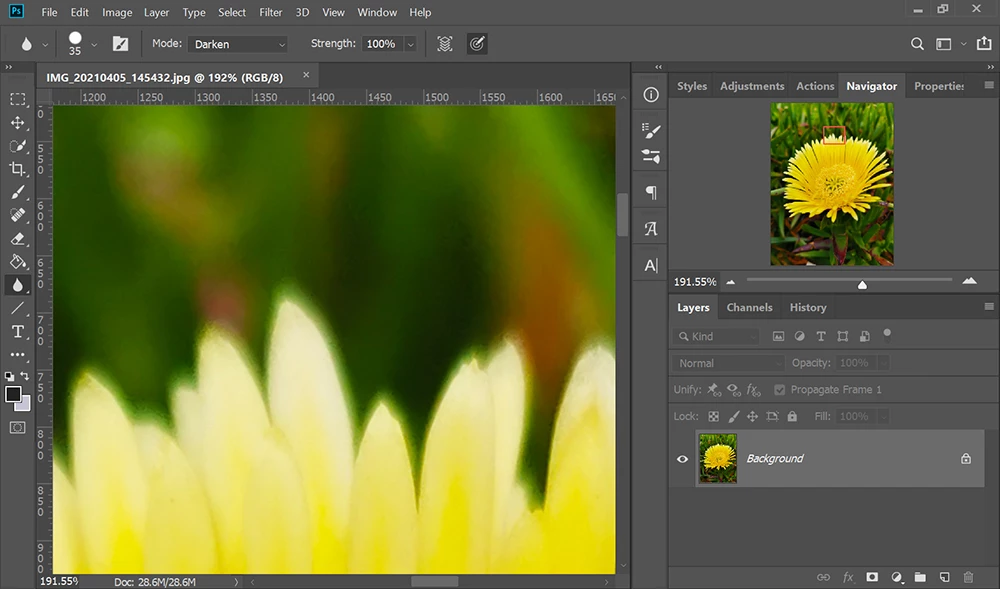


Stock Customers expect perfect images.


Study these links:


4 replies

Abambo
Community Expert
Community Expert
July 3, 2021

If you are new to stock, you should consider these resources: https://helpx.adobe.com/stock/contributor/tutorials.html
Please read the contributor user manual for more information on Adobe stock contributions: https://helpx.adobe.com/stock/contributor/user-guide.html
See here for rejection reasons: https://helpx.adobe.com/stock/contributor/help/reasons-for-content-rejection.html
and especially quality and technical issues: https://helpx.adobe.com/stock/contributor/help/quality-and-technical-issues.html

ABAMBO | Hard- and Software Engineer | Photographer
Nancy OShea
Community Expert
Nancy OSheaCommunity ExpertCorrect answer
Community Expert
July 2, 2021

Notwithstanding the fact that Adobe Stock already have millions & millions of perfect flowers in their database, yours is not focussed and the edges are not sharp.    See screenshot.


Stock Customers expect perfect images.


Study these links:


Nancy O'Shea— Product User & Community Expert
Legend
July 2, 2021

Adobe gave you a reason. What was it?  We can help understand it. 

RALPH_L
Community Expert
Community Expert
July 2, 2021

Hello @defaultycxlv4u7lr62 , you need to look at your photos at 100-300% their normal size. In the first photo you will see grain in the sky and a purple fringe in the clouds. The shadow areas are also underexposed. The secon photo has a bright halo around the edges of the flower. It is also a little blured. The thrid photo is the same as the first photo. Additionally, there is black spot on the upper right corner. The fourth has some blown out highlights onb the rocks.