Participating Frequently
May 10, 2021
Answered

Rejected Photo Samples

  • May 10, 2021
  • 3 replies
  • 1628 views

I am new to this community and uploaded a substantial quantity of photots to get my portfoio going. 75 of them were rejectwed, and I have attched a few to get an idea what technical difficulties would get these rejected, as Adobe provides no input for rejection.

This topic has been closed for replies.
Correct answer RALPH_L

Like @kirkandmimi said, watermarks are not allowed.

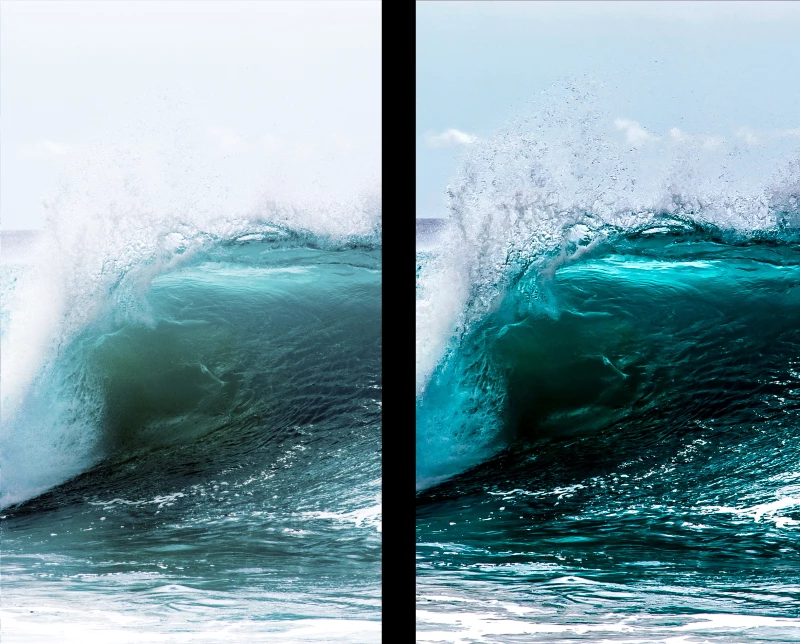
Your photo is nice but here are the problems. Look at the photo below and you will see what I mean. The left side is your photo; the right side has my alterations.

The second photo has similar issues plus to much color saturation and a touch of magenta on the horizon.


1. The horizon is not level.

2. The photo is overexposed.

3. The details in the sky are missing.

4. There is no depth (caused by lack of shadows) in the wave.

5. Lack of details in the water dropplets.
 

3 replies

Jill_C
Community Expert
Community Expert
May 12, 2021

I agree with the previous feedback regarding the quality of the image. My approach when I first started submitting images was to go slow. I submitted 6-10 per day, waited for feedback, studied and corrected the rejected ones if possible, then reassessed whether the next batch was "good enough". I had previously submitted images to Getty, but I have found that Adobe is far more discriminating. Throughout this process, my eye became trained to detect defects that I had never noticed before. Now, I get 90-95% of my images accepted, whereas in the beginning 25-30% were getting rejected.

Jill C., Forum Volunteer
Participating Frequently
May 12, 2021

Thank you for your feedback. Great points to work a few at a time. Now that I understand some of the rules a little better, I am on this approach. Also between schoolwork and work work, I have little time to work extra projects! I also agree, after really focusing on some images taken, they need more work.

RALPH_L
Community Expert
RALPH_LCommunity ExpertCorrect answer
Community Expert
May 11, 2021

Like @kirkandmimi said, watermarks are not allowed.

Your photo is nice but here are the problems. Look at the photo below and you will see what I mean. The left side is your photo; the right side has my alterations.

The second photo has similar issues plus to much color saturation and a touch of magenta on the horizon.


1. The horizon is not level.

2. The photo is overexposed.

3. The details in the sky are missing.

4. There is no depth (caused by lack of shadows) in the wave.

5. Lack of details in the water dropplets.


Participating Frequently
May 11, 2021

Thank you for the info and tips. Not sure why it is appearing like this on your side, as my image is much like the image on the right, with the exception of the horizon is fairly whited out. Also I do not have the amount of definition on some of the water droplets, as you mentioned, but he water coloring is almsot completely identiticle. Great detail on the sky and droplets, and I will get back to the "Drawing board"! Also to undo all my signatures!

RALPH_L
Community Expert
Community Expert
May 11, 2021

As you can see, there is a difference. Could it be that your monitor is not calibrated?
For photography, it is especially important. Here is the device I use.
Color Calibration for Photographers and Designers | Datacolor

After all, you want to be seeing what the consumer is seeing.

The sky is because I decreased the highlights which brings back overexposed details.

I increased the sharpnes of the water drops.


Known Participant
May 11, 2021

Signatures or watermarks are not allowed.

Participating Frequently
May 12, 2021

Thanks for the tidbit!
