vv47674653
Participant
February 8, 2019
Answered

Same old issue - The selected account is already in use.

  • February 8, 2019
  • 2 replies
  • 1413 views

Hello! It took me 4days to contact support via mail (online support has nothing to do with actually support functions)

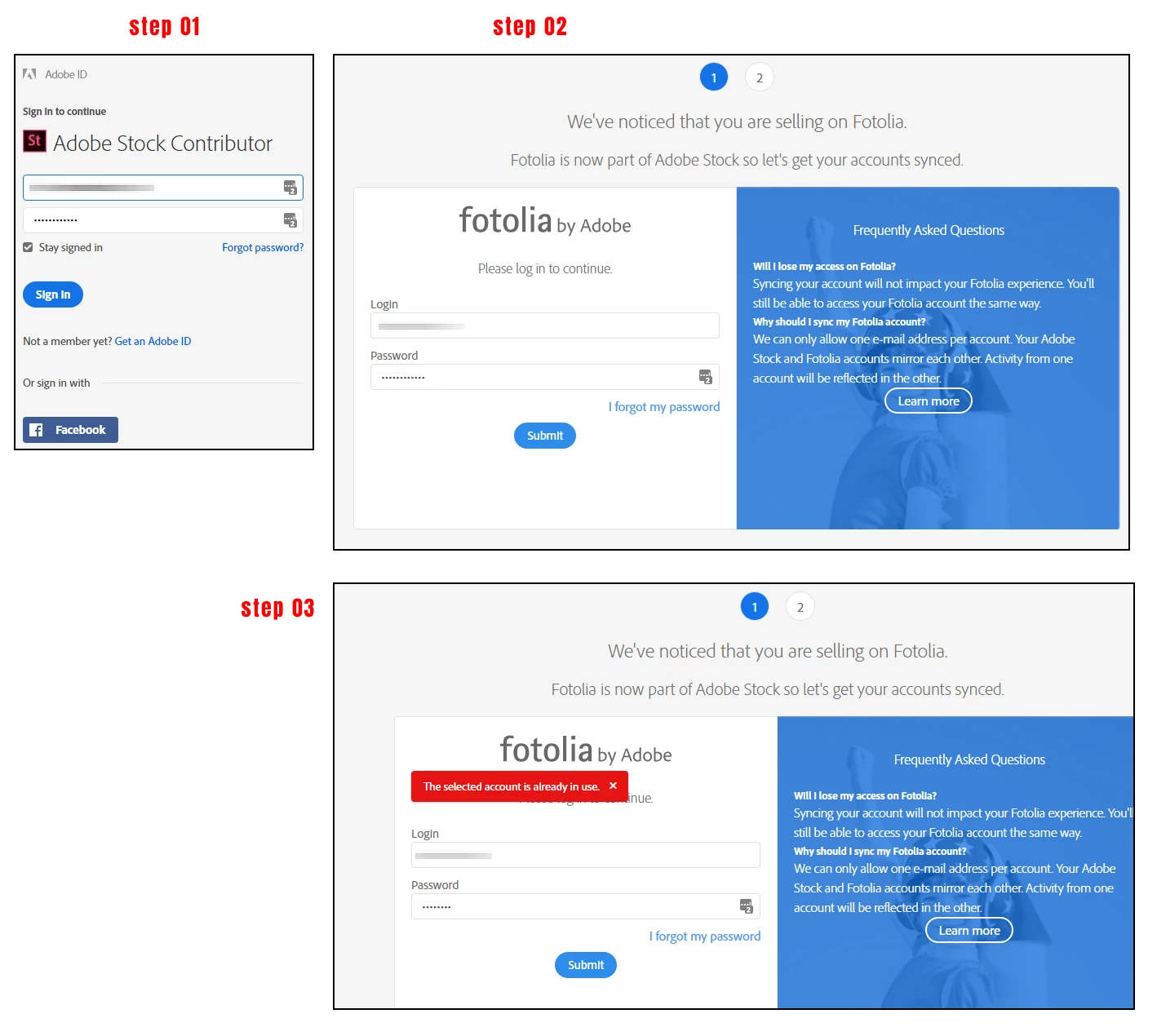
As you may know already that Fotolias/Adobe Stock syncing page appears when log into one`s account. Ofcourse its synced before,

but there is NO button like "I have synchronised my accounts before".
So after entering Fotolia`s login and password - it says The selected account is already in use

and there is no other way to enter one`s contributor account at Adobe Stock.

To log one`s contributor account - one need click this Adobe Stock Contributor  it has redirecting to this https://contributor.stock.adobe.com/en/onboarding/sync-fotolia-2

Which requires Login and pasword - after it says The selected account is already in use - and thats basically it.

I cant login to my contributor account for submitting, for indexing.... for anything.

Does anyone in Adobe company has a sollution?
This topic has been closed for replies.
Correct answer MatHayward

The error message "the selected account is already in use" occurs when you are trying to create a new account with an Adobe ID that already has a contributor account associated with it. You can only have one active account per Adobe ID. Instead of creating a new account, go back to the home page and click sign in at the upper right corner. Enter your Adobe ID and password and you should be all set.


To answer your question, support can be reached through the contact us link at the bottom of the contributor portal, or if you can't access that you can email contributor-support@adobe.com


Kind regards,


Mat Hayward 

2 replies

UI UX Designer
Participant
September 21, 2020

Hi there,

I got the same problem. Where should I ask question for help?


Thanks.

MatHayward
Community Manager
MatHaywardCommunity ManagerCorrect answer
Community Manager
September 21, 2020

The error message "the selected account is already in use" occurs when you are trying to create a new account with an Adobe ID that already has a contributor account associated with it. You can only have one active account per Adobe ID. Instead of creating a new account, go back to the home page and click sign in at the upper right corner. Enter your Adobe ID and password and you should be all set.


To answer your question, support can be reached through the contact us link at the bottom of the contributor portal, or if you can't access that you can email contributor-support@adobe.com


Kind regards,


Mat Hayward 

UI UX Designer
Participant
September 22, 2020

The issue has been resolved. The problem is in the browser.

It works on Mozilla Firefox.


Thanks.

J

MatHayward
Community Manager
Community Manager
February 8, 2019

I have already commented on your other post about this issue.

If after reading my notes you are still having trouble submit a ticket to support and we'll get back to you asap. It's important to note you must contact us via the Adobe Stock Contributor Portal and not through Adobe.com.

regards,

Mat Hayward

vv47674653
Participant
February 8, 2019

There is already opened a case Adobe Case  00071736 by Adobe Contributor Relations.

Which says

to log in, try going to https://contributor.stock.adobe.com and then click on 'Sign In' in the top right corner using your email address: ******@gmail.com. If you do not remember the password click on 'Forgot Password' to reset it. After the password is reset you should be able to log in.

And its just same thing I did before I have submitted my question to Adobe Contributor Support

No one gives an answer - WHY there is a SYNC page when a system HAVE to understand that this account is synced already.