Cosmic Studio
Inspiring
March 14, 2026
Answered

Spam question

  • March 14, 2026
  • 6 replies
  • 196 views

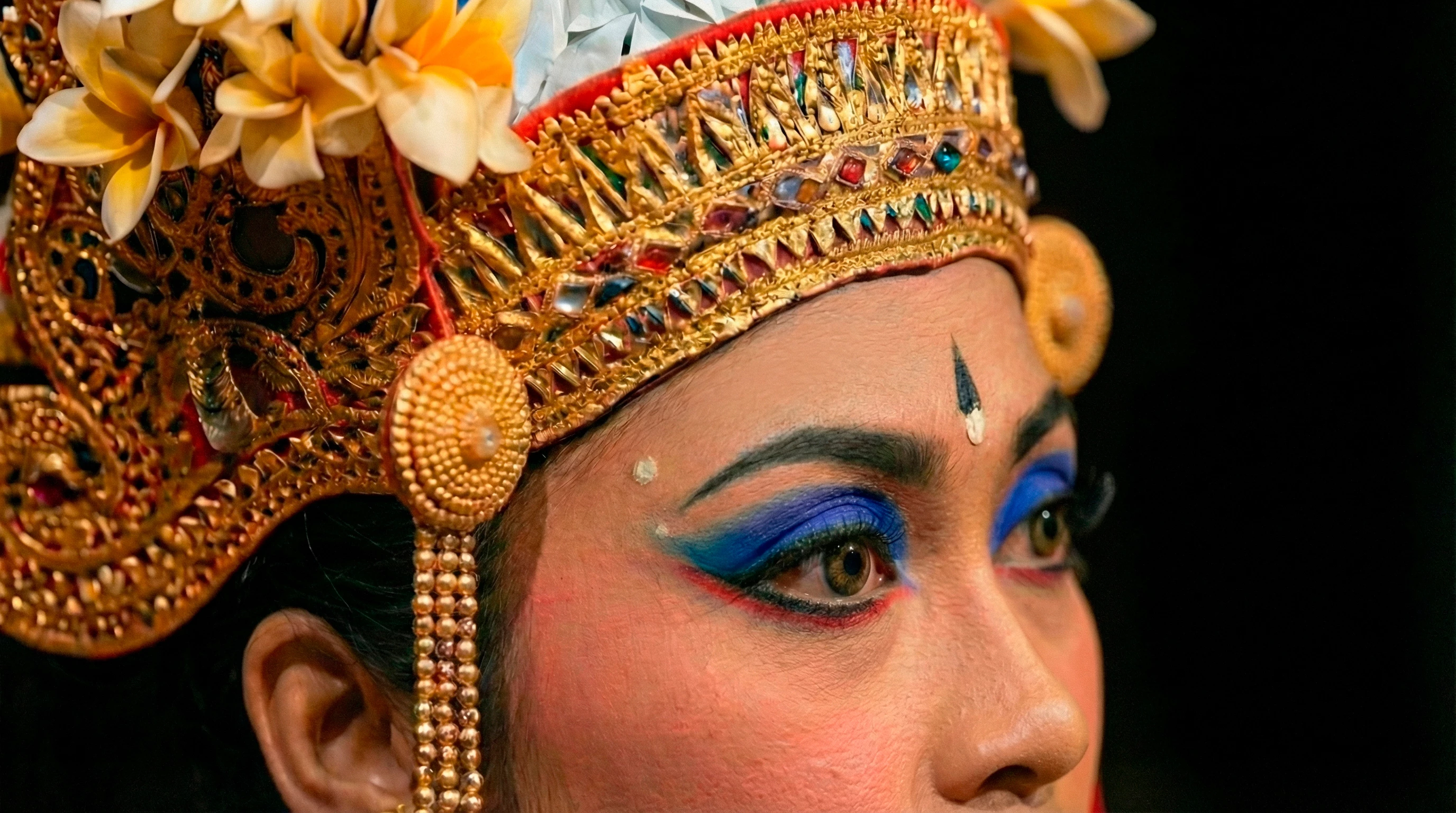
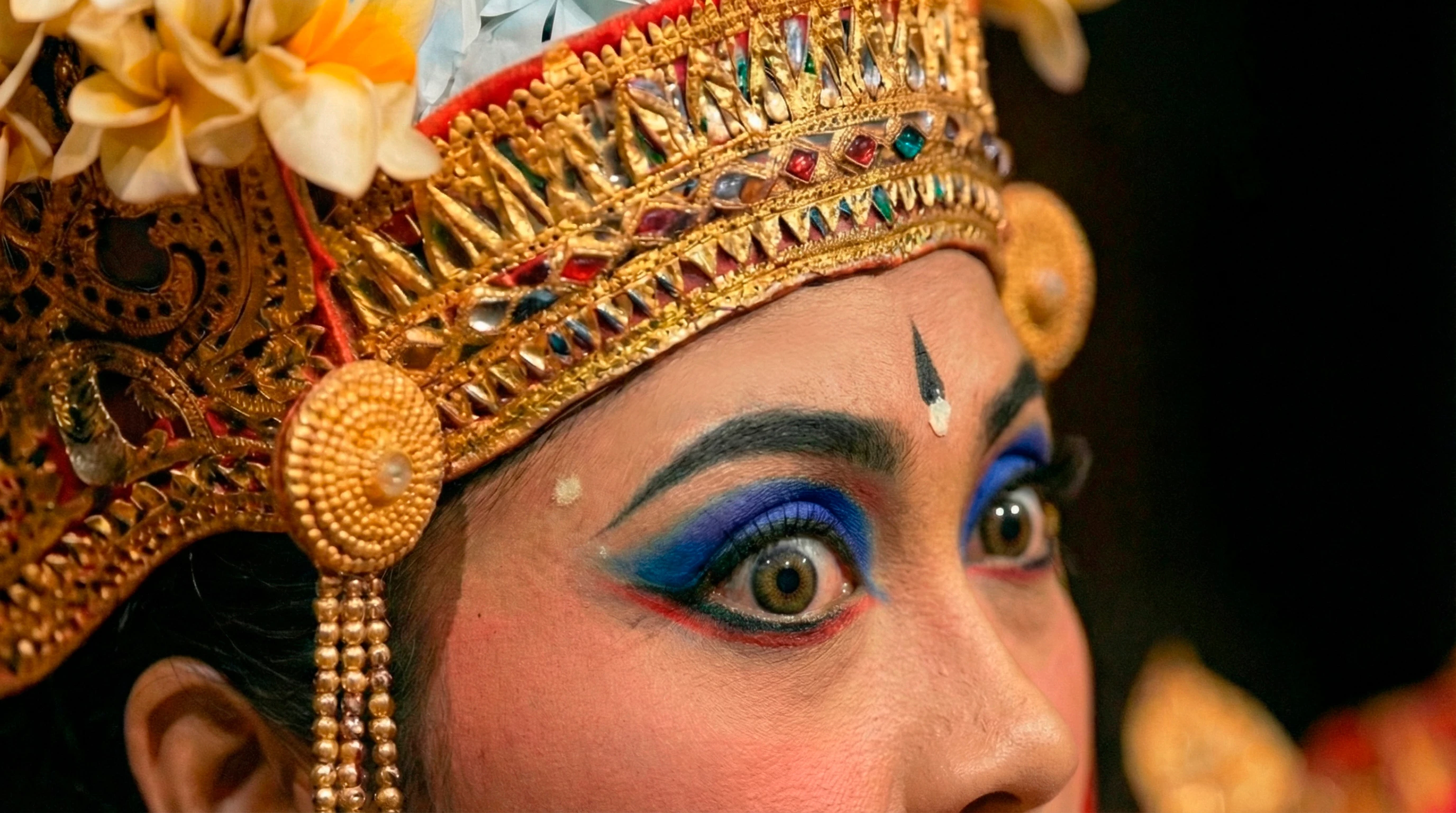
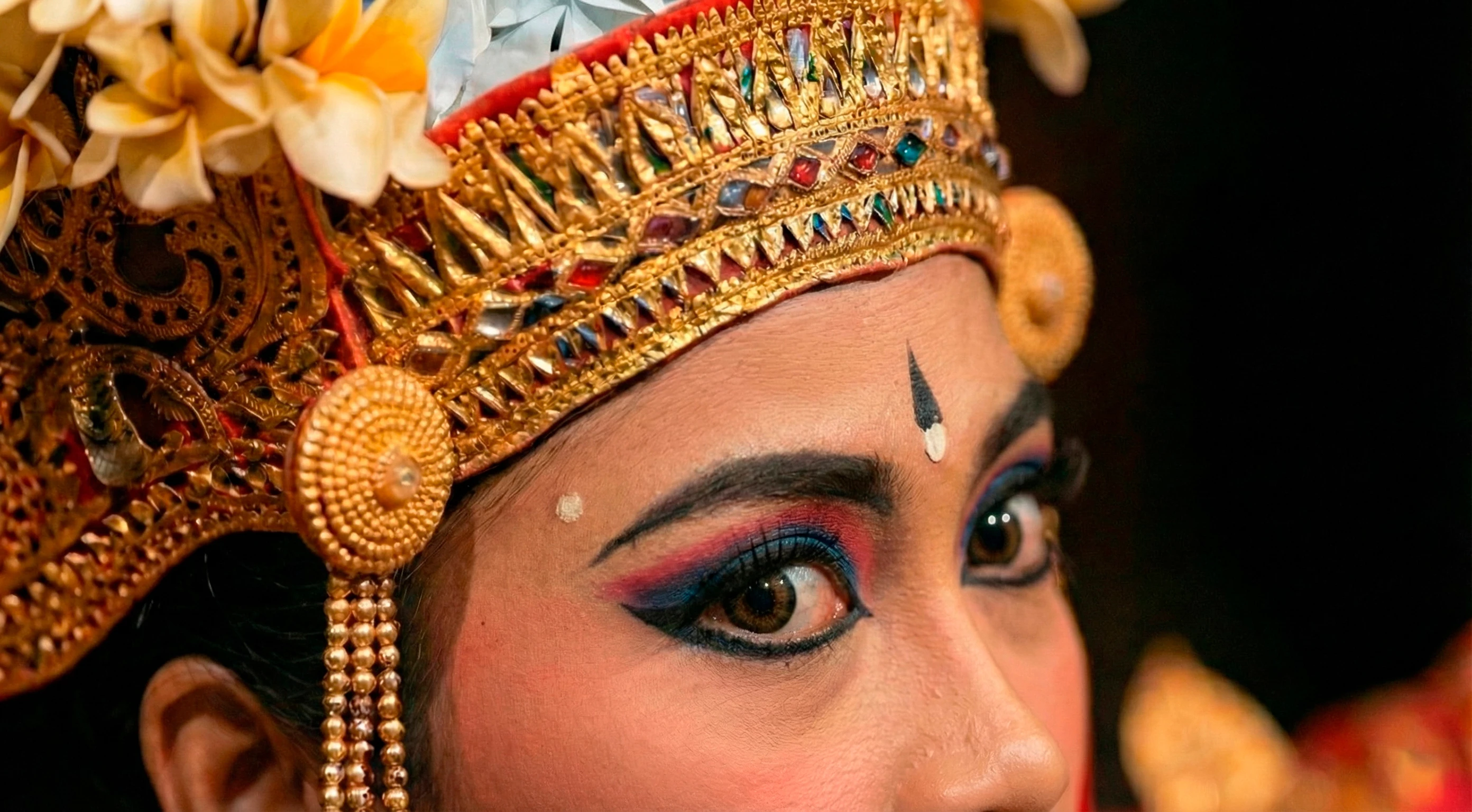
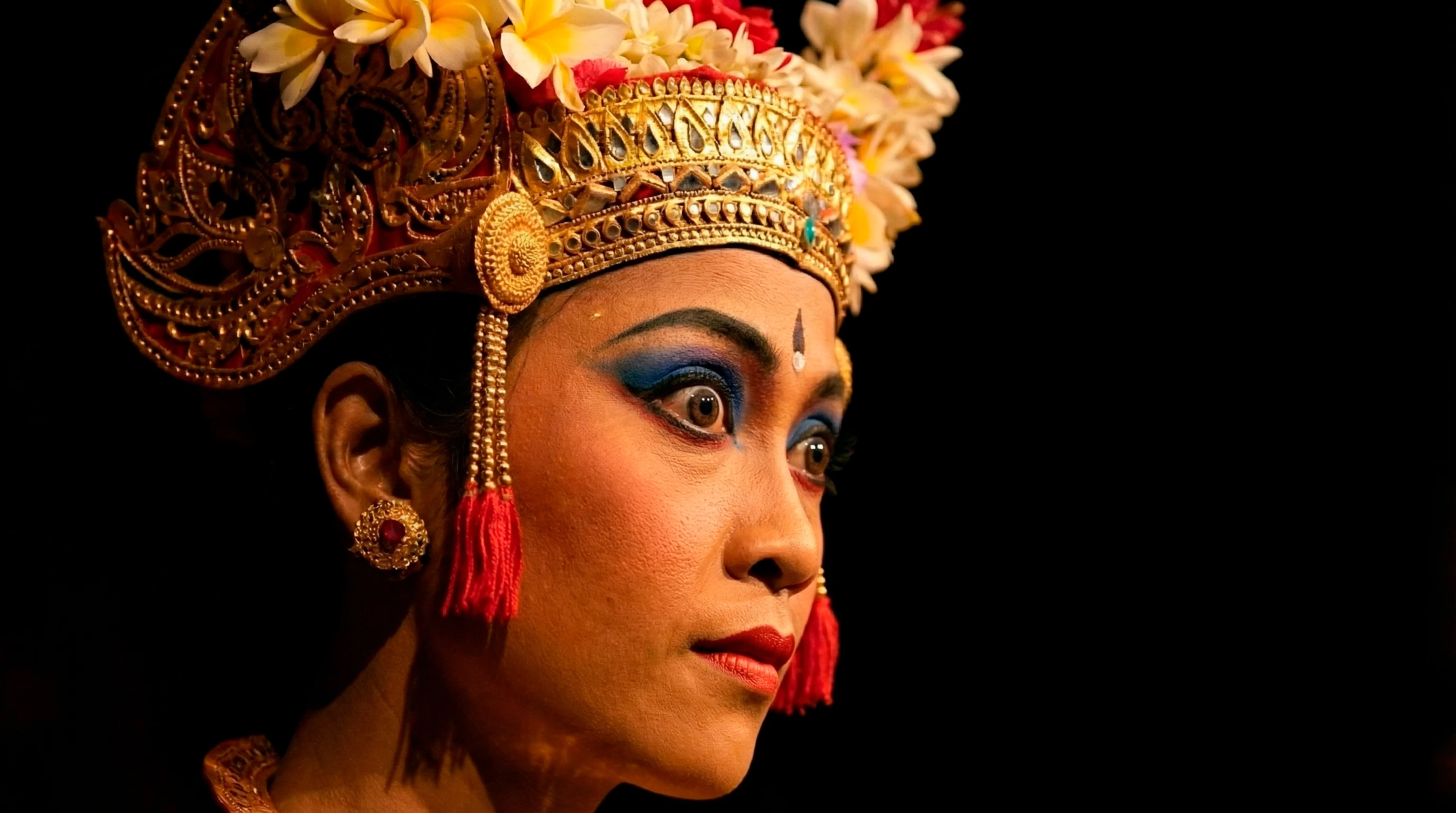
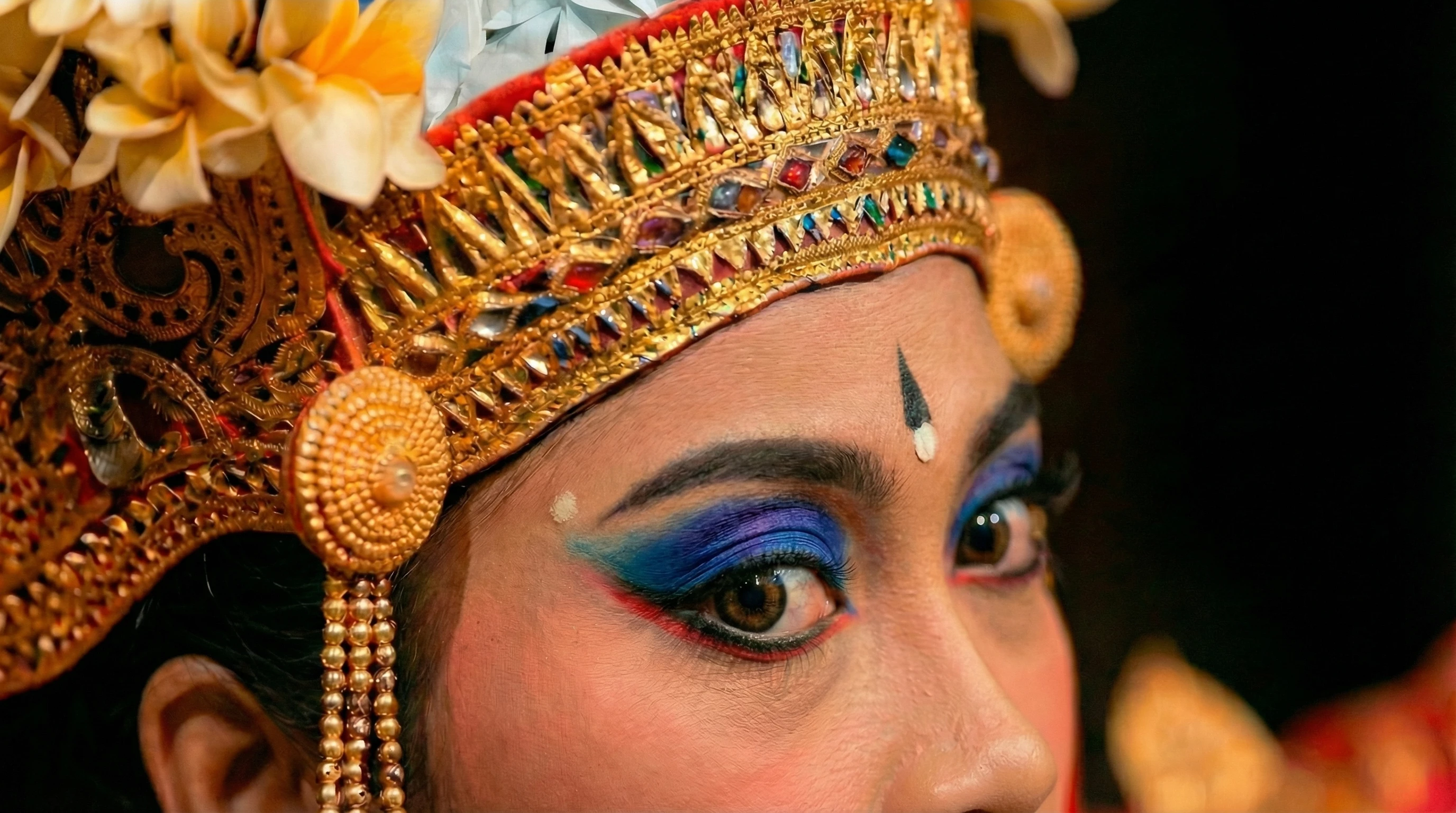
Legong is a traditional Balinese dance that uses expressive eye movements, especially the seledet (a kind of intense gaze). These photos had been accepted into my portfolio and are part of a larger series. I’d say the last one with different makeup might be considered spam, but what about the others?
 

    Correct answer daniellei4510

    Only one of the last three should have been accepted. The other two are too similar, different makeup or not.

    6 replies

    Nancy OShea
    Community Expert
    Community Expert
    March 15, 2026

    This is what Stock says about similar content in a series. 

    https://helpx.adobe.com/stock/contributor/help/similar-content-guidelines.html


    Nancy O'Shea— Product User & Community Expert
    daniellei4510
    Community Expert
    Community Expert
    March 15, 2026

    OK, let’s start over here. Since your post was about spamming and these images were apparently accepted, I think we overlooked another issue, which is the second reason the last three images shouldn’t have been accepted: quality issues. The headdress needs work. I’m guessing these were made with Nano Banana? It could have done better with the right editing prompts.

    Now back to the spamming issue. You mentioned at some point that if your is ever deactivated for spamming, Adobe will simply delete the similars and reactivate your account. For starters, reactivating an account can take weeks and often months. And no, it’s not likely that Adobe will delete the similars. They will likely expect you to do that, and they will follow up with another investigation to make sure you followed through. (I’m making some assumptions here...no one knows for sure exactly how the investigation process works.)


    Bottom line, I think your assets may have been reviewed by a moderator-in-training. ;)

    Adobe Community Expert | If you can't fix it, hide it; if you can't hide it, delete it.
    Cosmic Studio
    Inspiring
    March 15, 2026

    They were made with Nano Banana Pro on Feb 6, 2026. My account is already deactivated. I haven’t been informed of the specific reason yet, only that it was a violation of the terms.

    My account is about 1 year and 6–7 months old, with a little under 3,500 assets and almost 900 downloads. Would that still be considered a new account?

    Edit: English is not my native language, and I just realized I took the phrase literally. I thought “for starters” meant “for beginners,” as in “for beginners, reactivating an account…”

    daniellei4510
    Community Expert
    Community Expert
    March 15, 2026

    Ah, thanks for clarifying. I wasn’t aware your account was already deactivated.

    Adobe Community Expert | If you can't fix it, hide it; if you can't hide it, delete it.
    yamato713108855
    Community Expert
    Community Expert
    March 15, 2026

    The Help section states that you can submit up to three variations, but Adobe Stock's review process has become stricter recently, so even if you submit up to three variations, only one might be selected.

    March 15, 2026

    Hey ​@Cosmic Studio 

    Make sure to have the model release form signed as well. Which I m sure you are doing.
    Consider different angles, heights, and to capture the mood and story of the dancers. This will further add depth to your portfolio.


    Cheers

    Nate

    Cosmic Studio
    Inspiring
    March 15, 2026

    Hi ​@Oh.N8 

    Yes, I always try to generate images with different perspectives, compositions, and close-ups. Another thing I forgot to mention is that, as a video maker, I also see value in similar and consistent images. They could easily be turned into videos, so when I generated those images, I had that in mind as well.

    Please understand that I’m not questioning Adobe’s rules—I’m just trying to understand them so that, if my account is ever reactivated, I don’t violate them again.

    Since starting my portfolio, I’ve only worked with fictional people generated by AI that aren’t based on real photos and weren’t created using prompts that explicitly mention real individuals. So in that case, I wouldn’t need a model release, correct?

    March 15, 2026

    Hey ​@Cosmic Studio 

    Based on these search results:
    Whether you need a model release for AI-generated images on Adobe Stock depends on whether the person depicted is based on a real person or is a completely fictional creation. 

    I cannot definitively answer Yes or No. 
    I have had images accepted and I have been requested to have a model release form for AI generated content. As a result, I shy away from generating images of people to submit to stock sites.


    Each stock site is different. I have noticed that the stock site requirements being technical, model releases, and otherwise have become stricter.


    Quite honestly I see no point in generating an image of person and then claiming it to be my own. A person or a team of people took the photo. That person  or team should get the credit for their time and effort.

    Whereas Compositing an image and creating something different with a base image is different. 

    Based on a search:

    Here is the breakdown of Adobe Stock’s policies:

    1. When a Model Release IS Required

    • Identifiable Real People: You must submit a model release if the AI image is based on a real, identifiable person, including friends, family, or professional models.
    • Using References: If you used a photo of a real person as a prompt (e.g., in ControlNet or image-to-image) to generate the final image, a model release is required.
    • Named Persons: If you referenced a specific individual in your prompt, you must have a model release from them. 
       

    2. When a Model Release is NOT Required (Fictional People)

    • Fully AI-Generated: If the image is entirely generated by AI and does not depict a real, identifiable person, you do not need a model release.
    • Fictional Checkbox: In this case, you must check the box in the contributor portal that says "People and Property are fictional"
       

    Key Takeaways for Adobe Stock AI Submissions

    • Always Label: You must check the "Created using generative AI tools" box for all AI content.
    • File Type: Submit AI images as Illustrations, even if they look like photographs.
    • Property Release for Fictional People: Sometimes, if an AI-generated person looks very real, Adobe may ask for a property release to confirm it is fictional and you own the rights to it.
    • Prohibited Prompts: You cannot use real person names, famous individuals, or other artists' names in your prompts
    Jill_C
    Community Expert
    Community Expert
    March 15, 2026

    The last 3 are definitely too similar.

    Jill C., Forum Volunteer
    daniellei4510
    Community Expert
    daniellei4510Community ExpertCorrect answer
    Community Expert
    March 14, 2026

    Only one of the last three should have been accepted. The other two are too similar, different makeup or not.

    Adobe Community Expert | If you can't fix it, hide it; if you can't hide it, delete it.
    Cosmic Studio
    Inspiring
    March 14, 2026

    Hm, my main concern is that the photos are quite similar, but with different expressions. In my view, these expressions aren’t easily achieved through editing or generating new images. I’m also thinking that a computer might treat these photos as identical and ignore the differences in the gazes. Thank you. 👀

    daniellei4510
    Community Expert
    Community Expert
    March 14, 2026

    If all three were accepted, then I doubt there will be any future issues as far as your account is concerned. The moderator, or moderators, or the algorithm checking for similar content overlooked the strong similarities. Bottom line, I’ve had far more unique images rejected for similar content than any of the minor differences seen in these, so I can only speak from my own experience. 

    Adobe Community Expert | If you can't fix it, hide it; if you can't hide it, delete it.