
Participant
March 6, 2020
Answered

"Technical Issues"
  • March 6, 2020
  • 5 replies
  • 554 views


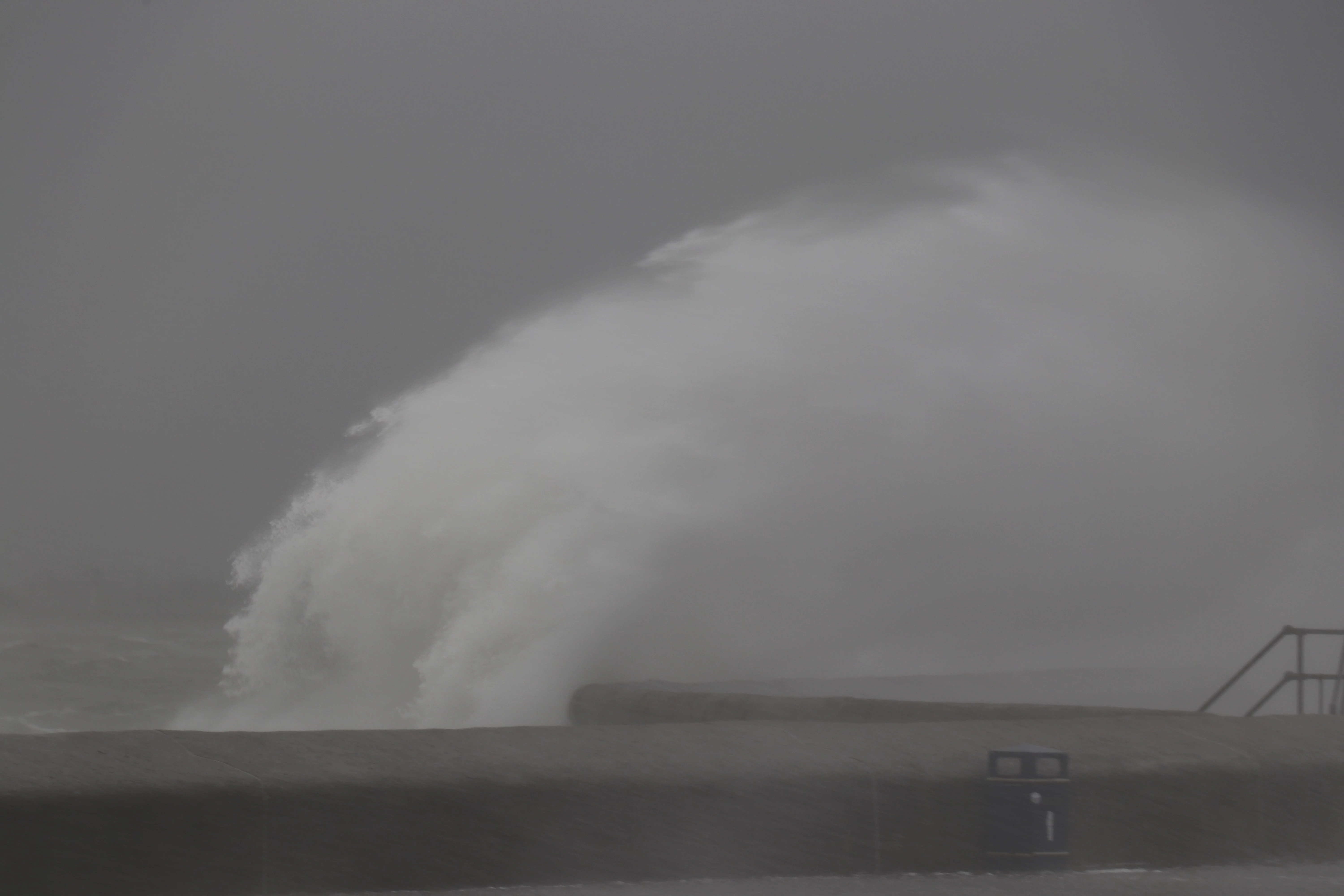
I am a new contributer to Adobe Stock and had this image rejected for "Technical reasons". Having had a look at what elements may cause an image to be rejected, I can't see why this one was. Maybe I'm just biased!

I could think that they may have seen blur/movement in the image, but looking at the image again I can see the sea spray being blown inland, so actually part of the dramatic image. 

Can anyone see any other reason for this image to be rejected, so I can learn for next time?

This topic has been closed for replies.
Correct answer Abambo

Look at your histogram. You have currently a wide range of tones that are not represented as well in the shadow area and the highlight area. If you have that image as a raw one, you may try to adjust, if not there is little chance that you can adjust without introducing other artefacts.

5 replies

Ricky336
Community Expert
Community Expert
March 15, 2020

You still don't have enough range of tones - contrast in the image. After a small alteration in Photoshop - adjusting the auto tones you get this:

Because of the lack of tonal range, you got the Technical Issues reason. (There may be other reasons as well.)

Participant
March 15, 2020

This photograph did have the histogram skewed to the left.

I did have a look at changing elements from the RAW file, but as it was a very grey stormy day the photo was pretty realistic. By a bit of photediting to get the histogram more balanced, the image was too bright and not really reflective of the reality,

Ricky336
Community Expert
Community Expert
March 7, 2020

Technical issues here would definitely be contrast! Your B&W is 'muddy'. For a B&W photo, you need a full range of tones - whites to blacks. Here, you just have a muddy grey.

jacquelingphoto2017
Community Expert
Community Expert
March 7, 2020

Hi Steve,

There don't seem to be sufficient contrast in this photo.

Best wishes

JG

Abambo
Community Expert
AbamboCommunity ExpertCorrect answer
Community Expert
March 6, 2020

Look at your histogram. You have currently a wide range of tones that are not represented as well in the shadow area and the highlight area. If you have that image as a raw one, you may try to adjust, if not there is little chance that you can adjust without introducing other artefacts.

ABAMBO | Hard- and Software Engineer | Photographer