February 7, 2022
Answered

Technical problems

  • February 7, 2022
  • 3 replies
  • 500 views

Hello! Please tell me what technical problems are there in this image?

This topic has been closed for replies.
Correct answer Nancy OShea

The lines are not sharp and the image looks smeared.
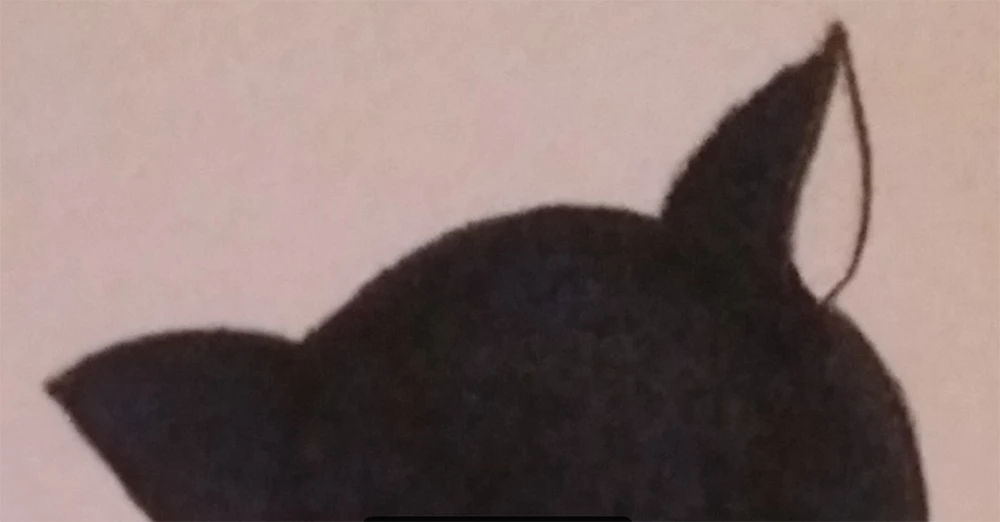
 

Drawings should be submitted as vector graphics in AI, EPS or SVG file type. 

Use Illustrator to turn your raster image (scan) into a vector graphic.


3 replies

PepeCastro
Inspiring
February 8, 2022

To obtain a digitized copy of a drawing you should not use the mobile phone, it is best to use a scanner and a program like Photoshop

February 8, 2022

Thanks for the answer.

Nancy OShea
Community Expert
Nancy OSheaCommunity ExpertCorrect answer
Community Expert
February 8, 2022

The lines are not sharp and the image looks smeared.


Drawings should be submitted as vector graphics in AI, EPS or SVG file type. 

Use Illustrator to turn your raster image (scan) into a vector graphic.


Nancy O'Shea— Product User & Community Expert
February 8, 2022

Спасибо за ответ.

reedesign1912
Inspiring
February 7, 2022

There is no sharp focus and it is very noisy.  It looks like you took this photo with your phone's camera.  While not impossible to get photos good enough for stock on your phone, it is very difficult to do so if the lighting conditions are not ideal.  It has to do with the very small sensor size of the camera on your phone and the amount of automatic processing done by the phone. 


On a side note, this looks like an original piece of artwork that would also require a property release.  If you are the artist, you would still need to complete a property release form.


If you are new to stock photography, take a look at some of these resources:


https://helpx.adobe.com/stock/contributor/help/photography-illustrations.html


https://helpx.adobe.com/stock/contributor/help/reasons-for-content-rejection.html


Rob R, Photographer
February 7, 2022

Thanks a lot for the answer.