


Participating Frequently
March 20, 2025
Answered

This simple PNG was rejected for "quality issues". I'd greatly appreciate your feedback!

  • March 20, 2025
  • 2 replies
  • 471 views

I thought it was almost perfect, what am I missing?

Thanks in advance


Correct answer Abambo

How did you do the cut-out. It is not clean:
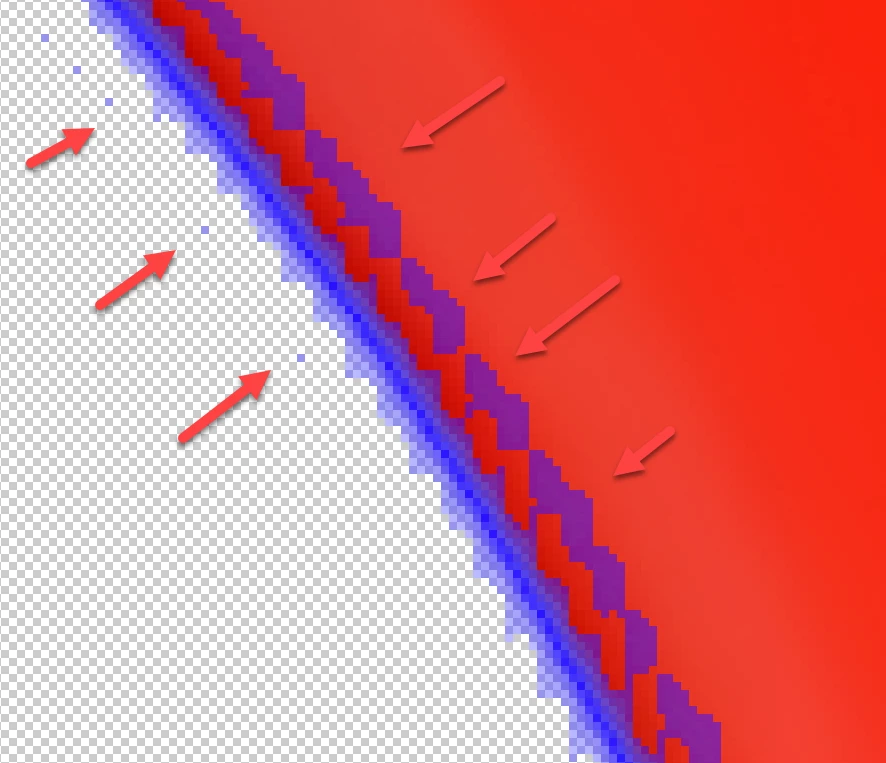
There should have only a thin line around your asset, for a correct cut-out.

2 replies

Abambo
Community Expert
AbamboCommunity ExpertCorrect answer
Community Expert
March 20, 2025

How did you do the cut-out. It is not clean:

There should have only a thin line around your asset, for a correct cut-out.

ABAMBO | Hard- and Software Engineer | Photographer

Devan1238Author
Participating Frequently
March 20, 2025

I see, I used Photoshop but with what you show I now understand I have to refine the edges. Thank you!

Abambo
Community Expert
Community Expert
March 21, 2025

Yes. You can have the stroke fx on during your refinement. That makes the task much easier.

ABAMBO | Hard- and Software Engineer | Photographer
daniellei4510
Community Expert
Community Expert
March 20, 2025

I think the issue is here:


Adobe Community Expert | If you can't fix it, hide it; if you can't hide it, delete it.
Devan1238Author
Participating Frequently
March 20, 2025

Appreciate it, to me it just looks like a slight shadow for added detail