ahmedtamer
Participant
April 28, 2026
Question

Title: Need help understanding "Quality or technical issues" rejection for my 3D renders/AI images

  • April 28, 2026
  • 3 replies
  • 65 views

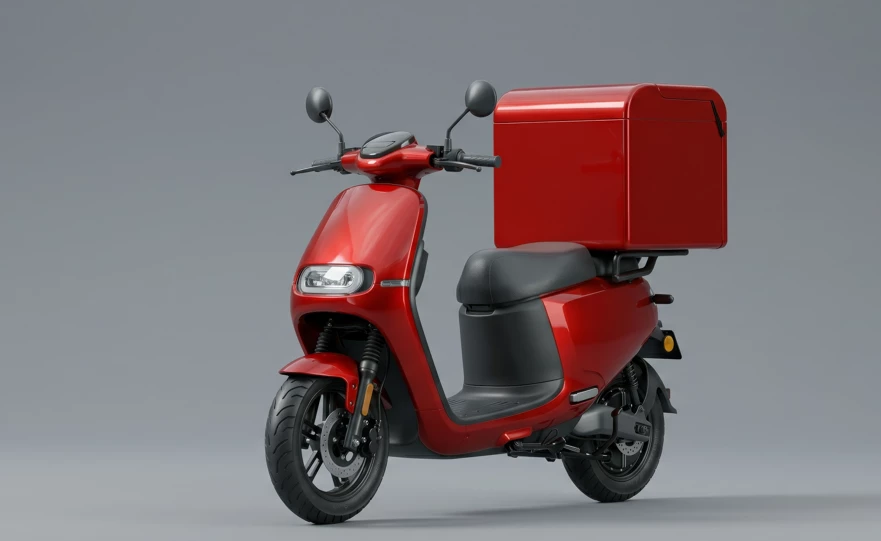
Hi everyone, I recently submitted a batch of images to Adobe Stock, but unfortunately, they were rejected for "Quality or technical issues". I have reviewed the files carefully at 100% zoom, but I am having a hard time identifying the exact issues (like artifacts, focus, or lighting problems) that caused the rejection. I always want to

ensure my work meets Adobe's high standards, so I would really appreciate your expert eye

s on this. I have attached a few examples of the rejected files. Could you please take a look and point out what needs to be fixed or what I might be missing? Any constructive feedback or advice on how to avoid this in future submissions would be highly appreciated. Thank you so much for your time and help!




    3 replies

    james.smith12
    Participant
    April 28, 2026

    It's definitely frustrating, but you're likely seeing a mix of things. Adobe's standards are especially strict on artifacts, noise, and focus. AI-generated images often carry "grainy" textures or unnatural patterns (artifacts), while 3D renders can suffer from misshapen details, compression artifacts, or poor lighting. My best, short suggestion is to check your work at a 300% zoom for any unnatural smoothness or odd patterning, and then try running your 3D/AI exports at a 5x upscale to help eliminate pixelated flaws.


    [link removed by moderator as per this community’s guidelines] 


    ahmedtamer
    Participant
    April 28, 2026

    Thanks a lot for the 5x upscale tip and the 300% zoom check! I’ll definitely look into your mentor's guidance as well. Truly appreciate the support!


    daniellei4510
    Community Expert
    Community Expert
    April 28, 2026

    Give the small size of the images you submitted, it’s difficult to look for possible errors without magnifying the size of the images, at which point the details become very soft. But you might look for issues like this: 


    Adobe Community Expert | If you can't fix it, hide it; if you can't hide it, delete it.
    ahmedtamer
    Participant
    April 28, 2026

    Thank you so much! Your feedback is very helpful. I completely missed the logical errors and those AI artifacts. I’ll make sure to check my future submissions at 200% zoom to ensure everything is perfect.


    daniellei4510
    Community Expert
    Community Expert
    April 28, 2026

    The pill organizer: Every one I’ve ever seen begins on a Sunday, not a Monday. And logically, the same identical pills would be in each container throughout the week. 

    Adobe Community Expert | If you can't fix it, hide it; if you can't hide it, delete it.
    ahmedtamer
    Participant
    April 28, 2026

    That is a brilliant observation! I completely missed the logical consistency of the daily pills and the starting day of the week. Thank you so much for pointing this out, I will definitely fix these conceptual details in my upcoming medical renders!