RALPH_L
Community Expert
Community Expert
October 29, 2020
Answered

Trying to find my reoccuring problems

  • October 29, 2020
  • 2 replies
  • 702 views

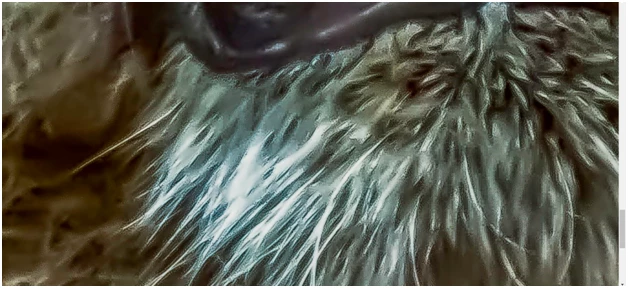
What is the problem here? I assume the waxy fur or is it the noise around the lion? Or is it too dark or too yellow?


 

This topic has been closed for replies.
Correct answer jacquelingphoto2017

Hi Ralph,

I like your lion.

Noisy around the edges, possibly as a result of over sharpening. There is also signs of a small amount of aqua color fringing. You need to watch the sharpen slider. Sometimes you'll need to reduce from the default. Another slider that can give you that effect is the Noise Reduction Detail slider. In the beard, there is also areas of highlights that has caused lost of details. Photos soot at 2000 ISO gets accepted. You just need to understand how to administer corrections. Do you have your camera set for RAW format? The inside of the lion's mouth gives the impression of photos taken as JPG format. Raw is easier to edit using Camera Raw. 


Best wishes

JG


2 replies

jacquelingphoto2017
Community Expert
jacquelingphoto2017Community ExpertCorrect answer
Community Expert
October 31, 2020

Hi Ralph,

I like your lion.

Noisy around the edges, possibly as a result of over sharpening. There is also signs of a small amount of aqua color fringing. You need to watch the sharpen slider. Sometimes you'll need to reduce from the default. Another slider that can give you that effect is the Noise Reduction Detail slider. In the beard, there is also areas of highlights that has caused lost of details. Photos soot at 2000 ISO gets accepted. You just need to understand how to administer corrections. Do you have your camera set for RAW format? The inside of the lion's mouth gives the impression of photos taken as JPG format. Raw is easier to edit using Camera Raw. 


Best wishes

JG


RALPH_L
Community Expert
RALPH_LCommunity ExpertAuthor
Community Expert
October 31, 2020

Thanks jacquelingphoto2017,

Yes I do shoot in RAW. Your help is the advice I needed. You showed me exactly what might have been the rejection reasons. I will try to watch these.

Abambo
Community Expert
Community Expert
October 31, 2020

Shoot with lower ISO (ISO of 20,000 is not recoverable for stock). It's difficult to say at what ISO you get in real trouble however. On my 5D Mark3, I've recovered pictures of ISO 2000 for stock. But that were rather simpler pictures with less detail.  All depends also on the camera you use. CR3 points to a newer model, so generally noise handling improves with newer generations. But the chip size matters also. There is no magic in: for lower ISO you need to go for a low aperture and a high exposure time. You will have more pictures out of focus like this, but who matters if you have a sharp one.


As for the rest: keep colours naturally.

ABAMBO | Hard- and Software Engineer | Photographer
Ricky336
Community Expert
Community Expert
October 29, 2020

Hello again,

The image here is too yellow/green. I think you have also used too much noise reduction. It's beginning to look like a painting. The pixels are becoming smudged.

RALPH_L
Community Expert
RALPH_LCommunity ExpertAuthor
Community Expert
October 29, 2020

I see what you mean. Theese would be my new steps.

#1 Original

#2 Global noise reduction

#3 Global details recovered

#4 Local details added

kellye31834878
Participating Frequently
October 29, 2020

With 20000 ISO you are never going to be able to recover this enough for stock, sorry. Usually about 45-50 is the limit in lightroom and you start to see the smudging.