kconkling
Known Participant
December 6, 2018
Answered

Turned down because of artifacts...

  • December 6, 2018
  • 3 replies
  • 2023 views

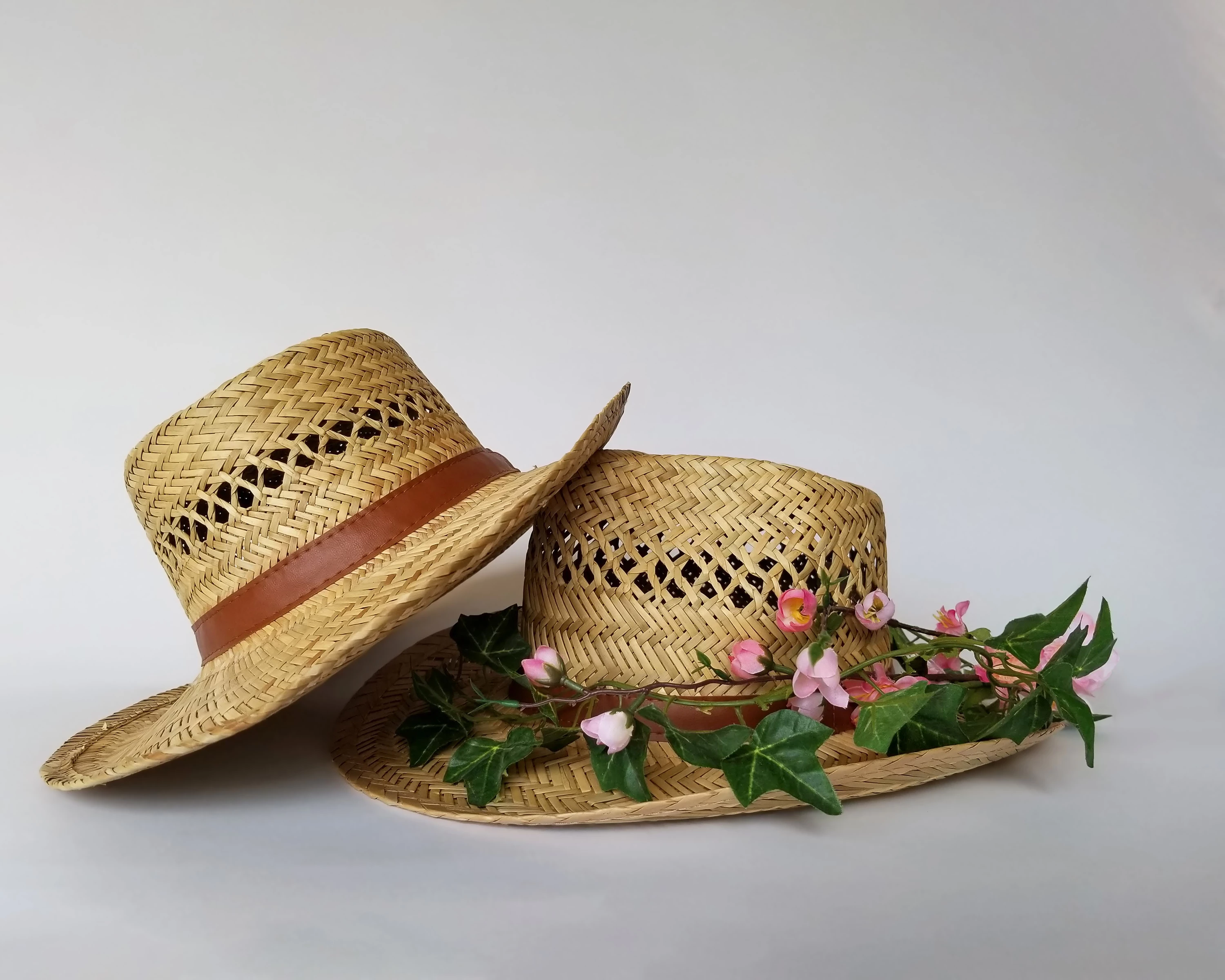
Thank you for info on the last photo.  I looked at this one again before I posted it, but if I'm missing something please let me know.  Thanks!!
This topic has been closed for replies.
Correct answer Ricky336

Hello,

It seems that you are using a smartphone for this picture - according to your metadata. So, with such phones artifacts are going to be a problem - especially when you increase them in size. Below was enlarged 111%. I guess you took this in JPEG format right? So, this is already a compressed file. Therefore, when enlarged you are going to get signs of artifacts like this:
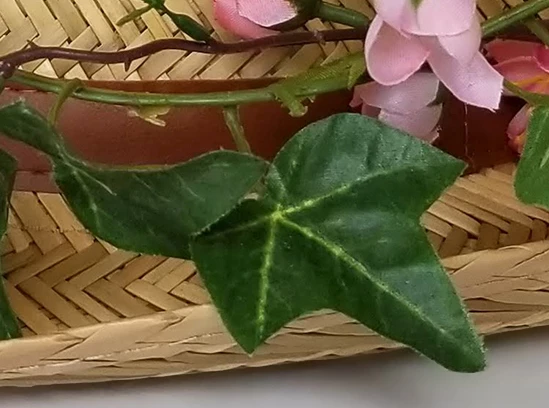
See how 'blocky' the leaves are. This is due to the JPEG compression.

In all honesty, generally speaking, it is better to have a camera with a bigger sensor and one that can take raw, rather than JPEG -

especially if you are considering uploading to Adobe Stock (and other stock sites).

3 replies

Ricky336
Community Expert
Ricky336Community ExpertCorrect answer
Community Expert
December 7, 2018

Hello,

It seems that you are using a smartphone for this picture - according to your metadata. So, with such phones artifacts are going to be a problem - especially when you increase them in size. Below was enlarged 111%. I guess you took this in JPEG format right? So, this is already a compressed file. Therefore, when enlarged you are going to get signs of artifacts like this:

See how 'blocky' the leaves are. This is due to the JPEG compression.

In all honesty, generally speaking, it is better to have a camera with a bigger sensor and one that can take raw, rather than JPEG -

especially if you are considering uploading to Adobe Stock (and other stock sites).

Abambo
Community Expert
Community Expert
December 7, 2018

To be clear: Phone pictures are accepted by Adobe. But to avoid refusals, all elements need to be optimal, including and specially lightning. Your phone should also have one of the better camera systems. Newer phones are here way better than older ones. I wouldn’t use my iPhone 6 for pictures for stock, because I feel that the required quality level of that camera is not given. I take pictures of my dog with it, and I love them, but they are not usable for stock.

ABAMBO | Hard- and Software Engineer | Photographer
joanH
Inspiring
December 10, 2018

Your 1300D is able to shoot raw and when yo put the right lens on, you will get great pictures. Well, the photographer needs to have an eye for the situation. And I very often take a bunch of pictures to select one as the good one.


Abambo, I would normally never try an Adobe stock photo via cell phone. However, I did sit in my car during an exceptional cloudburst and afterward came a sight I had to capture. I sent it to Adobe Stock and it was rapidly accepted! I took two more yesterday same way. If you like I will post it to this forum thread. Yes, I am having fun. Best, JH

joanH
Inspiring
December 7, 2018

Hi konkling, I think you can take out that small pink flower and clean up the area on Photoshop. The rest of the photo looks clear. If you pick the color of your background and erase carefully  - it will leave only background color behind. Make sure it set to background for match color. Leave no traces. Best regards, JH

Abambo
Community Expert
Community Expert
December 6, 2018

There are several artefacts in the leaves. This one stroke my eye, before even looking deeper at the image:

ABAMBO | Hard- and Software Engineer | Photographer
