Participating Frequently
November 1, 2021
Answered

Two portraits refused

  • November 1, 2021
  • 2 replies
  • 450 views

Hello Together.

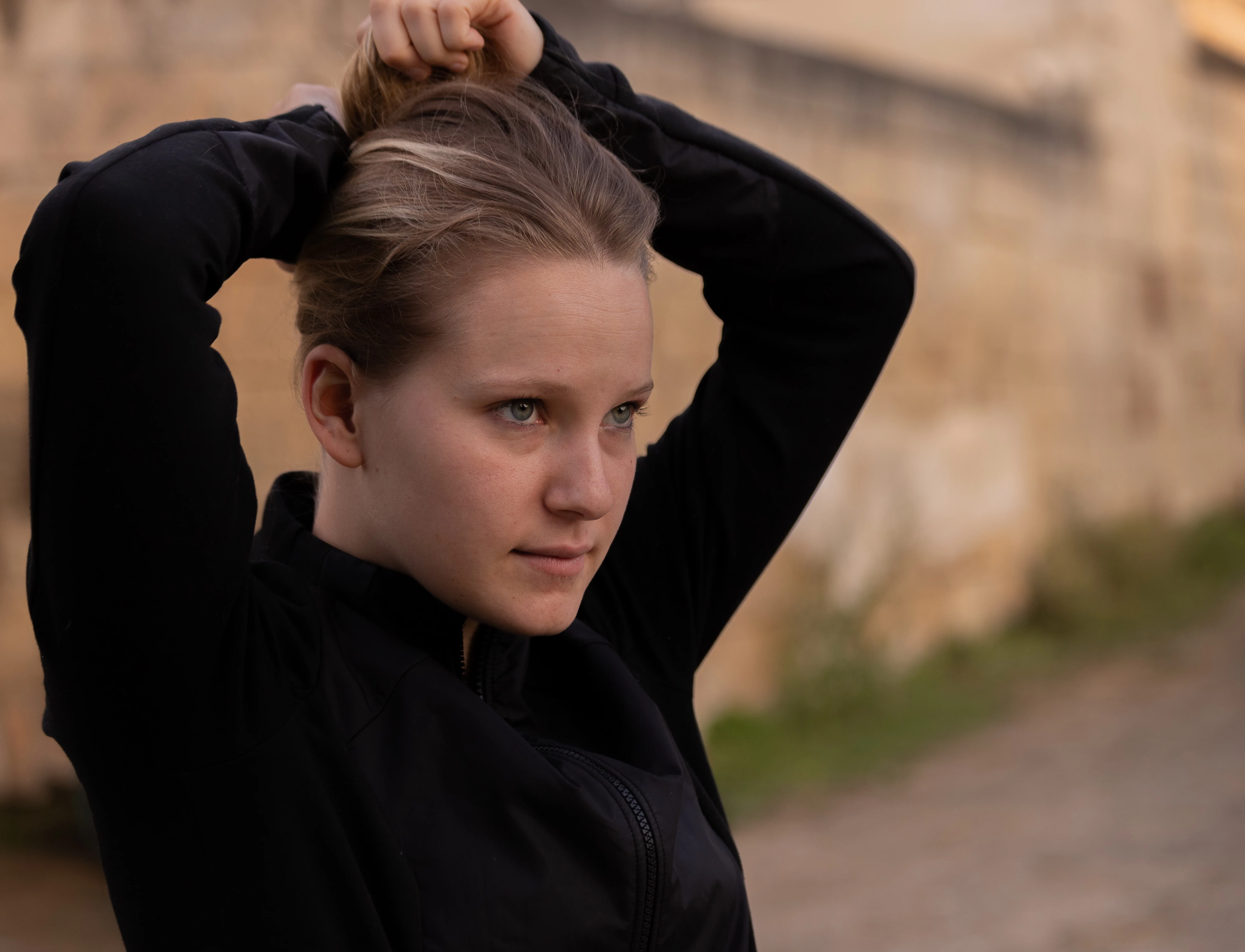
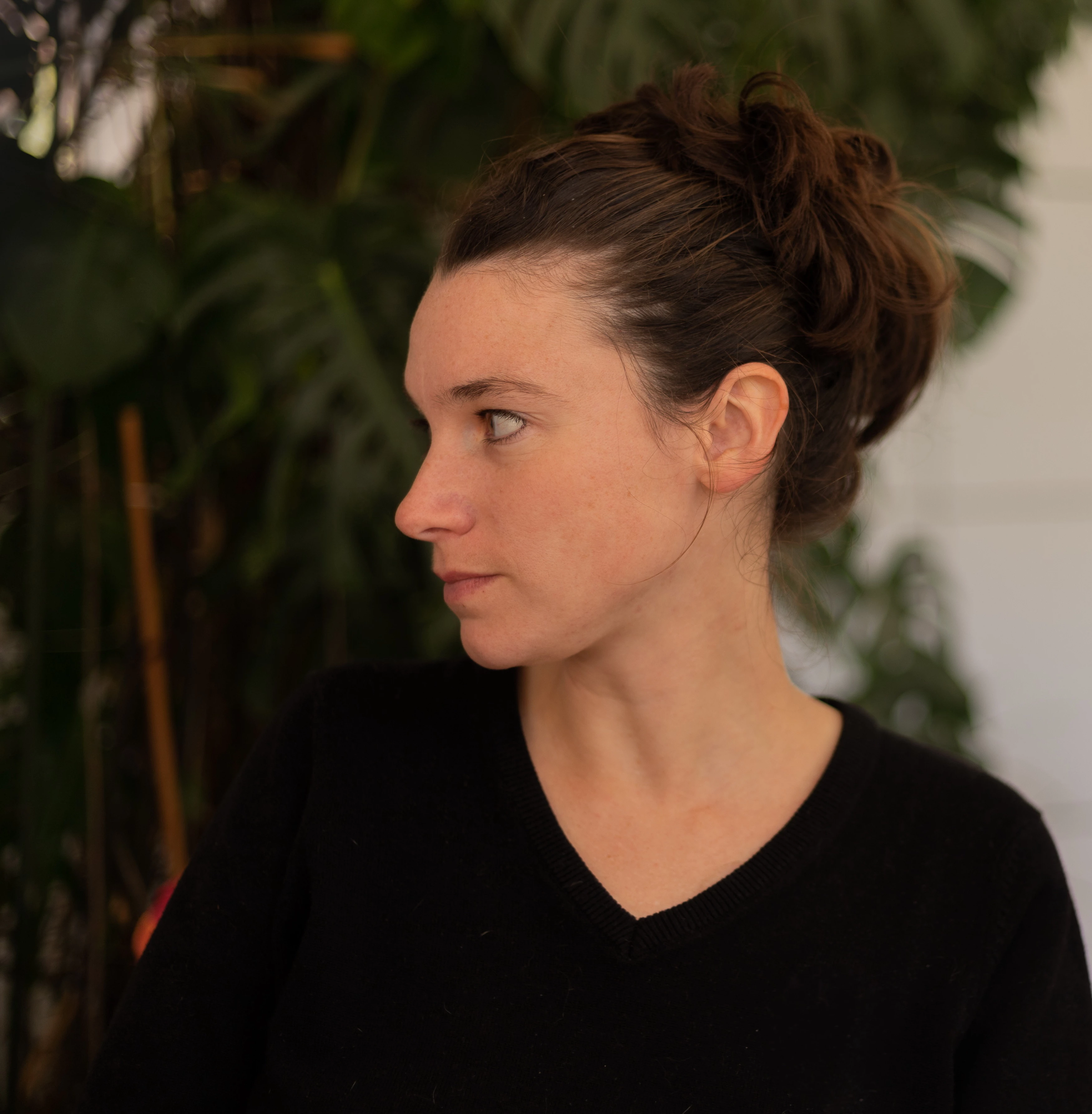
These two portraits were refused for publication, and I would like to understand why, as they received a nice sucess on my personnal social networks. If anyone could help me with the right review... 

Thanks in advance.

Fred


This topic has been closed for replies.
Correct answer jacquelingphoto2017

Hi @Frédéric5EE2 ,

The rule of third is not a hard and fast rule. There are a few points of focus in the view of your camera (about 11). Once you utilize these correctly you'll get nice images. You may do some of your images using the rule of third, however having too much negative space is not essential for stock. For single subject, the larger it is, the better, but leave space around the subject to facilitate cropping. Also I do not understand why you could not avoid cropping the hand of the first model. There is a pose for a picture, capture it in its entirety. 


Best wishes

JG

Photographer and Nutrition Author
2 replies

jacquelingphoto2017
Community Expert
Community Expert
November 2, 2021

Hi @Frédéric5EE2,

There's a halo around the left elbow of the model in the first image. It is important that the entire model is sharp to allow for cropping. I believe you were either too close to the model or did not have enough depth of field set. Around the arms is not sharp and of course the underexposure. That you need to pay attention to in camera.


The second image is also not completely sharp. The picture is noisy and also underexpose.


Best wishes

JG

Photographer and Nutrition Author
Abambo
Community Expert
Community Expert
November 1, 2021

I would have liked them on social media and refused for stock. I suppose they were refused for technical issues (please give us always the refusal reason…)


Both images are underexposed. Look at the histogram (here second):

The first image has also framing errors, the left edge is to near and the upper edge cuts off the hands. The second image has sharpness problems. With portraits, eyes need to be crisp sharp. With the first one, sharpness is satisfactory. I normally put special emphasis on the eyes, by lightening them up and sharpen them extra. Careful editing will help here to make the portraits still an edge better.


If you are doing planned portrait shoots, you should reconsider your lightning. A flash or two and a reflector may help. You should look at portrait tutorials for both shooting and post-processing. And do not forget: your background is important and should be part of the story.


I suppose you have model releases.


If you are new to stock, you should consider these resources: https://helpx.adobe.com/stock/contributor/tutorials.html
Please read the contributor user manual for more information on Adobe stock contributions: https://helpx.adobe.com/stock/contributor/user-guide.html
See here for rejection reasons: https://helpx.adobe.com/stock/contributor/help/reasons-for-content-rejection.html
and especially quality and technical issues: https://helpx.adobe.com/stock/contributor/help/quality-and-technical-issues.html


ABAMBO | Hard- and Software Engineer | Photographer
Participating Frequently
November 1, 2021

Hi Arambo.

Thank you for all these comments.

Some answers/comments:

Yes they were refused for technical issues, sorry for the miss, as it was looking so logical for me.

Yes I have model releases.

No it was not planned portrait shoots, but just taken "by hand" on instant, as I mostly do.

But I'm right now investing in some studio material (backgrounds, lights...) in order to go a step over.

On first image I agree with the upper edge cutting off the hands, but I had no choice (see original).

I'm more doubtful with the too near left edge, as my actual photography teachers/coachs are always asking me to not put the subject at the center of the frame, but ok, may be some more space.

So if I understand you well, it is more a problem of post production (except the cutted hands).

Fot this reason I attach here the original ones, then may be you can give me the right editing keys for them (I'm still a beginner on Lightroom...) if you have a few minutes for that.


Many thanks again.

Fred

Abambo
Community Expert
Community Expert
November 1, 2021

Lightroom or Lightroom Classic?


Didn't you take your pictures as raw files? If not, you should consider that!


As I said:

  • Correct the overall exposure.
  • Cosmetic changes to the face. Get rid of small imperfections without touching the character of the face. One “easy” fix to the skin is to lower the texture and lift the clarity.
  • Sharpen eyes and lift the exposure on the eyes (masking).
  • Carefully stamp out dust particles etc.

Maybe something like this quick&dirty edit!

Maybe something like this quick&dirty edit!

ABAMBO | Hard- and Software Engineer | Photographer