Participating Frequently
June 4, 2024
Answered

unacceptance of photos

  • June 4, 2024
  • 5 replies
  • 968 views

I uploaded 2 photos without any filters. I just clicked with my mobile phone. I don't know why they didn't accept it. they have given reason as quality issue. It will be great if you give feedback on this.

This topic has been closed for replies.
Correct answer Abambo

First:

Clipping and colour noise in the background. The asset looks like a phone picture. There are missing contrast.

Missing details due to the excessive (in-camera) post-processing. If the picture had been of a better quality, you would have needed a model release for some people in the image. The exposure is not the best.

Second:

The image is overexposed, as shown by the histogram:
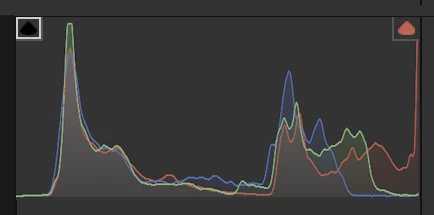
You have missing blacks (left).

You also have heavy artefacts in the picture:

I do not know what these signs represent, but they should be rock sharp:
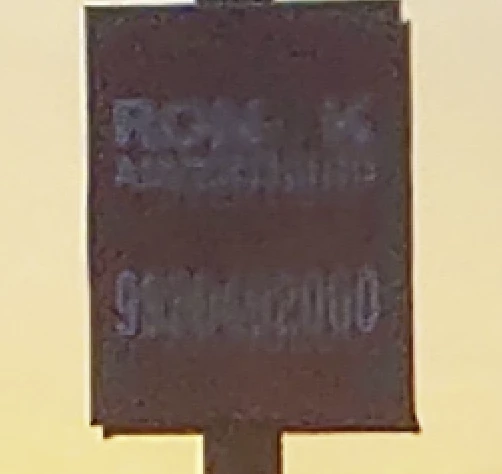
If they were sharp, you would probably get a refusal for IP reasons.

The image is missing contrasts.


For both pictures, the portrait mode is most likely not the best format for such pictures.

 

5 replies

Nancy OShea
Community Expert
Community Expert
June 4, 2024

Sadly these look like snapshots as opposed to professional quality photographs.


Compare your work with available Stock inventory.  It helps to see what you're competing with. 


Unlike social media, Adobe Stock customers expect the highest visual and technical quality for use in commercial projects.

Hope that helps.


Nancy O'Shea— Product User & Community Expert
Participating Frequently
June 5, 2024

Thank you Nancy.

Jill_C
Community Expert
Community Expert
June 4, 2024

Zoom in on each of these images and you'll easily see how blurry and noisy they are. Cell phone snapshots are rarely going to be acceptable for stock, unless they're taken under perfect lighting conditions.

Jill C., Forum Volunteer
Participating Frequently
June 5, 2024

Thank you Jill.

Ricky336
Community Expert
Community Expert
June 4, 2024

Hello,

Generally speaking, smartphone pictures don't do so well on stock. The sensor is too small to show detail. They are fine on a small screen, but not on a large monitor, or printing to a large size.

Even at 100% noise - 'grain' to use film speak isn't that good for digital photos and artefacts - areas where the pixels are seen - as given in another post.


Have a read of this. It's a brief guide on quality:
https://helpx.adobe.com/stock/contributor/help/reasons-for-content-rejection.html


Participating Frequently
June 5, 2024

Thank you Ricky

Abambo
Community Expert
AbamboCommunity ExpertCorrect answer
Community Expert
June 4, 2024

First:

Clipping and colour noise in the background. The asset looks like a phone picture. There are missing contrast.

Missing details due to the excessive (in-camera) post-processing. If the picture had been of a better quality, you would have needed a model release for some people in the image. The exposure is not the best.

Second:

The image is overexposed, as shown by the histogram:

You have missing blacks (left).

You also have heavy artefacts in the picture:

I do not know what these signs represent, but they should be rock sharp:

If they were sharp, you would probably get a refusal for IP reasons.

The image is missing contrasts.


For both pictures, the portrait mode is most likely not the best format for such pictures.

 

ABAMBO | Hard- and Software Engineer | Photographer
Participating Frequently
June 5, 2024

Thank you Abambo.

Abambo
Community Expert
Community Expert
June 5, 2024
quote

Thank you Abambo.


By @Deepak37823964fzpv

You're welcome.

ABAMBO | Hard- and Software Engineer | Photographer
Oleksandra Osadcha
Participating Frequently
June 4, 2024

Hi! Unfortunately the photo is really of very poor quality. If you look at the photo on a smartphone screen, you may think it looks great. But I advise you to open the photo on a big screen and view it at 100% scale. If you open these photos in full size, you will notice a large number of defects.
1. In the first photo, due to insufficient light, digital noise in the shadows is clearly visible. The situation is aggravated by smartphone algorithms that try to suppress these noises making all objects very blurry and flat.
2. Due to the fact that the smartphone camera has a small sensor, both photos have very low detail of objects.
3. Both photos have problems with shutter speed, so the objects lose clarity and look blurry. 
From my experience I can say that it is not an easy task to make a quality photo on the phone camera. On a small screen of the phone photo may look good, but a detailed examination will show a lot of artifacts.

Abambo
Community Expert
Community Expert
June 4, 2024

@Oleksandra Osadcha,

You can add pictures in-line, either with the “Insert Photos” icon or by copy/paste your screenshots here.

That avoids that people need to open your attachements to see what you want to show. For the OP it's always best to attach the original pictures as @Deepak37823964fzpv has correctly done.

ABAMBO | Hard- and Software Engineer | Photographer
Oleksandra Osadcha
Participating Frequently
June 4, 2024

Great! Thank you so much for the tip!  Next time I will take your advice

