Participant
October 14, 2023
Answered

upload limit

  • October 14, 2023
  • 2 replies
  • 7285 views

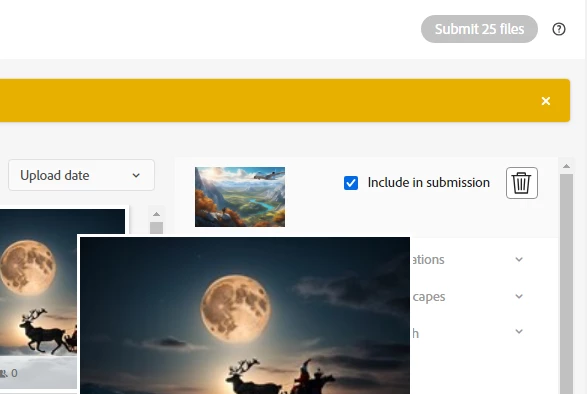
Hi everyone, I am facing an issue I just uploaded 30 images and submitted them for review last week and now I can't submit images for review as it button is not allowing me to click on it. here is its screenshot.

 

Correct answer daniellei4510

How many images to you presently have under review? In case you missed it, Adobe has set an upload limit of 51 images for new users and higher limits for people who have been contributors for longer periods of time.

2 replies

Participant
November 14, 2025

Hello,

I am a new contributor and my "Upload" button is not working. It is not clickable.

I received an email that I reached my upload limit, but I only have 26 photos in total. My "New" and "In review" tabs are both empty.

I also received an email to connect my Payoneer account. I have successfully connected my Payoneer account, but the Upload button is still not working.

My support case number is 004571272.

Can anyone please help me fix this so I can start uploading?

Thank you.

Jill_C
Community Expert
Community Expert
November 14, 2025

Did you click on the question mark next to the Upload field?

Jill C., Forum Volunteer
daniellei4510
Community Expert
daniellei4510Community ExpertCorrect answer
Community Expert
October 14, 2023

How many images to you presently have under review? In case you missed it, Adobe has set an upload limit of 51 images for new users and higher limits for people who have been contributors for longer periods of time.

Adobe Community Expert | If you can't fix it, hide it; if you can't hide it, delete it.
Participant
October 14, 2023

tnx for telling me yes i have 51 images in review

daniellei4510
Community Expert
Community Expert
October 14, 2023

Good to know it's not a real problem. Once some of the images are reviewed, you will be able to submit more images up to your max again.

Adobe Community Expert | If you can't fix it, hide it; if you can't hide it, delete it.
