

Vector files seem to generate DARK jpegs
I hope this post isn't redundant. I did a search, but found nothing, so here goes ...
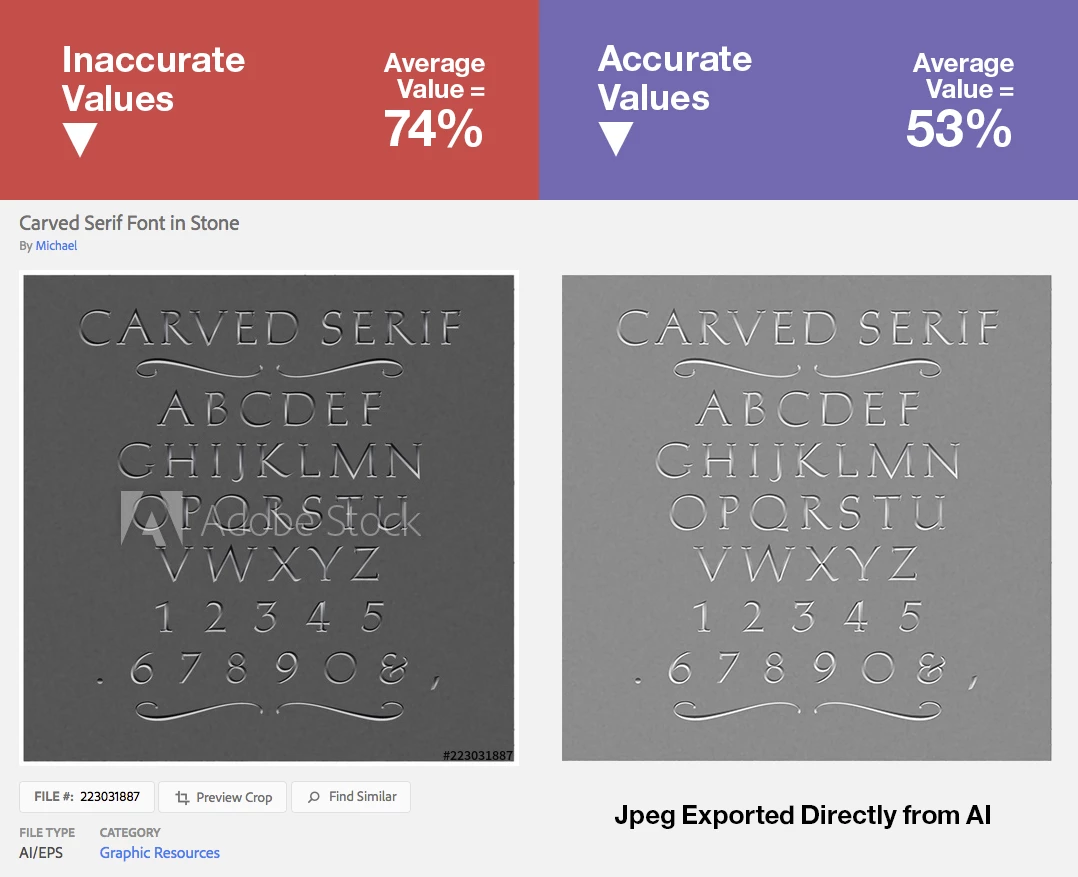
I've only submitted two files so far; the first one was approved for sale. The Jpeg automatically generated (with the Adobe Stock logo in front) is around 40% DARKER than accurate gamma values, making the darker values in the image all squished toward black, losing finer details.
Is this a known issue? The "vector expert" is out of town for awhile, so I'm waiting to get some intelligence on this.
My questions:
1. Is there a way to submit an ACCURATE jpeg with the submission of the vector file?
2. Is there a way to submit an accurate jpeg that REPLACES the horribly dark one in the search, after the original file has been submitted?
3. Out of curiosity, does this also happen with raster images (photos)?
Please see the attached image showing the difference between a normal AI export and the dark one generated by the cataloguing process.
Thanks for any advice on finding a way around this problem. :+)


 AdChoices