Alaska Dawn 907
Known Participant
December 1, 2025
Answered

What quality issues are wrong with image ?

  • December 1, 2025
  • 4 replies
  • 334 views

Adobe stock did not accept this image can someone tell me why , give specifics . And image is my copyright ed but I did not submit with copyright symbol and info. I created in Adobe Fresco and photoshop. Appreciate suggestions. 

thx Dawn

Correct answer Nancy OShea
quote
but I used vector brushes from Adobe Fresco. 
By @Alaska Dawn 907

===========

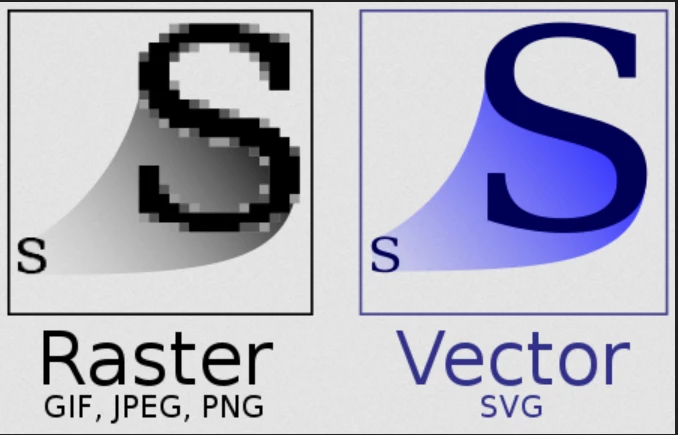
Yeah, but you brought it into Photoshop, which is a pixel-based editor. Thus, you negated all the benefits of math-based vectors.


To retain sharp, crisp vector graphics at any scale, use Illustrator and save as .ai, .eps or .svg files.


Hope that helps.


4 replies

daniellei4510
Community Expert
Community Expert
December 1, 2025

Caricature portraits.jpeg

Adobe Community Expert | If you aren't submitting your assets in sRGB, you probably didn't read the rules.
Nancy OShea
Community Expert
Community Expert
December 1, 2025
Jill_C
Community Expert
Community Expert
December 1, 2025

The lines on the left portrait are quite jagged.

Jill C., Forum Volunteer
Alaska Dawn 907
Known Participant
December 1, 2025
Jagged but I used vector brushes from Adobe Fresco. Thanks for checking!
Happy Holidays.
Dawn
Nancy OShea
Community Expert
Nancy OSheaCommunity ExpertCorrect answer
Community Expert
December 1, 2025
quote
but I used vector brushes from Adobe Fresco. 
By @Alaska Dawn 907

===========

Yeah, but you brought it into Photoshop, which is a pixel-based editor. Thus, you negated all the benefits of math-based vectors.


To retain sharp, crisp vector graphics at any scale, use Illustrator and save as .ai, .eps or .svg files.


Hope that helps.


Nancy O'Shea— Product User & Community Expert
RALPH_L
Community Expert
Community Expert
December 1, 2025

You should post the original here. When I look at this image at 150% it does not look sharp.