Participant
March 25, 2025
Answered

What should I do after my photo approved?

  • March 25, 2025
  • 3 replies
  • 163 views

Hi All,

I am new to Adobe Stock. I uploaded my first two photos, now visible in my dashboard and public profile. But I did not get an approval email.

  1. Are those approved?
  2. If those are approved, what should I do next?
  3. How to sell my photos and get paid?
  4. I did not mention prices anywhere while uploading. How are prices decided for the uploaded photos?


Thanks!

Correct answer yamato713108855


Assets that have passed Adobe's review will be displayed on the dashboard of your contributor page.
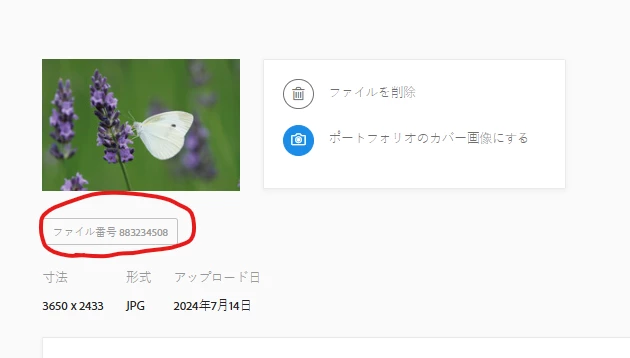
Clicking on the file number will take you to the published page.

An email will arrive one day after approval, but sometimes it doesn't arrive.


Once your assets are listed, all you have to do is wait for them to sell.
If you have your own social media accounts, you can promote them.

If you want to make a decent amount of money, register a lot of assets that users want.


Please check this out as well.

https://helpx.adobe.com/stock/contributor/help/getting-paid.html


Prices vary depending on the contract status of the purchasing user and the type of asset.
For photo assets, it's around $0.3 to $1.

3 replies

Jill_C
Community Expert
Community Expert
March 25, 2025

If you see them in your Dashboard page they are now available to buyers for licensing. You don't have any control over pricing. From the bottom menu on your Dashboard page click the link to the Royalty page to learn what you earn when an image is licensed. It appears that you haven't read much of the info in the help pages where all this is explained, so do take time to do that now which will improve your chance of success here.

Jill C., Forum Volunteer
daniellei4510
Community Expert
Community Expert
March 25, 2025

You will be paid 33% of the price paid for by the buyer. This can vary based on the type of subscription the buyer is paying for. You will usually receive an email within 24 hours after they have been reviewed notifying you whether they have been accepted or rejected.

Adobe Community Expert | If you can't fix it, hide it; if you can't hide it, delete it.
yamato713108855
Community Expert
yamato713108855Community ExpertCorrect answer
Community Expert
March 25, 2025


Assets that have passed Adobe's review will be displayed on the dashboard of your contributor page.
Clicking on the file number will take you to the published page.

An email will arrive one day after approval, but sometimes it doesn't arrive.


Once your assets are listed, all you have to do is wait for them to sell.
If you have your own social media accounts, you can promote them.

If you want to make a decent amount of money, register a lot of assets that users want.


Please check this out as well.

https://helpx.adobe.com/stock/contributor/help/getting-paid.html


Prices vary depending on the contract status of the purchasing user and the type of asset.
For photo assets, it's around $0.3 to $1.