Participant
April 8, 2025
解決済み

Whenever I post transparent AI generated png file for review it all rejected

  • April 8, 2025
  • 返信数 3.
  • 452 ビュー

Hi,

I need help a I am unable to understand whenever I post transparent AI generated png file for review, all files are rejected till date. I have always checked the AI option whenever I post, my file size is ok. Can anyone help me understand the exact reason for rejection. I have attached two upscaled files which are already rejected. It will be a great help for my future work. Thanks in advance.


Thanks & regards

Priyanka

 

解決に役立った回答 Abambo
quote

How can I avoide this check boxes.


By @priyanka_9088

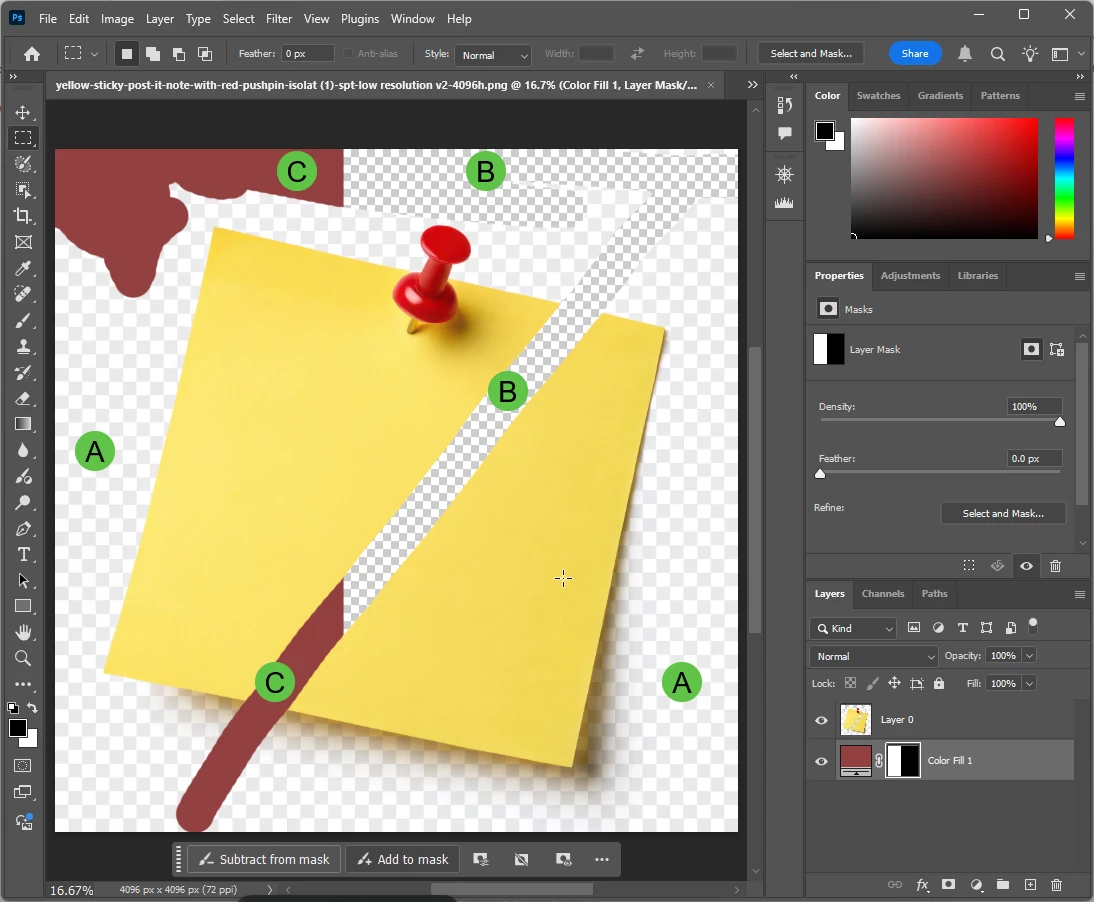
You need to make the background transparent...

A) Fake transparency. Confuses users with the transparency grid.

B) True transparency as shown by the Photoshop grid.

C) Background layer as applied in Photoshop. You see that I applied a mask to this one, so that only the left part of the graphic is covered.

返信数 3

RALPH_L
Community Expert
Community Expert
April 8, 2025

You should post the original assets here for our review. Usually, the fault lays on the edges. The edges must be real smooth.

yamato713108855
Community Expert
Community Expert
April 8, 2025

Please refrain from posting images with a checkered background without transparency as it will be confusing.
Customers will mistakenly think that the background is transparent and purchase the image.
If there is no transparency, use a solid background and post in JPEG format.

daniellei4510
Community Expert
Community Expert
April 8, 2025

The two above that you submitted are not actually transparent. There's a checkerboard pattern, but this is actually comprised of pixels with a checkerboard design.

Adobe Community Expert | If you can't fix it, hide it; if you can't hide it, delete it.
priyanka_9088作成者
Participant
April 9, 2025

How can I avoide this check boxes.

Jill_C
Community Expert
Community Expert
April 9, 2025

What tool are you using to remove the background and create transparency? It can be done in Photoshop.

Jill C., Forum Volunteer