
Rodrigo Murasawa
Participant
January 29, 2026
Question

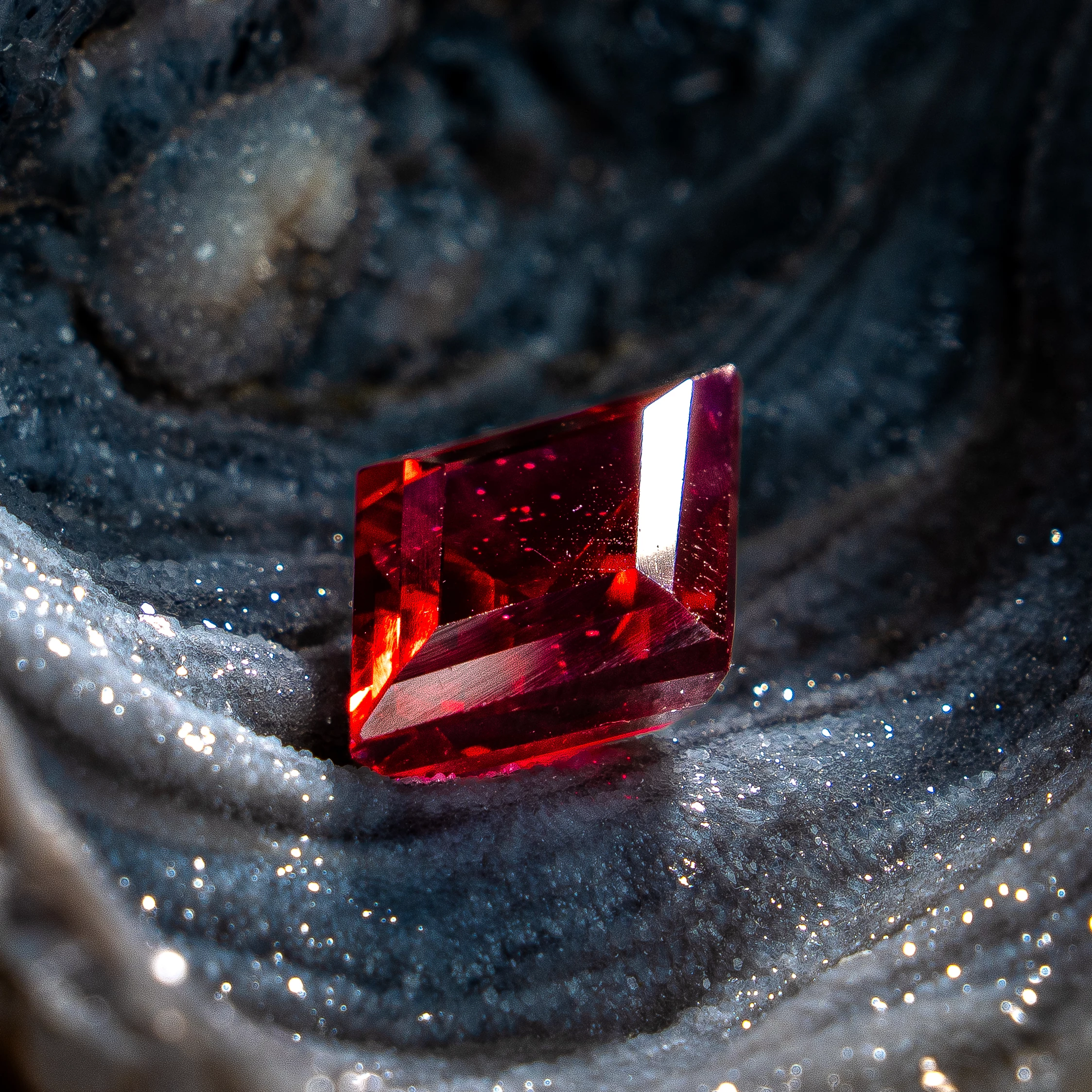
Why did this image was rejected?
  • January 29, 2026
  • 6 replies
  • 82 views

It was because of quality issues. I'm new here, I was surprised of it been refused by that. 

    6 replies

    Nancy OShea
    Community Expert
    Community Expert
    January 29, 2026

    For visual comparison, this is what you’re competing with in Stock inventory.

    https://stock.adobe.com/search?k=ruby+gemstone 1.2 Million results


    To be accepted, yours should be as good or better than what Stock is selling now.

    Background elements aside, your gem has noticeable scratches and groove marks caused by unfavorable lighting.


    Nancy O'Shea— Product User & Community Expert
    Jill_C
    Community Expert
    Community Expert
    January 29, 2026

    There’s also a large blown out facet on the gem. 

    Jill C., Forum Volunteer
    Ricky336
    Community Expert
    Community Expert
    January 29, 2026

    Hello,

    I think the foreground:

    … the out of focus parts may be distracting.

    I think the overall composition could be improved; you should try to show the stone off in its glory. It is a jem after all, and here it is nothing special—I think!

    The type of lighting could be improved as well, and that is where AI may fail!

    RALPH_L
    Community Expert
    Community Expert
    January 29, 2026

    In addition, I believe the highlights on the stone need work. The white is completely without any details. 

    jacquelingphoto2017
    Community Expert
    Community Expert
    January 29, 2026

    Hi ​@Rodrigo Murasawa 

    The file has noise grains and there is a blue color fringe around the white.

    Best wishes

    Jacquelin

    daniellei4510
    Community Expert
    Community Expert
    January 29, 2026

    Background is rather random. Square format is AI 101. A different aspect ratio might help with approving the background and composition. Some general cleanup need, but more must be done.


    Adobe Community Expert | If you can't fix it, hide it; if you can't hide it, delete it.