


Participating Frequently
November 23, 2020
Answered

why there is no filter to sort my images in my portfolio?

  • November 23, 2020
  • 3 replies
  • 1291 views

why there is no filter to sort my images in my portfolio?

My new content falls down the drain and there is no way to sort by recent and see all content

Please adobe copy and paste the same sort filters that general searchs to personal portfolio. 
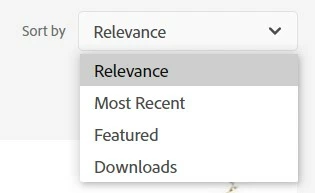
 

This topic has been closed for replies.
Correct answer RALPH_L

The portfolio has no sort options. The assets are sorted by most recent approved to oldest approved asset.

The buyer should not be concerned with other options like "Downloads". 
He only has the option to search for an asset.

3 replies

RALPH_L
Community Expert
RALPH_LCommunity ExpertCorrect answer
Community Expert
May 15, 2024

The portfolio has no sort options. The assets are sorted by most recent approved to oldest approved asset.

The buyer should not be concerned with other options like "Downloads". 
He only has the option to search for an asset.

jacquelingphoto2017
Community Expert
Community Expert
November 24, 2020

Hi @roverto007 ,

Using "my" it is only the categories I list that would apply. Hence, it would appear we are not understanding each other.I sit possible you can do a screenshot of the page so that I can understand exactly what page you are talking about?

Regards

JG

Participating Frequently
November 24, 2020

I'm posting in "stock contributors" right?

I mean that when a customer see my portfolio of images in Adobe stock photos don't have filter to sort my images, and new content falls down the drain because there is no way to sort by anything. you can see atacched in first post the "sort by" in general search

jacquelingphoto2017
Community Expert
Community Expert
November 25, 2020

Hi @roverto007 ,

I will assume you are talking about your Public Profile. I also assume that what goes for my Profile goes for everyone. When files are accepted they initially occupies the first page, if you have not sold any, or the spaces or pages following the sold files. As people view and click they tend to intermingle with files that are sold for low value.


On your Dashboard you may group images in Collections that can be featured on your Public Profile two collections at a time. At the top right of each of your files is a small square (check box). Click in it to select the file. You may select as many files as you wish. At the bottom left you will see in blue "Add to a collection" or "Create a collection". Name your collection and click to add the selected files. In your case you may create a "Most Recent" collection. You are permitted to add up to 1,000 files to a collection and you are allowed to remove files you do not wish to remain in it. After creating the collection you may feature it by first clicking on Collection on the white menu strip above your file display. Click on the three buttons at the top of the collection you created, then click on "Feature on my public profile". (I am assuming everyone has this feature).


Normally new files start at the bottom of the search and work themselves up based on views, clicks, and purchases. Meeting these criteria depends on a number of other factors. On the general Adobe market, however, there is a filter called Undiscovered that will find many of these files that are at the lower end of the search engine.


I hope I was able to cover your concerns, and you found my suggestions useful.

Best wishes 

JG

jacquelingphoto2017
Community Expert
Community Expert
November 24, 2020

Hi @roverto007 ,

I am not sure what you are talking about. Are you talking about your

Dashboard page,

Public Portfolio or 

Adobe Portfolio (Pt)?


Regards

JG


Participating Frequently
November 24, 2020

adobe stock
