Daud Rehan
Known Participant
October 21, 2023
Answered

Worries regarding Rejections.

  • October 21, 2023
  • 2 replies
  • 2304 views

I hope everyone is doing well. I'm concerned about my stock rejections once more, therefore I'd want to ask a simple, childish question.
How many rejected photos may I have before my account is in danger of being suspended or facing other repercussions?


[Moderator moved the thread to the correct forum]

This topic has been closed for replies.
Correct answer daniellei4510


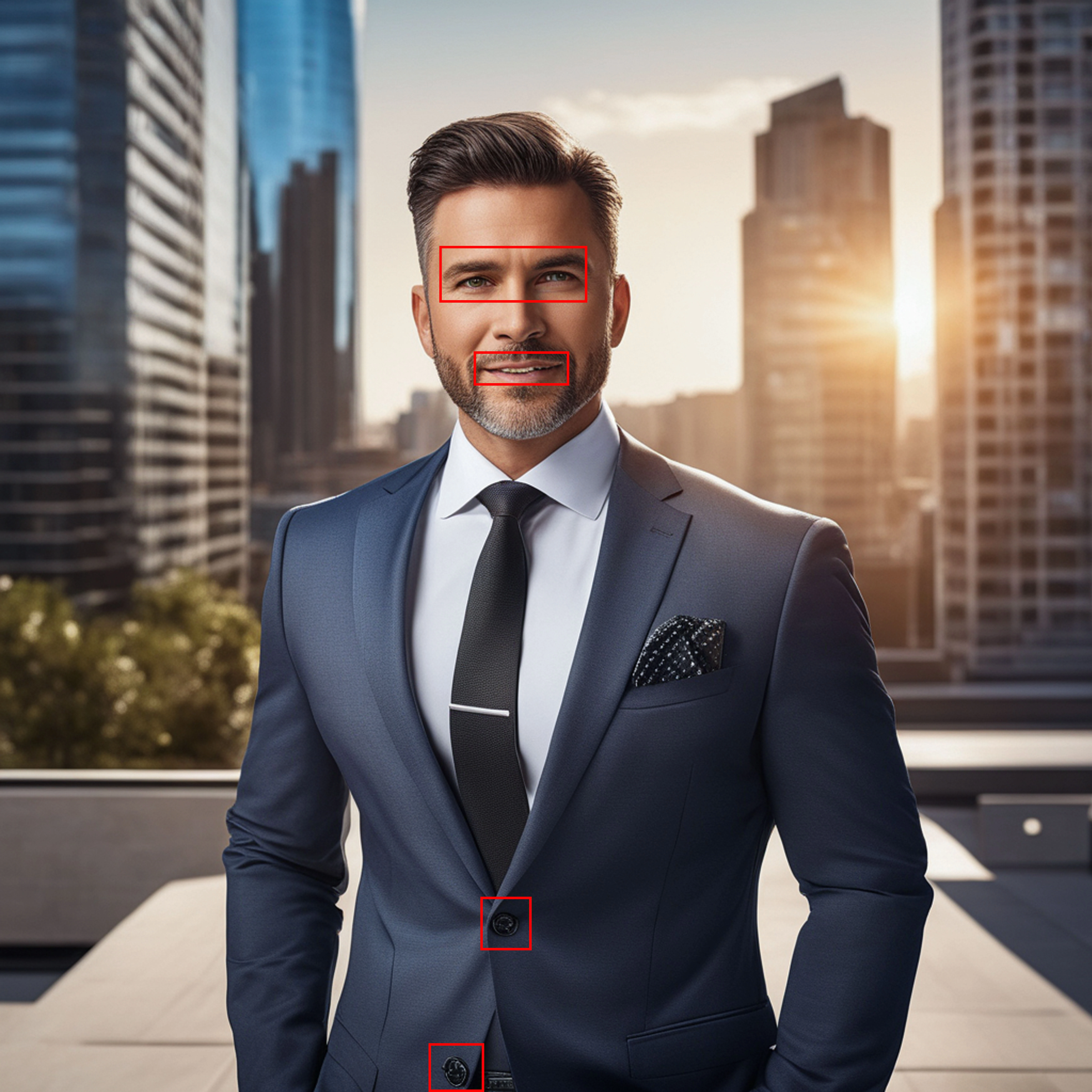
Okay, these are the images that were rejected. I am aware that you previously advised me to "avoid square format," but these were the photos which I submitted when I was a complete novice.
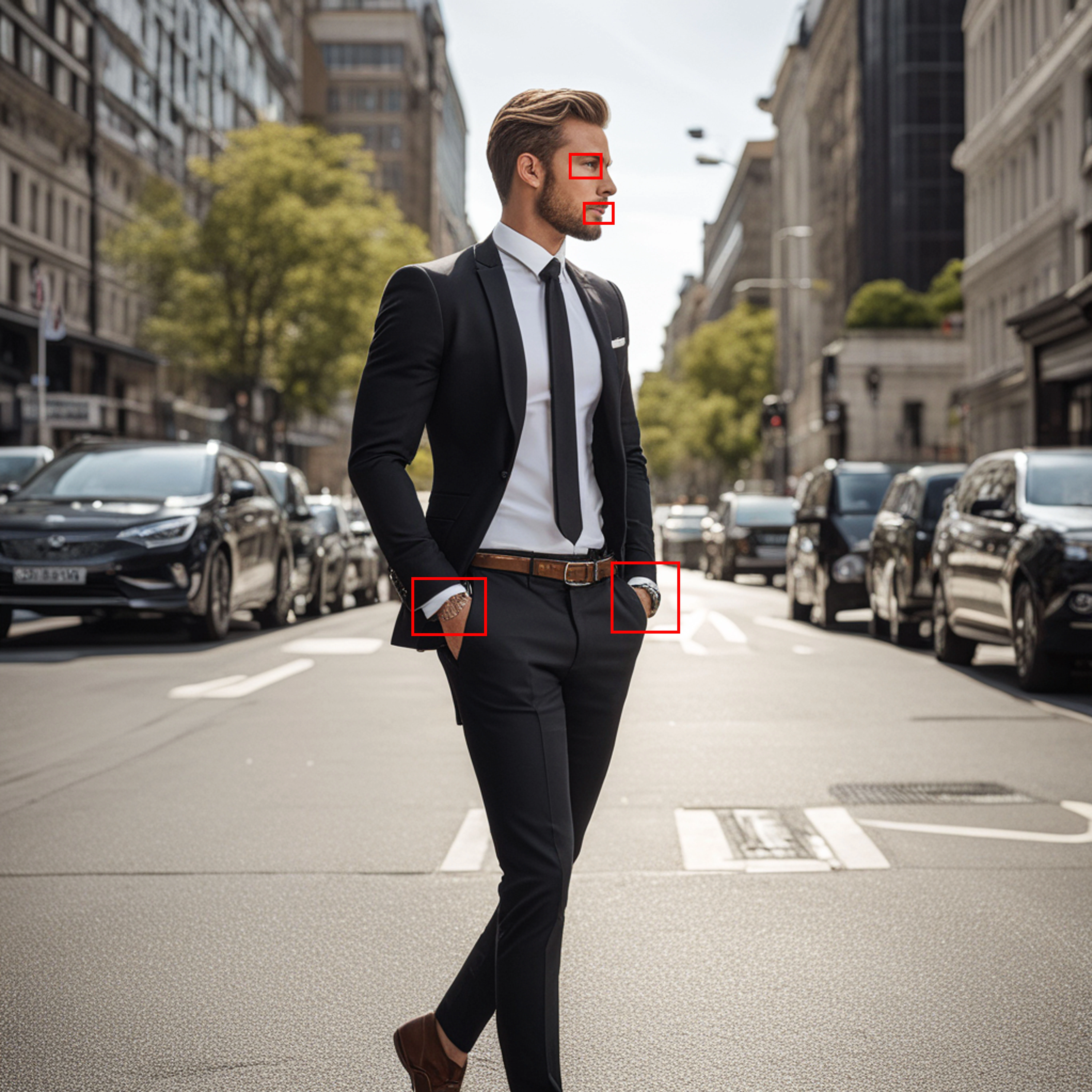

Teeth, eyes and ears need fixing, some weird artifacts showing up here and there, some haloing around the tie (probably the result of upscaling). The image of the man in the middle of the street. He seems separated from the background, as if he was composited. Seems like he should be casting a shadow somewhere to make him more a part of the scene. In general, if your goal is photorealism, these subjects look more like cardboard cutouts rather than flesh and blood people. 


2 replies

daniellei4510
Community Expert
Community Expert
October 21, 2023

Daud,

I would highly recommend you run your images through facial restoration software such as GFPGAN: 

https://colab.research.google.com/drive/1sVsoBd9AjckIXThgtZhGrHRfFI6UUYOo#scrollTo=zuBCgeH08tdn


If you're on a Mac, it does not work with Safari. Use Chrome instead.


Reduce your original AI images by 50% before sending them through (the result will return an image that is back to its original size).

It does not work well with faces that are in strong profile. That is, both eyes need to be as visible as possible.


This is a free site, but if their servers are busy, you won't be able use it (worse case scenerio), or you'll be able to use it without their GPU. Otherwise, simply come back at a later time or purchase some GPU hours.

Adobe Community Expert | If you can't fix it, hide it; if you can't hide it, delete it.
Daud Rehan
Known Participant
October 22, 2023

believe me, sir how vital it is to me to have that kind of programme and website, Currently, I utilise Photoshop's neural filters to eliminate artefacts and other filters for more serious issues, however, the outcome is 10/6, which barely satisfies me. Yes, I am in Windows and I'm extremely looking forward to that type of software which figures out all of these very tiny facial problems which I'm eligible to recognize.
And in last, i want to ask: Isn't Photoshop alone sufficient for all types of photo restorations?


Abambo
Community Expert
Community Expert
October 22, 2023
quoteAnd in last, i want to ask: Isn't Photoshop alone sufficient for all types of photo restorations?


By @Daud Rehan

Yes, you can do all in Photoshop, but sometimes it's faster to use other helper programs.

ABAMBO | Hard- and Software Engineer | Photographer
Jill_C
Community Expert
Community Expert
October 21, 2023

Although I don't recall seeing a specific number posted anywhere in the Adobe help pages, I think the general rule of thumb is that you should aim for >50% acceptance rate.

Jill C., Forum Volunteer
Daud Rehan
Known Participant
October 21, 2023

Thank you for sharing that information. I think its a quite fair acceptance rate if it is but all of a sudden, something happened that forced me to post: four of my images were rejected in a row, which brings my acceptance rate below 50%. I also want to share my rejected photos to seek guidance.

daniellei4510
Community Expert
Community Expert
October 21, 2023

I also want to share my rejected photos to seek guidance.


By @Daud Rehan


You are certainly encouraged to do so. Post them at full resolution as submitted. If they are too large to be accepted, reduce them only as much as necessary to allow them to be posted.

Adobe Community Expert | If you can't fix it, hide it; if you can't hide it, delete it.