kownine
Participant
June 23, 2026
Answered

After upscaling an image, there is no option to download the upscaled version. When I click the Download button, only the original image is downloaded instead of the upscaled image.

  • June 23, 2026
  • 1 reply
  • 0 views

After upscaling an image, there is no option to download the upscaled version. When I click the Download button, only the original image is downloaded instead of the upscaled image.

Steps to Reproduce:

  1. Upload an image.
  2. Click Upscale.
  3. Wait for the upscaling process to complete.
  4. Click Download.

Expected Result:
The downloaded file should be the upscaled image.

Actual Result:
Only the original image is downloaded, and there is no option to download the upscaled version.

Additional Information:
The issue occurs after the upscaling process completes successfully.

    Correct answer Hajar Toutsi

    Hi kownine,
    Thank you for reaching out about this.

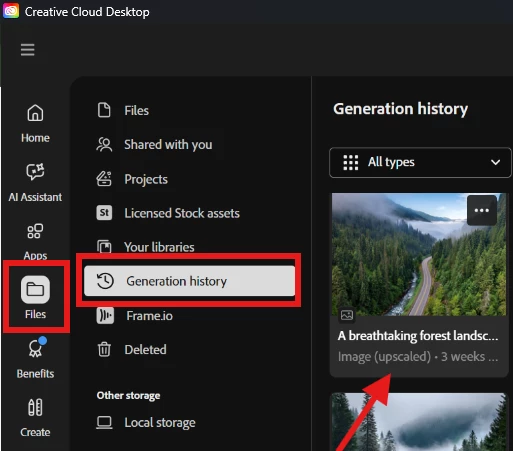
    Please open your Adobe Creative Cloud Desktop app and locate your upscaled generation, it should have an “Upscaled” label. From there, try downloading it.


    Let us know if this helps!

    Hajar
    [Moved to questions]


    1 reply

    Hajar Toutsi
    Community Manager
    Hajar ToutsiCommunity ManagerCorrect answer
    Community Manager
    June 23, 2026

    Hi kownine,
    Thank you for reaching out about this.

    Please open your Adobe Creative Cloud Desktop app and locate your upscaled generation, it should have an “Upscaled” label. From there, try downloading it.


    Let us know if this helps!

    Hajar
    [Moved to questions]