digitalmediaphile
Participant
June 23, 2026
Answered

can't delete assets in files. can't view all assets with newest on top. reverse order works

  • June 23, 2026
  • 1 reply
  • 0 views

I have a weird issue with Firefly.  When I go to files, generation history, if I sort with newest on top, I only see the last two days of creations. If I sort oldest on top, I CAN get everything to display after a bit. I cannot, however, delete anything in any view of generations. I get a failure message, "failed to delete the asset". Tried three computers, both Edge and Chrome, Windows 11. I can see more in newest on top at https://www.adobe.com/files/firefly when I go in through Creative Cloud. app reports 51.9GB used storage. can’t delete either single assets or a selection. 



8:47

    Correct answer Hajar Toutsi

    Hi digitalmediaphile,
    Thanks for reaching out.
     

    Due to ongoing backend processing and system load, this behavior can occasionally happen. The generation history may take some time to fully load, or it might appear incomplete temporarily while the system catches up.
     

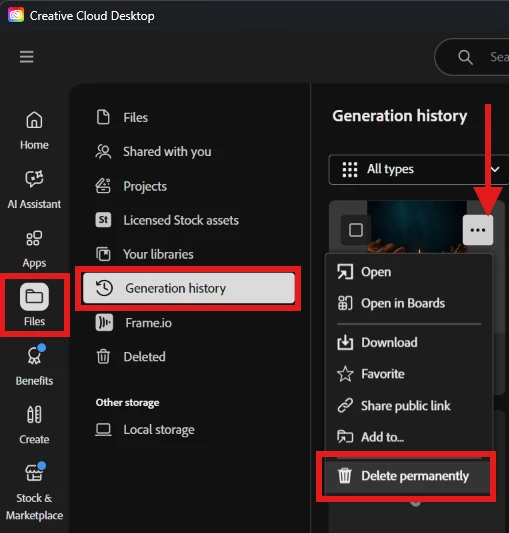
    In the meantime, you can still access your generated outputs or delete them directly through the Creative Cloud Desktop app, or directly from https://www.adobe.com/home. Select Generation history under Files, this space saves all of your generated media (images, audio, and videos) and it allows you to access and/or delete them.


    Let us know if that helped you delete your output.

    Hajar
    [Moved to questions]


    1 reply

    Hajar Toutsi
    Community Manager
    Hajar ToutsiCommunity ManagerCorrect answer
    Community Manager
    June 23, 2026

    Hi digitalmediaphile,
    Thanks for reaching out.
     

    Due to ongoing backend processing and system load, this behavior can occasionally happen. The generation history may take some time to fully load, or it might appear incomplete temporarily while the system catches up.
     

    In the meantime, you can still access your generated outputs or delete them directly through the Creative Cloud Desktop app, or directly from https://www.adobe.com/home. Select Generation history under Files, this space saves all of your generated media (images, audio, and videos) and it allows you to access and/or delete them.


    Let us know if that helped you delete your output.

    Hajar
    [Moved to questions]