

Critical UI/UX issues in Generation View: No image zoom, wasted canvas space, and poor visual hierarchy
Description: The current generation workspace has major usability bottlenecks that slow down image review and iteration:
-
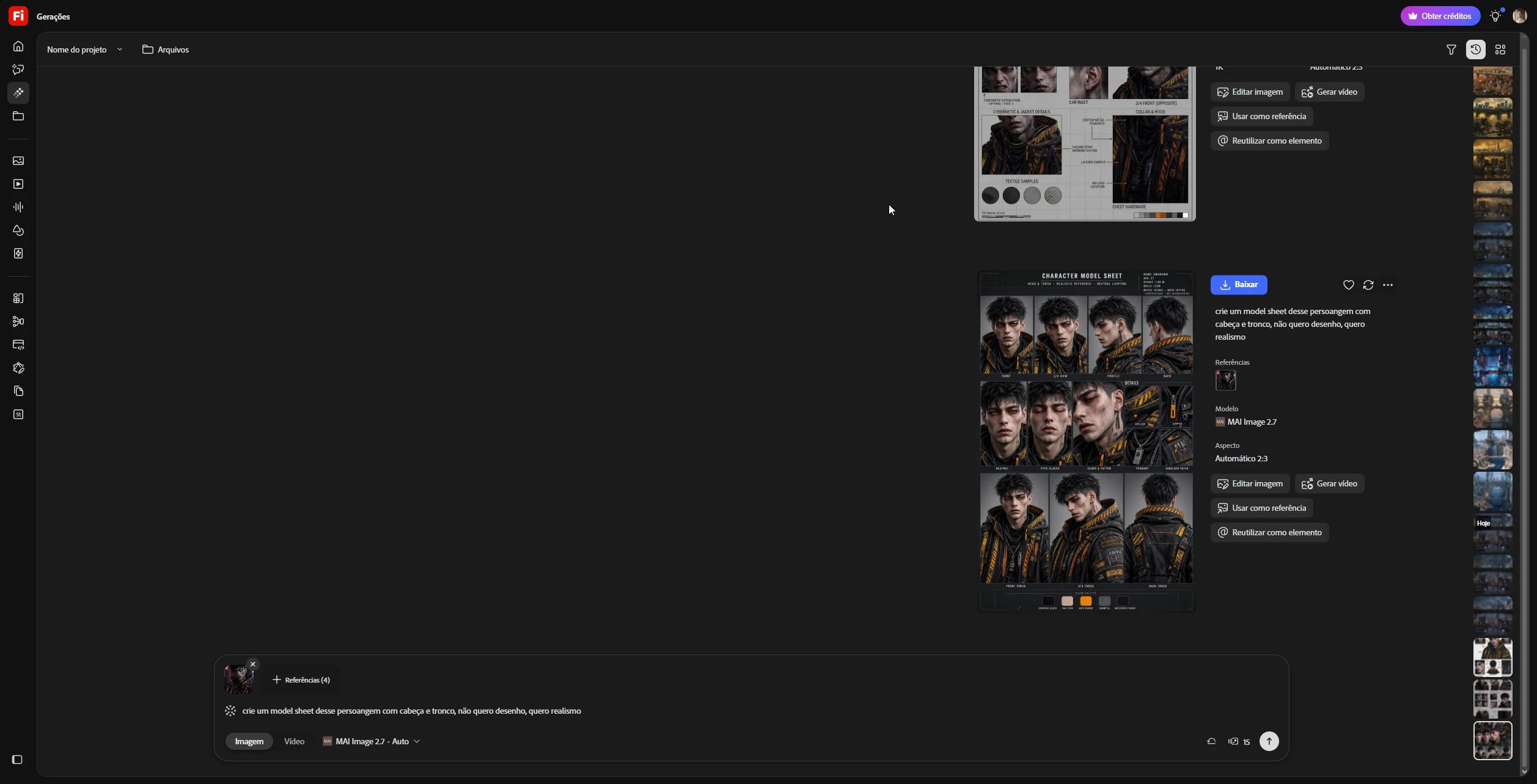
No zoom or full-screen inspection: Users cannot zoom in or open generated images in a lightbox to inspect fine details, textures, or artifacts before downloading or regenerating.
-
Massive wasted screen real estate: On widescreen displays, over 50% of the left/center viewport remains completely empty while the generated output is squeezed into a narrow column on the right.
-
Poor content-to-UI ratio: The metadata and action column (Download, Edit, Use as reference, etc.) takes up nearly as much horizontal space as the image itself, competing with the primary visual output.
-
Cramped history sidebar: The far-right thumbnail strip is overly narrow and densely packed, making quick comparison across iterations difficult.
Suggested Fix: Center the generated image to utilize the empty viewport space, add click-to-zoom / pan inspection controls, and consolidate metadata and action buttons into a cleaner, collapsible side panel.
 AdChoices