

AlanGilbertson
Community Expert
Community Expert
January 16, 2026
Question

Cross-Product Creative Challenge #11: PSA Posters from an Alternate Timeline

  • January 16, 2026
  • 17 replies
  • 1489 views

Welcome to a new Cross-Product Creative Challenge! Thanks to everyone who participated in the temporal mash-up. This time, we're messing with history again, this time with a civic or propaganda poster from an impossible timeline.


The Challenge:

Design a civic poster—propaganda, safety warnings, or recruitment ads—for a world that runs by different rules. Maybe it's a world where air is a subscription service, or where silence is the local currency. Maybe it's

  • “Join the Venus Terraforming Corps – 1939”
  • “Steam Rail to the Moon – Great Western Aether Lines”
  • “Vote for the AI Party – 1968”

Go crazy. Start in Firefly or Boards or Express or Photoshop, but use at least two different tools to get to your final product.


Guidelines:

  • A prompt is not enough. Layer your assets and refine your composition. Treat Firefly as a collaborator, not a shortcut. Use prompts to generate characters. Try out partner models.
  • Think like a director. What’s the story here? Who are the characters? What's happening in the scene?
  • It’s a Cross-Product Challenge! Don't do it all in Firefly. Use Photoshop, Illustrator, Substance, Adobe Express, Fresco—whatever tools will help you build the scene.
  • Share your process. Tell us how you created it. What tools did you use? How did you refine your idea? What choices did you make?


My example is a PSA from the U.S. government Department of Gravity.
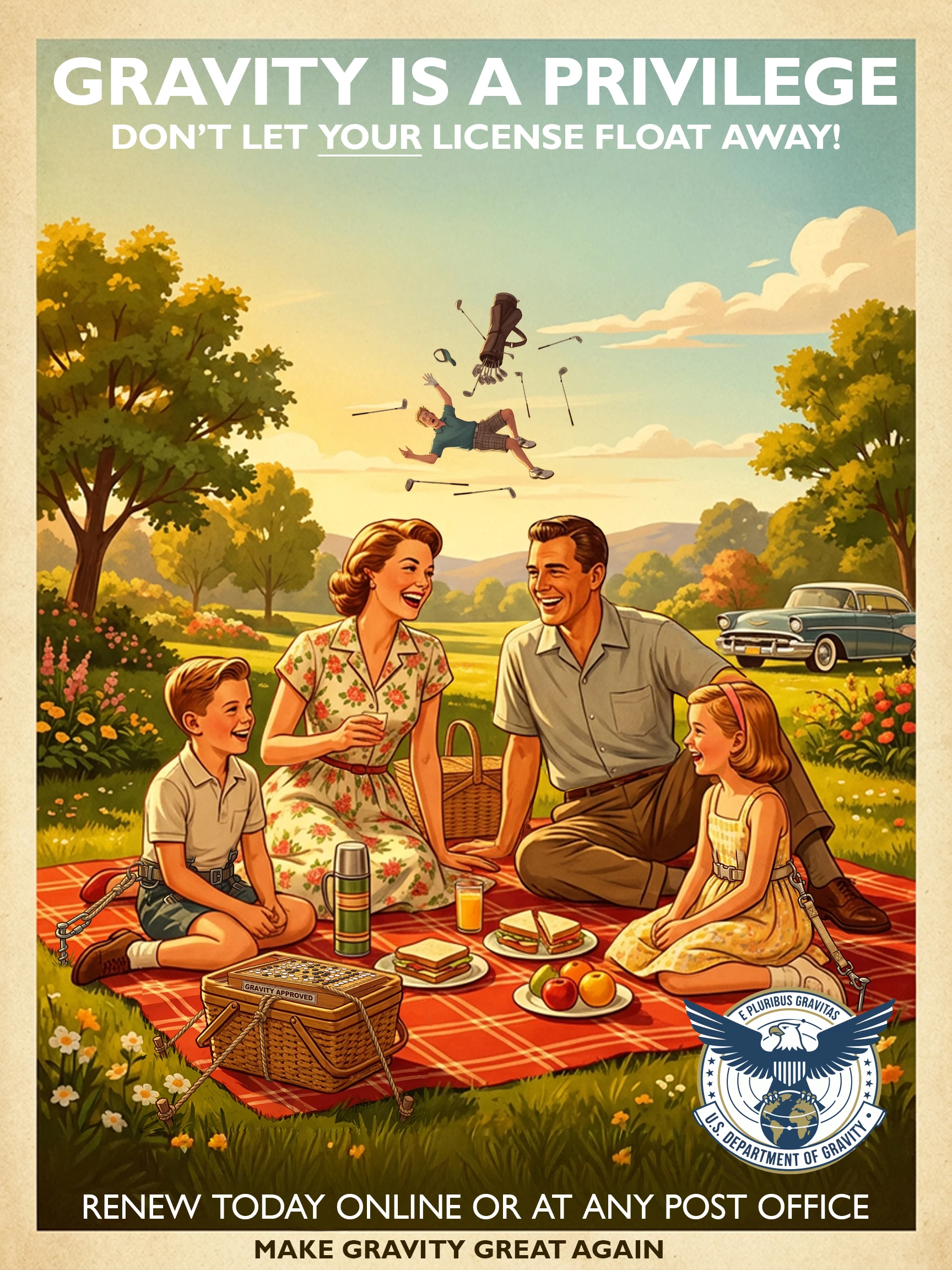
Poster-1a.jpg

The base is a typical 1950s American family scene generated with Nano Banana. The tie-downs and safety harnesses are Generative Fill using Firefly 3, adjusted and composited in Photoshop. The departmental logo was generated in Adobe Illustrator using the Gemini partner model. Because this is a thinly veiled threat, I generated a hapless golfer who didn't pay his license fee. Text added in Photoshop.

17 replies

January 20, 2026

This is a fantastic prompt for a challenge—playful, thoughtful, and very on-brand for cross-product creativity. I really like the emphasis on process over prompts and treating Firefly as a collaborator rather than a shortcut. The “Department of Gravity” example is clever, and the way you combined Nano Banana, Firefly, Photoshop, and Illustrator clearly shows the kind of layered thinking you’re encouraging. Looking forward to seeing how far people push the alternate-timeline concept with story, design, and tool choice.

AlanGilbertson
Community Expert
Community Expert
January 20, 2026

You sound just like Gemini. It said pretty much almost exactly the same thing.

January 19, 2026

Concept: A world where sound is strictly rationed and silence is enforced by the state. This poster warns citizens against unauthorized noise-making in public “Quiet Zones.”

Process:

Firefly (Image Generation): Generated the base image using a prompt for a “1940s noir-style street scene at dusk, empty park bench, vintage street lamp, muted colors.”

Photoshop (Compositing & Narrative): Used Generative Fill to add a ominous, trench-coated “Sound Warden” figure in the background, observing the scene. Added a stark, dramatic shadow from the lamppost to enhance the mood. Key element: used the brush tool to paint a faint, ghostly “echo” ripple near the bench, suggesting a recently committed sonic crime.

Illustrator (Typography & Branding): Created the official “Department of Silence” seal and the stark, authoritarian typography for the headline and warning text. Used a modified period-appropriate font to sell the alternate history.

Tools: Adobe Firefly, Photoshop, Illustrator.

AlanGilbertson
Community Expert
Community Expert
January 20, 2026

Sounds great. Go ahead and include the image in your post so we can see what you came up with!

duuufner
Community Expert
Community Expert
January 19, 2026

In Firefly I wrote "The poster is printed on a textured, recycled material. The image is a hyper-realistic digital painting. The foreground shows the pristine, artificially lit interior of a biodome park—clean children playing under a synthetic sun. But reflected in the dome's glass, we see the haunting, beautiful, and terrifying outside: colossal, glowing bio-luminescent fungi forests and swirling, colorful gas mists."  

Firefly_Gemini Flash_The poster is printed on a textured, recycled material. The image is a hyper-realisti 11028.png


Used generative fill in Friefly to add aliens.

Firefly 20260119153646.png


Brought the image into Photoshop to use generative fill to add an astronaut in left background.

1.png


Added a layer with color blend mode Screen and used the outside world blue to paint wth soft brush over the astronaut to make it look like a glare on the dome so the astroaut looks like she it outsode the dome. 

2.png

duuufner
AlanGilbertson
Community Expert
Community Expert
January 19, 2026

Thanks for detailing the workflow behind this imaginative and delightfully creepy construct! Somehow the casual way that the aliens are sitting around observing the kids adds an extra layer of horror to the whole scene. Great work.

duuufner
Community Expert
Community Expert
January 19, 2026

The image kind of reminds me of the book Wool (tv show Silo).

duuufner
derekwatson
Community Expert
Community Expert
January 19, 2026

PSA Posters.jpg

Slightly different approach with a couple of posters within in a scene...

Derek Watson
AlanGilbertson
Community Expert
Community Expert
January 19, 2026

That's a deliciously "Blade Runner meets Fahrenheit 451 meets Pulp Fiction" take on the theme. How did you put it together?

derekwatson
Community Expert
Community Expert
January 19, 2026

Firefly for the scene, billboard taken from another image as well as peeling poster. Text placed using vanishing point and CC logo from illustrator then extruded and glow added then masked into box. 

Derek Watson
Participant
January 18, 2026

I’ve been obsessed with those clever University of Utah posters—the ones that show how reading fiction actually helps us build better ethics in the real world. They got my brain moving, and I decided to create my own "alternate reality" version!

I started by playing around in Adobe Firefly to design official-looking government seals for a fake agency. I eventually landed on this "Bob Ross" style medallion. I thought it was a hilarious contrast: a stiff, formal U.S. government badge, but featuring everyone’s favorite "happy little trees" painter!

The idea really took off when I imagined a world where a government agency actually has to remind people that science fiction isn’t real.

I wanted the poster to look like a weird, vintage travel ad. Using Firefly, I generated a tropical beach scene with dinosaurs, then used the "insert" tool to pop a mushroom cloud into the background—giving it that perfect, slightly unsettling "50s sci-fi" vibe.

AlanGilbertson
Community Expert
Community Expert
January 19, 2026

None of these are showing and won't open, for some reason. Edit the post, remove the attachments, then use the picture icon in the toolbar to upload them again. That way they'll show on the page and we can all share in the fun!

melissapiccone
Community Expert
Community Expert
January 16, 2026

cat supreme.png

I started by creating a Firefly board.


I went to chat gpt and pasted in the challenge text from the post asking for some ideas. I gave me a ton and I liked a cat idea. I had it help with prompts for Firefly.


In Firefly I put in a bunch of prompts and tried a bunch of options - sadly, Firefly produced the worst results. Gemini 2.5 was my favorite. I was getting black and white images and brought in Alan's image as a reference because I like the art and colors. That gave me more of the vibe I was going for. Once I had the basic poster, I had Firefly generate the seal and then I had Firefly combine the poster and the seal together for me.


On to Photoshop - I used the remove tool to remove some text that Firefly had created. I used the Vanishing Point Filter to add the text "They were always in charge" under the cat. I turned all of my layers into a smart object, tossed it into a Creative Cloud library and moved onto Illustrator. 


In Illustrator I used type on a path to add the text to the seal "Felis Supra Omnia" - Cats above all - I don't know latin, so i asked chatgpt for that little blurb. I used Illustrator because type on a path sucks in Photoshop and is faster and easier in Illustrator - it's the best app for text on a path.  


Melissa Piccone | Adobe Trainer | Online Courses Author | Fine Artist
AlanGilbertson
Community Expert
Community Expert
January 18, 2026

Dang, you're good! You captured the sinister 1930s vibe perfectly, and the whole thing is stunning.


My experience is similar to yours: The Firefly models just aren't great at this kind of thing. I've found Imagen/Nano Banana tend to do better with cultural references and people in general, because they have the Gemini LLM to pull from. I used the Gemini model in Illustrator for the Dept. of Gravity logo, and it added the Latin motto on its own. That was not part of the prompt.

AlanGilbertson
Community Expert
Community Expert
January 16, 2026

It turns out, the USDG is running a campaign:
Poster-1b.jpgPoster-2.jpg

derekwatson
Community Expert
Community Expert
January 19, 2026

Hmmm, it may improve my handicap!

Derek Watson