


Cross-Product Creative Challenge #15: Product Catalog with a Twist
Welcome to a new Cross-Product Creative Challenge! Thanks to everyone who participated in the luxury magazine challenge. This time, Alan and I are making a catalog with a twist: Design a catalog ad for wealthy, non-alien animals—any creature will do, so long as it lives on Earth.
The Challenge [Read all of it!]:
Design a catalog for a website, a paper catalog, trade catalog or parts book. Choose something that is not exactly from this world. Your audience could be something from your magazine luxury cover.
The standard aspect ratio for digital e-commerce product catalogs and social media feeds is 1:1 (square), while vertical formats like 4:5 or 9:16 are used for mobile-first feeds and stories. For print, traditional catalogs use standard paper proportions close to; so, use one these aspect ratios
Start in Firefly, Boards, Adobe Express or Photoshop, DO NOT stop at a prompt. This is a crossproduct challenge. Use Firefly and then bring it into other Adobe Apps to create something.
Pay attention to the quality details (lighting, contrast, composition) and content details (titles, product description, buttons, logo) you will have to get right.
Guidelines:
- A prompt is not enough. Layer your assets and refine your composition. Treat Firefly as a collaborator, not a shortcut. Use prompts to generate products. Try out partner models.
- Think like an editor. What products are there? Who is your audience? What products would appeal to your audience?
- It’s a Cross-Product Challenge! Don't do it all in Firefly or AI generation. Use Photoshop, Illustrator, Substance, Adobe Express, InDesign—whatever tools that will help you build the catalog.
- Share your process. Tell us how you created it. What tools did you use? How did you refine your idea? What choices did you make?
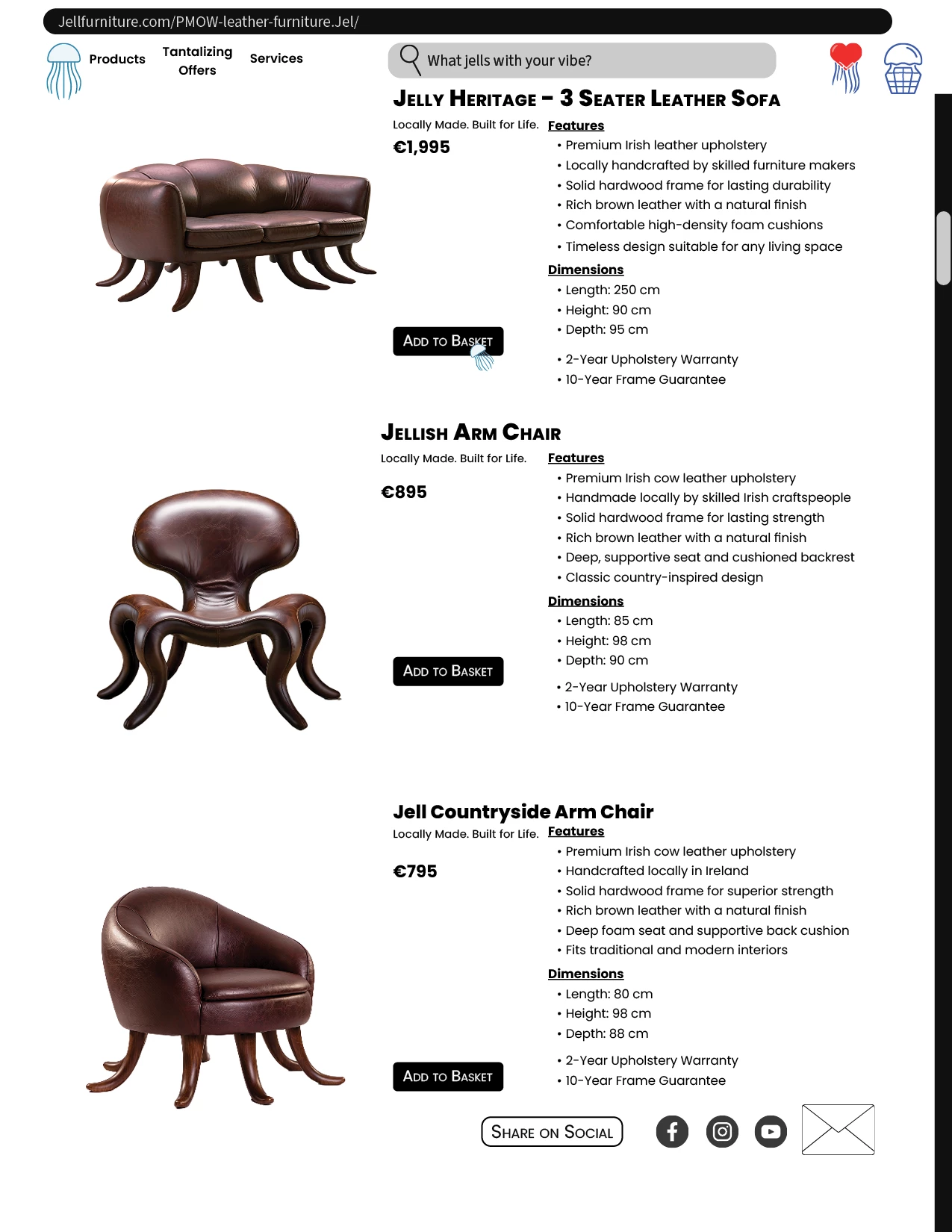
This catalog starts with the Jelly Heritage Couch, Jellish Arm Chair, and Jell Countryside Arm Chair that were generated in Firefly. Took these images into PS to colour correct using Camera Raw Filter and then removed the background. Refined the selection with the Pentool.
In Illustrator, created the jellyfish logo, the jellyfish checkout box, the jellyfish like button, and the search magnify glass. Put these items into the library.
I went into Adobe Fonts and chose the fonts.
Used Vector images for social posts.
Brought all these items into Adobe InDesign to layout the content and create consistent graphic styles, paragraph styles, and CMYK swatch colours for consistency in colour. I used only 4 colours. The website header and scroll box were added to create a website look and feel.


 AdChoices