

AlanGilbertson
Community Expert
Community Expert
August 21, 2025
Question

Cross-Product Creative Challenge #7: Mystery Story Book Cover

  • August 21, 2025
  • 15 replies
  • 2662 views

Welcome to the Cross-Product Creative Challenge. Thanks to everyone who participated in the Galactic Wildlife challenge. This one will demand a little more!


The Challenge:
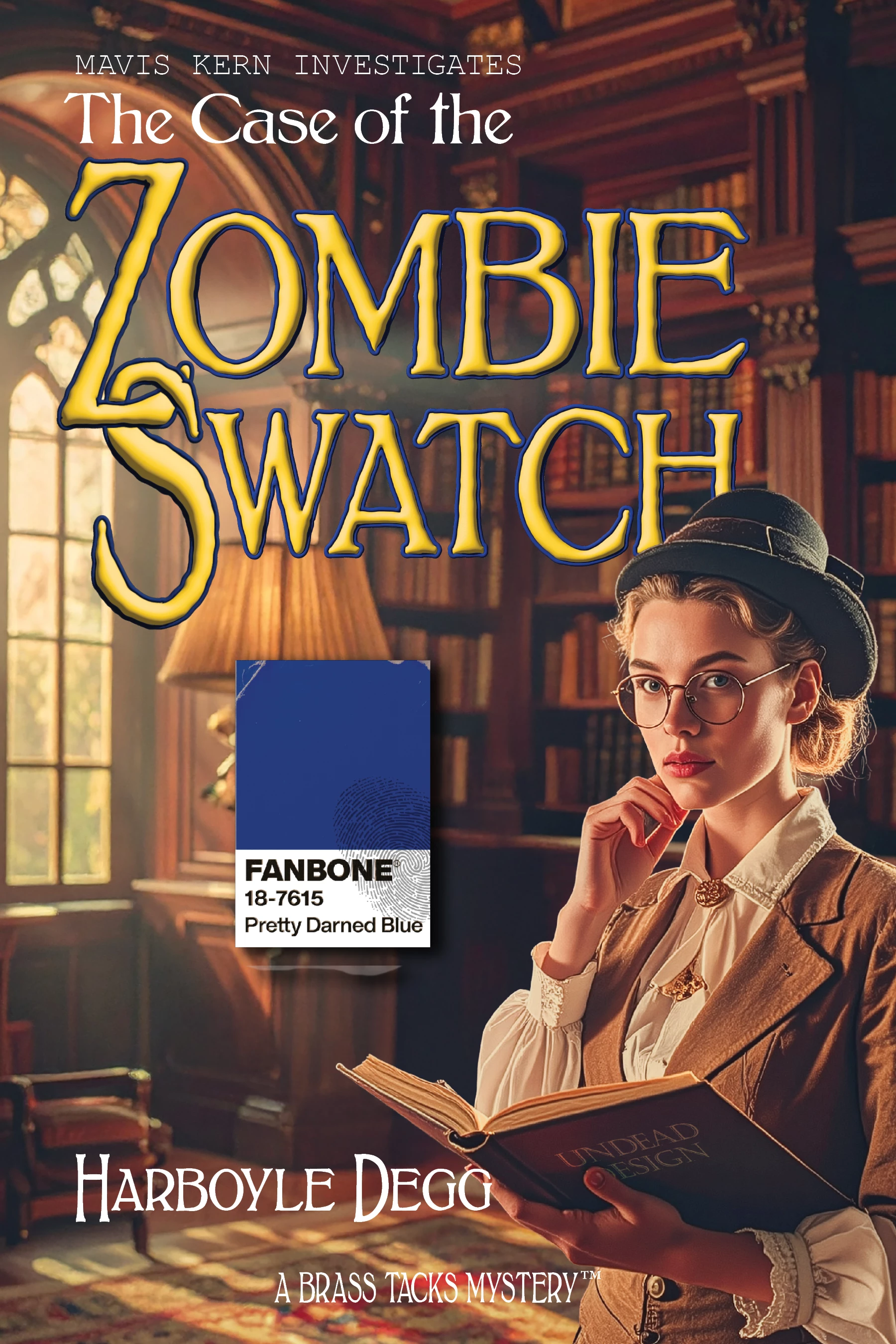
Design the cover for a mystery novel, one that will stand out in a bookstore display. It can be noir, cozy, psychological, procedural, or 1930s pulp fiction. The exact genre is up to you.

Guidelines:

  • A prompt is not enough. Layer your assets and refine your composition. Treat Firefly as a collaborator, not a shortcut.
  • Make it real. Include a title and author name, but no taglines or blurbs.
  • It’s a Cross-Product Challenge! Use Photoshop, Illustrator, InDesign, Substance, Express—whatever tools help you build a compelling cover.
  • Process matters. Include a brief description of how you created it. What tools did you use? How did you refine your idea? What choices did you make? This is how we share ideas and techniques.

This example uses Firefly, FLUX.1 Kontext, Photoshop, Illustrator, Adobe Stock (the thumbprint), and of course InDesign.
15 replies

J E L
Community Expert
Community Expert
August 25, 2025

  • InDesign: Book layout.
  • Photoshop: Cover photo adjustments.
  • Express: Publisher's logo. Prompt: “Publisher logo icon representing a stack of books.”
  • Illustrator: Logo adjustments.
  • Firefly Image 4 Ultra: Author portrait. Prompt: “Author portrait of a man in early 50s with the Amazon jungle in the background. Head and shoulders shot, close-up, dramatic and mysterious.”
  • Local brain: Back cover copy. I wish I had all day to work on these fun projects so I could refine each detail!
AlanGilbertson
Community Expert
Community Expert
August 25, 2025

That's fantastic! As a fan of Robert Bringhurst, I love the typography, too.

As for wishing for more time... I hear you, but hey, take as long as you want! I worked on this piece in spare time for at least two weeks. There are 30 different versions of "Mavis Kern"  (I tried every model available in Firefly), and a half-dozen type treatments that didn't make it into the final image. Even the almost-final Photoshop file had six Layer Comps so I could switch things up in InDesign. This stuff takes time in real life, so why not in an exercise like this, that's all about exploring creative ideas and where you don't have deadline pressure?


Here's an early iteration of the challenge image:

J E L
Community Expert
Community Expert
August 26, 2025

Thanks and very kind of you to say so, @AlanGilbertson. I love your Pantone swatch concept. The font I used is Maxime.

Community Expert
August 25, 2025

I created a book cover design for The Haunting of Hill House by Shirley Jackson (1959)
I started by creating a photo with firefly 

here then added adjustments and created text with fx in photoshop webAnd finally I created this 

AlanGilbertson
Community Expert
Community Expert
August 25, 2025

Thanks Mariam, for the great cover and the description. I confess I've barely glanced at Photoshop on the web, so it was interesting to see your treatment done with that tool.

Community Expert
September 1, 2025

Thank you Alan, The photoshop on the web is an interesting tool. I like to use it for some work. It's user interface is very intuitive. And great for doing adjustments and editing. 

Sk. Arif Hossain
Participating Frequently
August 23, 2025


I started in Firefly, where I generated a dark wooden wall, a shattered antique mirror, and a pair of faint glowing eyes as separate elements. Working with them individually gave me the flexibility to build the scene more intentionally. In Photoshop, I composited everything together, blended the reflections into the broken glass, and pushed the lighting with curves and gradient maps to create a tense, cinematic atmosphere. For typography, I paired Rig Solid from Adobe Fonts for the fractured title with Pacifico for the author’s name, keeping a clean contrast between the two. To add texture and depth, I pulled in an aged paper overlay from Adobe Stock and layered it into the background. Once the main cover was complete, I used Adobe Express to test the design on a mockup, then brought it back into Photoshop for some final refinements with the brush tool. Using this cross-product workflow helped me take an initial Firefly concept and develop it into a polished, bookstore-ready psychological thriller cover.

Sk. Arif Hossain
AlanGilbertson
Community Expert
Community Expert
August 23, 2025

That's an excellent and carefully thought out design. Thanks for the detailed summary of how it came together in the cross-product workflow. I think you hit the nail on the head about creating individual Firefly elements with, "Working with them individually gave me the flexibility to build the scene more intentionally."

Sk. Arif Hossain
Participating Frequently
August 23, 2025

Ha Ha you got me, actually, that was the second version of that image. The original draft is below for your perusal, I hope your head will not spin now (ha ha)

Sk. Arif Hossain
Joseph Labrecque
Community Expert
Community Expert
August 22, 2025


Started with a free template from Adobe Stock. Generated a woodcut illustration with Firefly on the web. BComposited that upon the book cover in the template using Photoshop - selections and masking w/ blend modes and such. Added in black shape overlays and text for the title of the book. Finally, used a selection in Photoshop to generate the image of the little fellow on the path. 

AlanGilbertson
Community Expert
Community Expert
August 23, 2025

Exquisite! And the composition gives it amazing depth, especially with that aerial perspective. Just delightful.

Rollan Banez
Community Expert
Community Expert
August 22, 2025

Creative Community Leader / Educator - Empowering fellow educators with creativity and innovation
fbeaume
Community Expert
Community Expert
August 28, 2025

Wow!
Special mention to the diamond texture types!
Great job Rollan!