

AlanGilbertson
Community Expert
Community Expert
September 18, 2025
Question

Cross-Product Creative Challenge #8: The Paleolithic Gallery

  • September 18, 2025
  • 14 replies
  • 2681 views

Welcome to the Cross-Product Creative Challenge. Thanks to everyone who participated in the Mystery Book Cover challenge. Now we're diving into the ancient past.

The Challenge:
Imagine a Stone Age art exhibition. What would your Neolithic art gallery look like? Would it have docents? A gift shop? A party of bored schoolkids being dragged along by a teacher?

Guidelines:

  • A prompt is not enough. Layer your assets and refine your composition. Treat Firefly as a collaborator, not a shortcut. Use prompts to generate ancient-looking art, textures, and environment. Try out Gemini 2.5 Flash (Nano Banana), which will be free on Firefly for a short time.
  • Think like a curator. What’s the story behind the exhibition? Does it have a theme?
  • It’s a Cross-Product Challenge! Don't do it all in Firefly. Use Photoshop, Illustrator, InDesign, Substance, Adobe Express—whatever tools will help you build the scene.
  • Share your process. Tell us how you created it. What tools did you use? How did you refine your idea? What choices did you make?
14 replies

Community Expert
September 23, 2025

Let's visit Lady Sapiens exhibition!

Process:
- I generated the cave on Firefly. That cave is a celebration of life, like a mother nature cave.

- I went on Wikipedia to find real paleolithic statues - the opportunity to take a little tour of this art was too good to pass up. I downloaded several woman statues: Lespugue Venus, the Brassempouy lady (the portrait), Willendorf Venus (my favorite, in large and in the center of the artwork), ...
- With Photoshop I did the composition of the placement of the statues and I created 3 visitors - then, I exported the artwork, went on Firefly and tried all the models created by others (from Gemini to Runway Gen4) to give an harmonization to the collage. In that situation, Flux Kontext Pro was the best.
- I created the exhibition title on Adobe Express and added an effect of marble.
- Back in Photoshop I added the stone title to the Flux Kontext Pro result and did the last refinements.


AlanGilbertson
Community Expert
Community Expert
September 23, 2025

That's magnificent, Christelle, thoughtfully crafted, as always, and a wonderful take on the theme.


You used an interesting approach to harmonizing the scene elements. How would you compare it to the Harmonization  feature in Photoshop beta, or using a Color Lookup layer?

Community Expert
September 23, 2025

Thank you Alan 😊


It was the first time I had tried models created by others. I had already tested Harmonize thoroughly, and this feature would have been my fallback solution if I hadn't managed to do it this way. I use Harmonize to integrate a photo into a collage and repeat the process for each image. Here, it's something else: the "harmonisation" has been applied on the whole scene, only one time and it is not just about color, light and shadows.
On Firefly, at first, I just wanted to use the raw Photoshop collage as a composition reference and enter a detailed prompt. The different models didn't work (it was impossible for them, even when I tried to simplify the prompt as much as possible while keeping words like Paleolithic, prehistory, etc.). I tried again with the same photo and a simple prompt: “Make it realistic and artistic, like a statue gallery with visitors.” And it did more than just harmonize:
- it managed colors, light, and shadows as a whole and applied them to objects according to their shape on the entire image with a single click
- it improved the silhouettes of the characters created as visitors in Photoshop, scaled of the grass in relation to the size of the characters, managed the support of the statues on the ground, ... even if I didn't keep them, it created very realistic new visitors.


Incredible!


My only downside: I lost a lot of definition and image quality.
I didn't use color look-up this time, but Camera Raw on the final scene in smart object and finally the Lighten Preset at 50%.

Peru Bob
Community Expert
Community Expert
September 22, 2025

Wall from Firefly, images and text added in Photoshop

AlanGilbertson
Community Expert
Community Expert
September 22, 2025

Those are impressive downlights for a 20,000-year-old gallery. (Just sayin'.)

@mj
Community Expert
Community Expert
October 7, 2025

Lost civilisations

Myra Ferguson
Community Expert
Community Expert
September 18, 2025

I thought Ice Age sculptures in ice would be interesting. I double checked that the Stone Age overlapped the Ice Age.


I used Firefly Image 4 for to generate the majority of the image.


I modified it in Photoshop. The horns looked like stone, so I changed the color. I did the same for the nostrils, the eye slit, and the mouth which were too dark and desaturated.


I got the stone from Adobe Stock, rotated it, added text, modified the appearance of the stone a little so the text showed up better, adjusted the color, and gave it a shadow to match the ones generated by Firefly for the people.

AlanGilbertson
Community Expert
Community Expert
September 19, 2025

Yay, Myra! You're fast out of the gate with this one, which is beautifully put together. Love the attention to detail. Thank you!

Myra Ferguson
Community Expert
Community Expert
September 19, 2025

Thanks! 🙂

AlanGilbertson
Community Expert
Community Expert
September 18, 2025

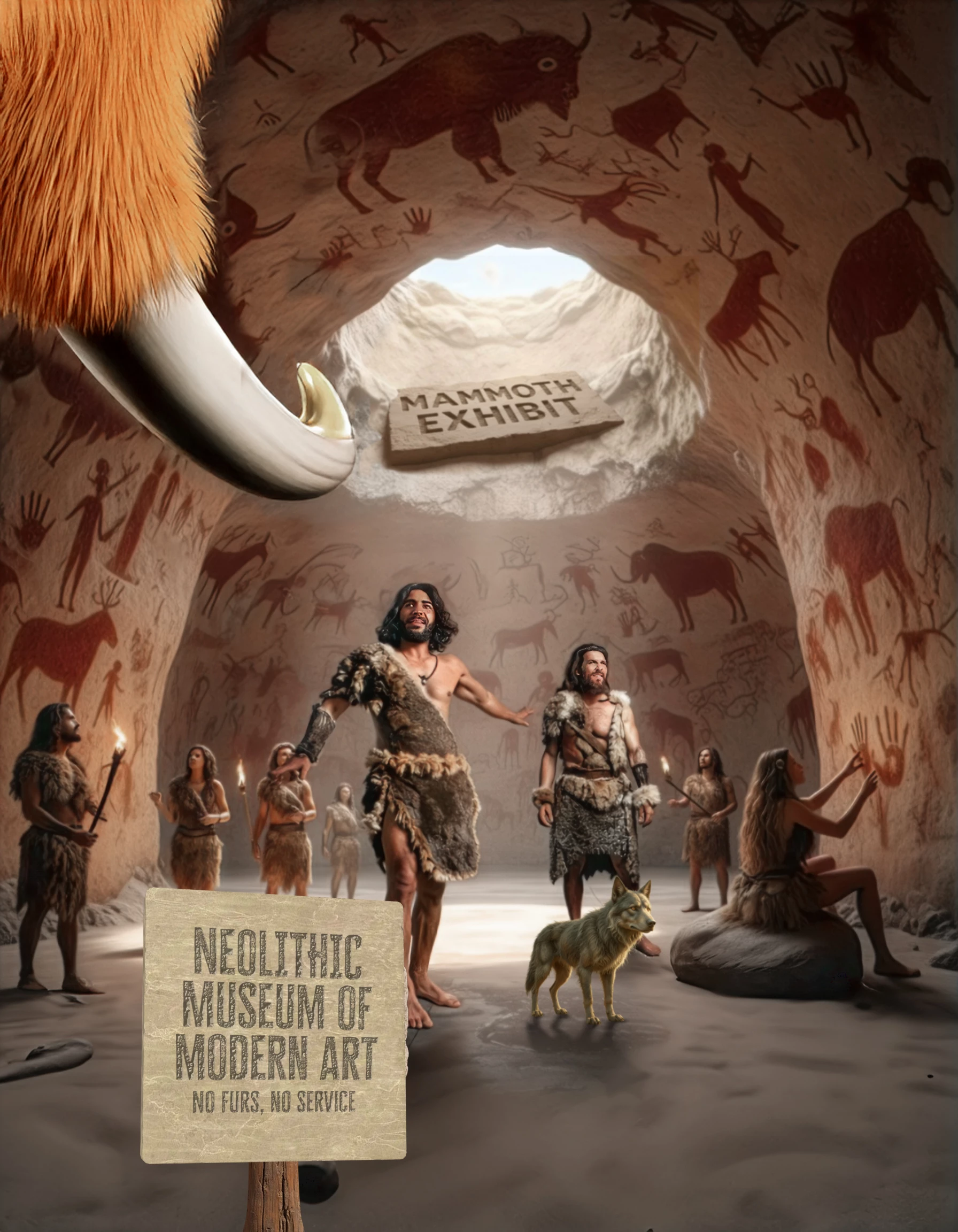
The mammoth is optional. I just thought it looked cool.


Tools used here were Firefly Boards (cave and individual neolithic characters by Firefly Model 4, collage by Gemini 2.5 Flash), Generative Upscale, GenFill and GenExpand (Photoshop), Gemini 2.5 Flash in Firefly (background mammoth exhibit sign), Illustrator/Stager/Photoshop/Substance 3D Viewer pipeline (museum sign, text in Photoshop), Adobe Express Generative AI as an experiment (wolf).