
Participant
November 14, 2025
Question

Does not understand prompt

  • November 14, 2025
  • 3 replies
  • 58 views

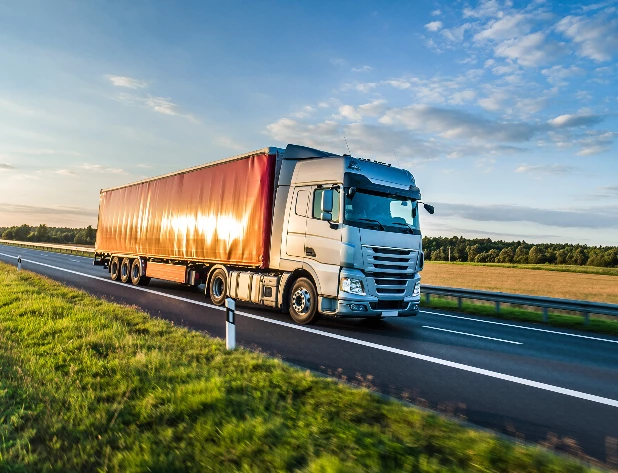
prompt: tir truck with pvc coated trailer on polish highway, vehicle moving from left side of the picture to right side of the picture and centered on image, image is taken perpendicularly to the vehicle

absurd result:


3 replies

droopydog500
Community Manager
Community Manager
November 14, 2025

Hi @Adrianpl,


The aspect ratio of the generated image has to match exactly with the composition reference or you will see that cropping. If you change the aspect ration for your generated image, also change it for your composition reference. Shrink the object in the composition reference to make it smaller in the generated image. It is almost like the generated image is traced from the composition reference.


    droopy

Adobe Community Expert (not an Adobe employee)
AdrianplAuthor
Participant
November 14, 2025

Dear SamarthS,

Thanks for quick reply.

I've been trying this with model 4 and 5 without sucess.

The problem I am facing, is when I add reference style image it almost replicates entirely the image (meaning even the distance of an object to edges of the document, which is problem for my task at hand).
Example of close to desired effect:

But again, other problem occurs like the truck above is solid wall, not curtainsider, it is not from right side but from left, the margins around image are minimal (when changing to 4:3 the image is cropped and not fitted to this proportions)

AdrianplAuthor
Participant
November 14, 2025

I have been trying to use this terrible text to image engine since 1st generation and every time it frustrates me to use it, so I use something else


Previous prompt result:


Community Manager
November 14, 2025

Hi @Adrianpl


Thanks for reaching out. Could you share the model you are using to make this image? I tried your prompt in Image Model 5 and obtained the following results.
You can also try adding a reference image for the truck. 

^Sam