I keep getting the error. hopefully things will improve. usually what i have to do is fully close and reload the site. i feel like it gets increasingly more likely as the generation history gets filled up with more images. I have been unable to find a way to clear the history as well, and if this is not a feature already then seems very reasonable for the next update to allow this: starting a new concept? clear the previous generations in the history.
I took a look at your requests from the last 7 days to figure out what might be causing those errors. It looks like 49 of your generations using Partner models went through successfully, and the most recent failure happened because your account ran out of credits.
If you are running into other unexpected errors, the best way we can troubleshoot is if you could share the specific generation settings you were using and the approximate time it happened. Even better, you can collect a HAR file (browser logs) while the error occurs and send it my way. Please make sure to send logs via Direct Message (DM) so we can keep your information private.
Regarding clearing your history, it depends on which view you are looking at:
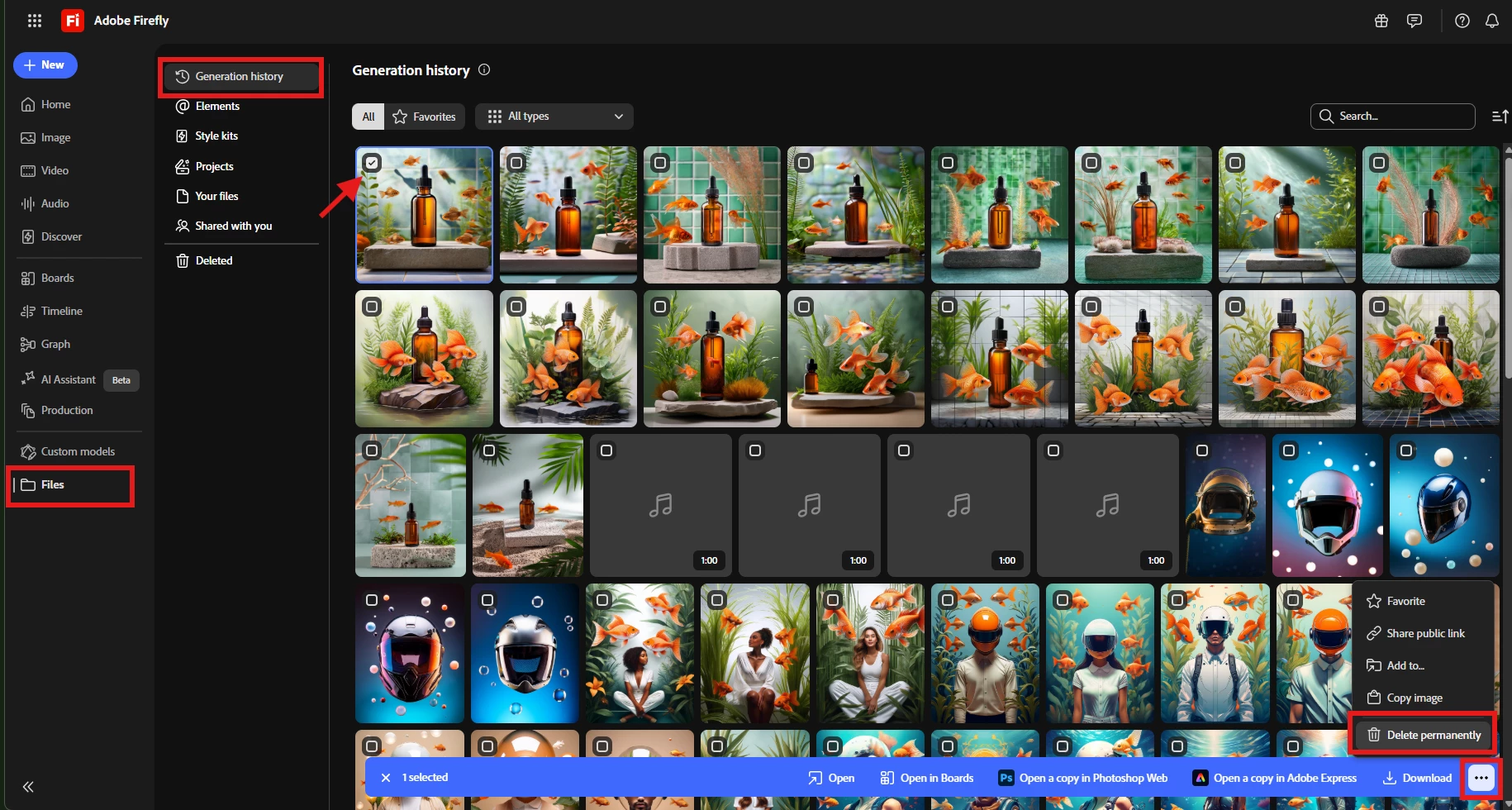
Generation History: You can already delete specific outputs by navigating to Files > Generation history and selecting the ones you want to remove.
Main Generation Page: If you're trying to clear the history right from the main generation page, you will currently need to clear your browser's cache. The good news is that our product team is well aware of this limitation, and it's already on their radar as a feature request!
Hope this helps! Let us know if the errors persist after your credits reset or if you have any other questions.
I took a look at your requests from the last 7 days to figure out what might be causing those errors. It looks like 49 of your generations using Partner models went through successfully, and the most recent failure happened because your account ran out of credits.
If you are running into other unexpected errors, the best way we can troubleshoot is if you could share the specific generation settings you were using and the approximate time it happened. Even better, you can collect a HAR file (browser logs) while the error occurs and send it my way. Please make sure to send logs via Direct Message (DM) so we can keep your information private.
Regarding clearing your history, it depends on which view you are looking at:
Generation History: You can already delete specific outputs by navigating to Files > Generation history and selecting the ones you want to remove.
Main Generation Page: If you're trying to clear the history right from the main generation page, you will currently need to clear your browser's cache. The good news is that our product team is well aware of this limitation, and it's already on their radar as a feature request!
Hope this helps! Let us know if the errors persist after your credits reset or if you have any other questions.




 AdChoices