howardzinn
Participant
July 30, 2026
Question

Firefly bug: Something went wrong

  • July 30, 2026
  • 4 replies
  • 14 views

Hi. I’m new here and I’d like to report the infamous “Something went wrong  Please try again later” bug in Firefly.

Elsewhere, Adobe directed me to post here and share this info, as if it makes any difference.

  • Your browser & OS version: Windows 10
  • The Firefly model you're using: Unknown
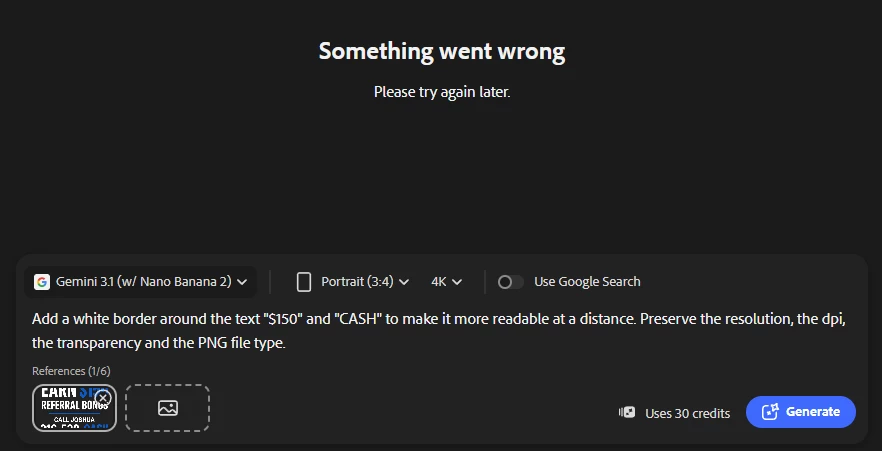
  • Your prompt (or a screenshot): 


  • Whether you're using a reference image: yes I am.


    4 replies

    Hajar Toutsi
    Community Manager
    Community Manager
    July 31, 2026

    Hi howardzinn,
    Thanks for including all the details here, that makes it much easier to dig into.

    What happened on our end: the primary model handling your request hit a temporary capacity limit and returned a "please try again" response internally, but the system rerouted to a backup model to finish the job. That model generated your image, and it saved successfully on our servers.

    So the "Something went wrong" message you saw was almost certainly a display hiccup tied to that first internal handoff, not a sign that the generation actually failed. Your image should be sitting in your Generation history under Files even though the on-screen message suggested otherwise.

    Could you check your history and let us know if it's there? If it's missing despite what I've described, that would point to something else worth digging into, and I'd want to follow up on that separately.

    Hajar

    July 31, 2026

    Hey ​@howardzinn 

    Help us. Help you.

    Something went wrong

    • Workflow Context:
      • The full prompt you were using.
      • Copies of any reference images, keyframes, or original images used.

    Based on the prompt you might be having a few issues. AI Generate Image models struggle w identifying Text and w text.

    I would use Firefly boards, PS, or Illustrator to add the boarders around the requested Text. You will need to do it manually. 

    Note: Here’s a useful article explaining the most common reasons that trigger the error you’ve been seeing.

    Suggestions on How to Prompt
    https://community.adobe.com/questions%2D404/use%2Dadobe%2Dfirefly%2Dto%2Dgenerate%2Dyour%2Dimages%2Dand%2Dvideos%2D1476088?tid=1476088&fid=404


    howardzinn
    Participant
    July 31, 2026

    Yeah. I did it manually. Thanks.

    howardzinn
    Participant
    July 30, 2026

    Hi. I’d like to report the infamous “Something went wrong  Please try again later” bug in Firefly.

    Elsewhere, Adobe directed me to post here and share this info.

    • Your browser & OS version: Windows 10
    • The Firefly model you're using: unknown
    • Your prompt (or a screenshot): 


    • Whether you're using a reference image: yes I am.