

Participant
June 12, 2025
Answered

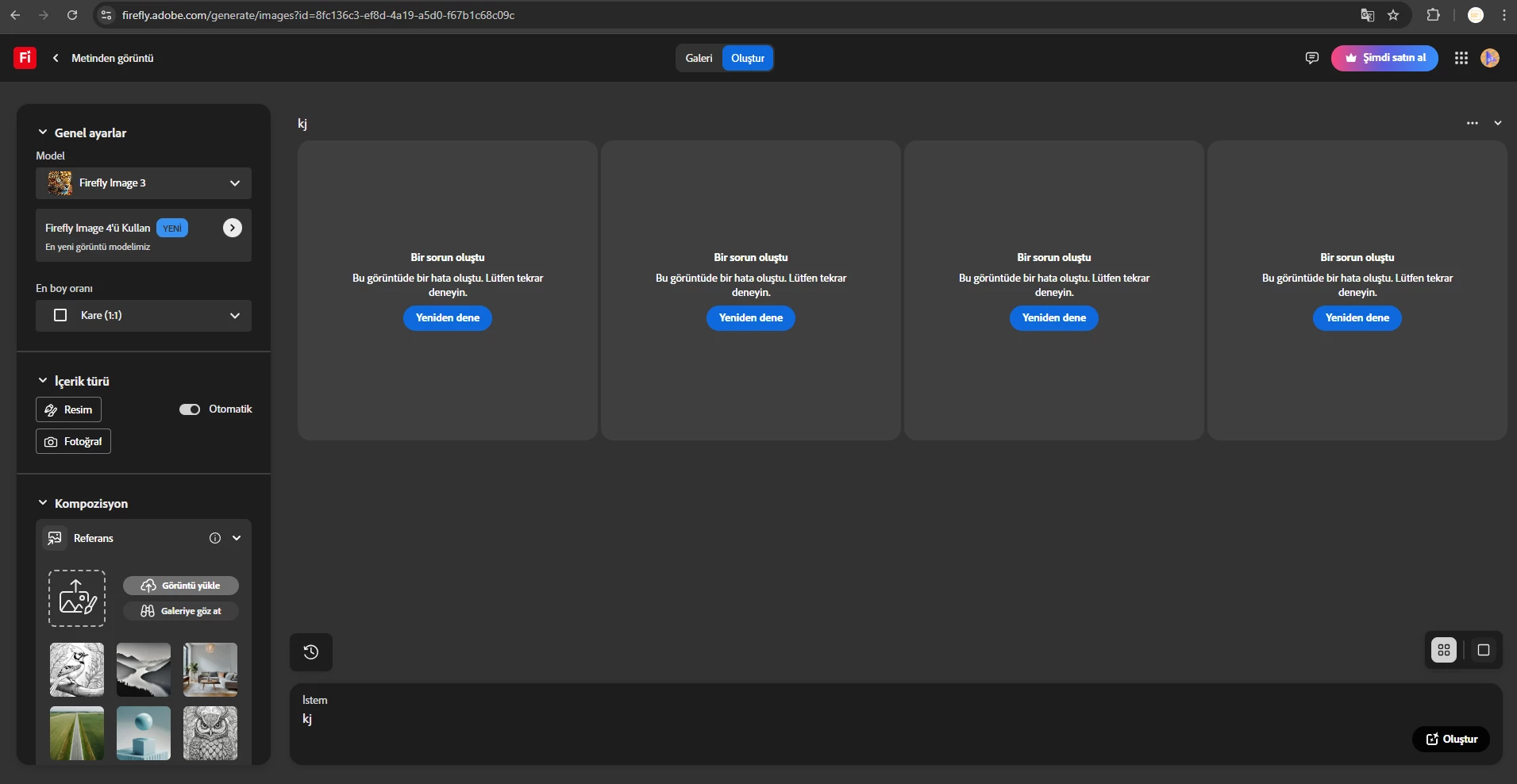
Firefly Gen 3 and Gen 4 isn't working

  • June 12, 2025
  • 10 replies
  • 1934 views

Hello,


Our Firefly isn't working properly, we're writing  long or short prompts but we can't get any images. We need a little help in here 🙂 We're waiting the responses.


Best Regards,

Koza Gida


Correct answer Julie34026512aen9

Thank you for the reply.


For some reason, Text to Image is now working for me today. I am still using the same browser as before (Chrome) and didn't change anything that I was doing previously. 

10 replies

droopydog500
Community Manager
Community Manager
June 17, 2025

Hello @KOZA38932789kwbd@Jeremy26566283fc20, and @Julie34026512aen9,


The Adobe engineers need additional information to understand what is causing this. If you are able, can you please follow these steps.


      1. Use Chrome or Microsoft Edge.
      2. Navigate to the generation page.
      3. With the browser window selected, and hovering over that window, right click the mouse and select "Inspect":

        That will open up a developer console on the right side of the screen. You will see something like this:


      4. On the top of that panel, you will see a menu bar. If "Network" is visible click on it. If not, click on ">>" and then select "network":

        You will now see:
         

 Try to do a generation that fails with that error. Then click on this button:


That will save a "har" file.  Then message me here privately with that file. If this platform will not let you upload, I can work out an arrangement to get it to me.


I am sorry this is so complicated.  Please let me know if you have any questions.


My best,

    droopy


Adobe Community Expert (not an Adobe employee)
Julie34026512aen9Correct answer
Participant
June 17, 2025

Thank you for the reply.


For some reason, Text to Image is now working for me today. I am still using the same browser as before (Chrome) and didn't change anything that I was doing previously. 

droopydog500
Community Manager
Community Manager
June 17, 2025

ok, if it happens again, please follow these steps.


    droopy

Adobe Community Expert (not an Adobe employee)
Participant
June 16, 2025

Everytime I enter a prompt for Text to Image feature, it displays "Something went wrong. This image produced an error. Please try again."


Have tried different browsers to no avail.

June 16, 2025

Thanks @Julie34026512aen9  for reaching out.

Could you provide a screenshot and an example of the prompt that you are using?

Cheers

Nate

Jeremy26566283fc20
Participating Frequently
June 13, 2025

Ten A
Community Expert
Community Expert
June 14, 2025

I checked the Adobe server status and it doesn't seem to be having any trouble with Firefly. I think it is a local problem, have you tried connecting to WiFi or changing your browser to something else?


Jeremy26566283fc20
Participating Frequently
June 15, 2025

Yes. I've tried both WiFi and my cell phone data. Neither make any difference. I have deleted my cache. I've tried on my iPhone and my iMac. Nothing works. I've been using Firefly for a long time now. It's not something that I'm just learning of figuring out. Even if I go back and use earlier models, the composition option doesn't work, and it flags almost every prompt that it shouldn't. I've even used ChatGPT to help me create prompts that shouldn't trigger a flag. Nothing works. I use this for my work, so this is frustrating to say the least. 

Participant
June 13, 2025

Hello,

Problem solved incorrectly, first open the firefly image genera tab, then click a random pre crafted image, then you will using it without any errors et cetera. 


Best Regards!

droopydog500
Community Manager
Community Manager
June 13, 2025

Hi @KOZA38932789kwbd,


I am sorry for all the questions...


Can you please try another browser as a test and see if it works.

Is this happening on more than one computer or just one computer? If you have not tested, please test on another computer.

If that does not work, please try resetting the windows firewall to the defaults.

If that does not work, please ask your IT department to follow the instructions in this article: Domains to be allowed for Adobe apps & services to function correctly.


Please let us know if any of these solve the problem.


Thanks,

    droopy

Adobe Community Expert (not an Adobe employee)
Participant
June 13, 2025

Hello,

Operation system is Windows, browser is chrome, vers number: 137.0.7151.104 (64 bit), and we're connecting the internet with the company network.

droopydog500
Community Manager
Community Manager
June 12, 2025

Hello @KOZA38932789kwbd and @limychacha,

Thank you for your messages. I think both of you might be experiencing the same problem.


Can you please reply with the following information:
• Do other Firefly functions also fail, such as text to vector or generative fill?
• Tell us what operation system (OS) and browser you are using along with their version numbers.
• Tell us how your computer or device is connected to the network (home wifi, company network, mobile network, etc.).

Thanks,
    droopy

Adobe Community Expert (not an Adobe employee)
Participant
June 12, 2025

Hello,


Still not working. Error is the same, please contact us. 

Community Manager
June 12, 2025

Hi @KOZA38932789kwbd


Thanks for reaching out. Try reloading the page (or a hard reload pressing <SHIFT> while clicking the reload button) and try again. Please try another browser and let us know if this works.


Thanks


Merged thread

^Sam
Participant
June 12, 2025

이미지 요청 시 이미지는 제공되지않고, 횟수는 차감됨. 약 20~30건 정도 수량 차감ㅠㅠ
