dencon
Known Participant
December 13, 2025
Answered

Firefly responding weirdly to simple commands

  • December 13, 2025
  • 2 replies
  • 221 views

First—in lieu of chat help, which I can't find, here we go—apparently I've used up all my monthly points in testing. Nothing created was worth saving. I deleted them all (I think). None downloaded, anyway. Zero points left.  Do I really have to use purchased points to test this app?  I found no clear descriptions of which model to use for what, which left me having to try a little of this, a little of that. I thought I'd give Firefly a shot since I've been an Adobe user since the 90's. And, yes, I tested before buying, but ran out of test points quickly. 

I have a still image (attached), parts of which I wish to animate.  I've found a handful of competitor apps that have given results that are close to what I'm looking for, some with pleasant surprises I didn't ask for (and no support).  No happy accidents here.  My prompt to make banners in the picture blow in the wind was "make orange banners blow in the wind", same prompt as with competitor apps.  It zoomed, panned & scanned, neither of which I asked for. A subsequent prompt that included "Do not crop image. Do not zoom in or out",  but to no avail. 

Other apps, like HaiLuo , were remarkably close, but also without enough testing time to see if I'll get what I'm paying for.  The one app with an an unasked-for feature made the sun come out, shining from off-camera left, shadows and all (I had a question, but no support, so here I am).  I included a prompt for that in Firefly, and nothing.  All the other apps I tried had the trees moving in the wind. Not that I asked for it, but it was cool looking.  A final prompt, that didn't work well for any, was to make the happy-face on the tree look as if creating (blowing) the wind. All results were cartoonish, maybe too much to ask for. 

Windows 11, Edge browser (avoiding Chrome, Firefox had issues)

So, in conclusion, I'd like to test and see results before using points.  Can I get my points back? How about a few paragraphs with clear written descriptions (tone down the sales pitches) of what exactly the various Adobe or partner models are for and, perhaps especially, what they're not for. 

Happy to repost elsewhere if this isn't a "Discussion" issue. 

Thanks, Dennis

Correct answer droopydog500

Hello @dencon,

Thank you for your message. There is a lot to unpack here...


In general, there is not a concept of complimentary generations for testing. All generations are charged, in accordance with your plan. I bolded the last part of the previous sentence, because some generations are complimentary under some plans and others are complimentary under promotions.


How many credits you receive, what those credits can be used for, and how credits are consumed differs by plan. The major difference that is not always obvious and generates quite a few questions here in the forum is whether the plan you are on allows premium features (such as image to video and translation) or only standard features (such as text to image using the Firefly model only and generative fill). If the plan allows premium features, then standard features are complimentary. 


How many credits are consumed varies based on the model, the length (for video), and the resolution (for video). Many of us will experiment at a lower resolution until we are happy with the results and then generate at a higher resolution. It says to the left of the generate button how many credits will be consumed by your generation:

droopydog500_0-1766770741623.png


The nity grity details of what I discuss above are contained in these documents which cover generative credit consumption for every service, what plans have premium services included, and how many credits each plan receives. They are in: Generative credits FAQ and Partner models in Adobe products.


Also, I mentioned promotions. There is currently a promotion that allows some plans to get complimentary generations for image models and for the Firefly video model. For information on the current Firefly promotion, see: Unlimited Generations Promo: December 16–January 15.


When you say:


I'm not the only one confused with the word "model".  It's not clear the it's a third party, which is what it is, until it's too late. 


I am not sure what you mean. The models are listed on the left:
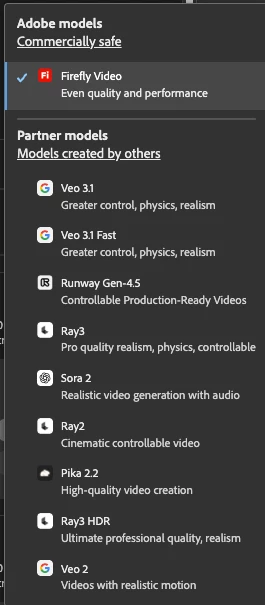
droopydog500_1-1766771749789.png

and it indicates whether they are an Adobe model or partner model. And the credits that will be consumed is listed to the left of the Generate button. Or maybe I am misunderstanding your question.


There are multiple ways Adobe could charge for generating images and videos. They could charge a flat fee and allow unlimited (or have high limits) generations, they could only charge for images that are downloaded or used, or charge for every generation.  Whichever method they use, the cost of the compute power needed to generate has to be covered. If they only charged for images or videos you downloaded/used, then it is likely the cost of those would be higher. I only mention that because if only downloads/uses were charged for people are likely to do more generations before reaching the final product, thus increasing overall compute costs. So that change might not mean your costs would be lower.


The models do not understand the concept of a word being negated by the word in front of it. So using "not [X]", "no [X]", "exclude [X]", "minimise [X]", "with no [X]", and "without [X]" does not work. Generally a negative prompt word is ignored  and the model adds to the image or video the thing you are trying to avoid.  You basically need to find "positive" words and phrases telling the model what you want to see rather than telling it what you do not want to see.  Such as "flat land" rather than "no mountains" or "desolate" rather than "no people".  If I am not sure how to describe something I want to exclude in a positive way, I will ask Google Gemini or ChatGPT for ideas.  Just be aware that when they give prompts, they are usually too wordy and conversational, so you have to edit them, but they are good for ideas.


When it moves and you do not want it to, words like stationary, still, fixed, etc. can be helpful.


As for what model is best for what cirumstances, I think that is a topic beyond what can be covered in this reply, and creatives do not always agree. Outputs from the model are a function of how the model is trained and how you are trained on using prompting, so the results from a single model can significantly vary based on prompting.


One major difference worth noting is that the Firefly models are safe for commercial use, meaning they are trained on licensed or public domain content and the model is trained not to violate trademarked or copyrighted materials. The other models do not offer that. 


I do not know why Adobe only offers a limited number of aspect ratios. It is not a comment we see in the forums that frequently, so it is possible the voice for having more is not loud enough. I would encourage you to create an idea in this forum asking for additional aspect ratios and let others upvote it. [It is best to have only one idea in an idea post so the reactions of others in the community can clearly show support for that specific idea; and those posts are linked to Adobe's internal product request tracking system.]


Hope I have helped some.


My best,
    droopy

2 replies

droopydog500
Community Manager
droopydog500Community ManagerCorrect answer
Community Manager
December 26, 2025

Hello @dencon,

Thank you for your message. There is a lot to unpack here...


In general, there is not a concept of complimentary generations for testing. All generations are charged, in accordance with your plan. I bolded the last part of the previous sentence, because some generations are complimentary under some plans and others are complimentary under promotions.


How many credits you receive, what those credits can be used for, and how credits are consumed differs by plan. The major difference that is not always obvious and generates quite a few questions here in the forum is whether the plan you are on allows premium features (such as image to video and translation) or only standard features (such as text to image using the Firefly model only and generative fill). If the plan allows premium features, then standard features are complimentary. 


How many credits are consumed varies based on the model, the length (for video), and the resolution (for video). Many of us will experiment at a lower resolution until we are happy with the results and then generate at a higher resolution. It says to the left of the generate button how many credits will be consumed by your generation:

droopydog500_0-1766770741623.png


The nity grity details of what I discuss above are contained in these documents which cover generative credit consumption for every service, what plans have premium services included, and how many credits each plan receives. They are in: Generative credits FAQ and Partner models in Adobe products.


Also, I mentioned promotions. There is currently a promotion that allows some plans to get complimentary generations for image models and for the Firefly video model. For information on the current Firefly promotion, see: Unlimited Generations Promo: December 16–January 15.


When you say:


I'm not the only one confused with the word "model".  It's not clear the it's a third party, which is what it is, until it's too late. 


I am not sure what you mean. The models are listed on the left:

droopydog500_1-1766771749789.png

and it indicates whether they are an Adobe model or partner model. And the credits that will be consumed is listed to the left of the Generate button. Or maybe I am misunderstanding your question.


There are multiple ways Adobe could charge for generating images and videos. They could charge a flat fee and allow unlimited (or have high limits) generations, they could only charge for images that are downloaded or used, or charge for every generation.  Whichever method they use, the cost of the compute power needed to generate has to be covered. If they only charged for images or videos you downloaded/used, then it is likely the cost of those would be higher. I only mention that because if only downloads/uses were charged for people are likely to do more generations before reaching the final product, thus increasing overall compute costs. So that change might not mean your costs would be lower.


The models do not understand the concept of a word being negated by the word in front of it. So using "not [X]", "no [X]", "exclude [X]", "minimise [X]", "with no [X]", and "without [X]" does not work. Generally a negative prompt word is ignored  and the model adds to the image or video the thing you are trying to avoid.  You basically need to find "positive" words and phrases telling the model what you want to see rather than telling it what you do not want to see.  Such as "flat land" rather than "no mountains" or "desolate" rather than "no people".  If I am not sure how to describe something I want to exclude in a positive way, I will ask Google Gemini or ChatGPT for ideas.  Just be aware that when they give prompts, they are usually too wordy and conversational, so you have to edit them, but they are good for ideas.


When it moves and you do not want it to, words like stationary, still, fixed, etc. can be helpful.


As for what model is best for what cirumstances, I think that is a topic beyond what can be covered in this reply, and creatives do not always agree. Outputs from the model are a function of how the model is trained and how you are trained on using prompting, so the results from a single model can significantly vary based on prompting.


One major difference worth noting is that the Firefly models are safe for commercial use, meaning they are trained on licensed or public domain content and the model is trained not to violate trademarked or copyrighted materials. The other models do not offer that. 


I do not know why Adobe only offers a limited number of aspect ratios. It is not a comment we see in the forums that frequently, so it is possible the voice for having more is not loud enough. I would encourage you to create an idea in this forum asking for additional aspect ratios and let others upvote it. [It is best to have only one idea in an idea post so the reactions of others in the community can clearly show support for that specific idea; and those posts are linked to Adobe's internal product request tracking system.]


Hope I have helped some.


My best,
    droopy

Adobe Community Expert (not an Adobe employee)
dencon
denconAuthor
Known Participant
December 26, 2025
Thanks, you've helped a lot. Much to unpack on boxing day. I'll try to
separate my slightly off-topic questions separately in the future.
cheers, dencon

--
My Website <>
My Instagram <>
dencon
denconAuthor
Known Participant
December 16, 2025

And after reading other Firefly related discussions, apparently I'm not the only one confused with the word "model".  

It's not clear the it's a third party, which is what it is, until it's too late. Right?  Still, not enough time to see if I'll be getting what I pay for. I, for one, need to see the finished project, before buying. Pay to remove watermark, pay to download, whatever. And if it's not possible, tell me. Can A.I. do that? Maybe not, but a human could. 

Back to another issue with using Firefly to animate a still image: why just the three aspect ratios? 16:9, 1:1 and 9:16, pretty much the only reason I had to test the third party "models".  If the workaround is puting 4:3 and 3:2 on a 16:9 canvas, that's just annoying.