imvp
Participating Frequently
June 29, 2026
Answered

Firefly returns a slop image. Text is garbled (was simplest text in the world). Gives an awkward, unusable image, poor ratio, perspective. Failure to feature the subject.

  • June 29, 2026
  • 4 replies
  • 50 views

Use a clear prompt.

Push “generate”

Get slop. 

Lose credits.

    Correct answer Hajar Toutsi

    Hi imvp,
    Thank you for reaching out about this.

    Text generation within AI models is a known limitation, and Firefly is no exception. Adding text or symbols directly during the generation step can sometimes be unreliable, even when quoted.

    One good option is to generate the image without the text/symbol and then add it afterward in Adobe Express.

    Another workaround you might find helpful is using Edit in Boards. Load your generated image with the misspelled text, choose Edit, then Edit text in image, and you’ll be able to correct the spelling.
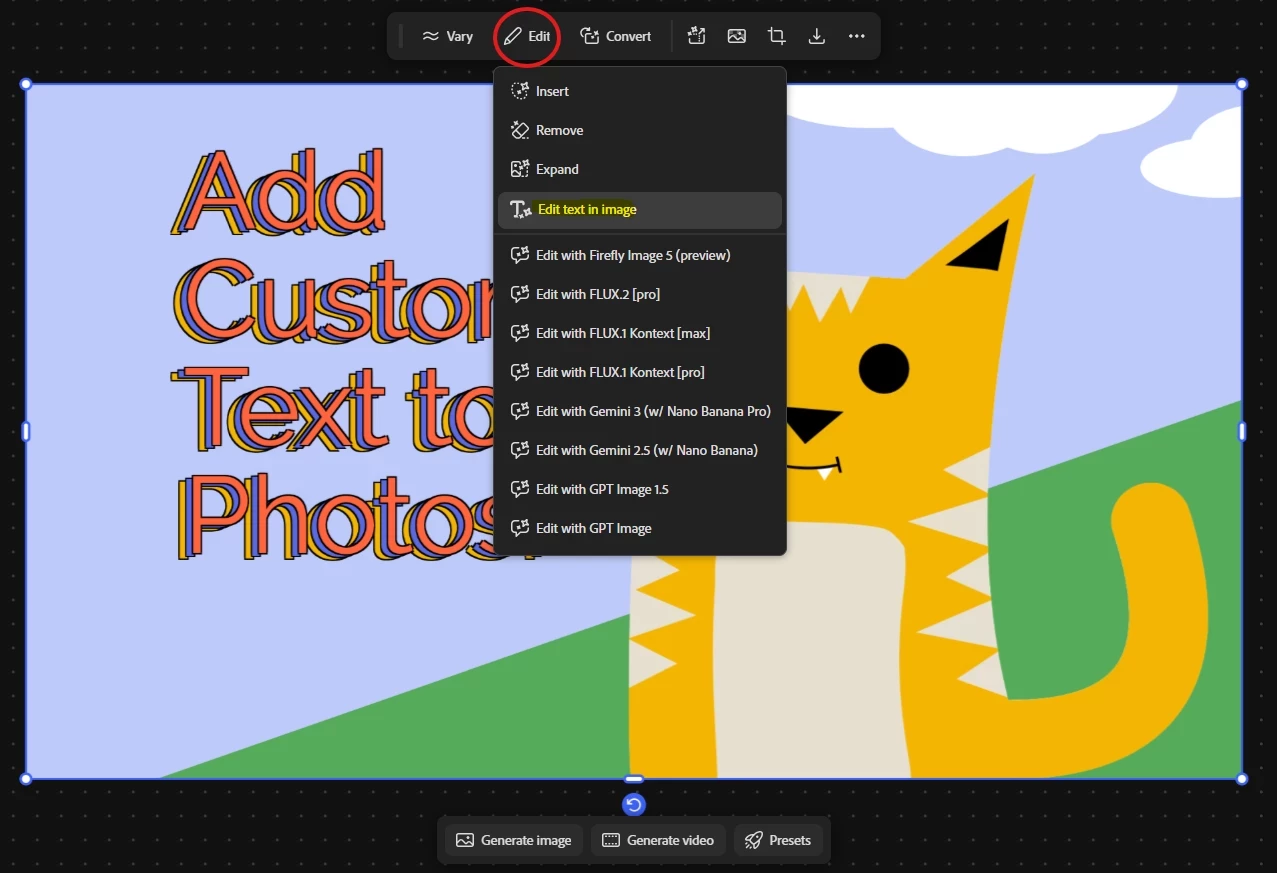
    Fix text in Boards


    I hope these steps help you achieve the result you’re looking for. Please let us know how it goes.

    Hajar
    [Moved to question]


    4 replies

    imvp
    imvpAuthor
    Participating Frequently
    July 7, 2026

    Then make it a free experimental feature.
    Don’t make us pay for slop while training Adobe’s models.

    Hajar Toutsi
    Community Manager
    Community Manager
    July 10, 2026

    Hi imvp,
    I completely understand where you're coming from. It feels incredibly unfair to spend your generative credits on an image that turns out completely unusable.
     

    To address your point about making it a free experimental feature: the biggest hurdle there comes down to how generative AI works on the backend. Every single generation, regardless of whether the text comes out perfectly or looks like garbled "slop"; requires the exact same massive amount of cloud-based GPU computing power. Because those hardware and processing costs are real for every single click of the "Generate" button, the system charges generative credits to cover that compute time. Currently, the AI has no way of reading its own visual output to determine if the text looks "good" or "bad" to a human, meaning it can't automatically refund credits for a failed text attempt.
     

    As for why it fails so often on text: AI image generators don't actually understand spelling, grammar, or language. They are trained to predict patterns of pixels based on millions of images. When you ask for text, the AI isn't typing letters; it is trying to visually draw shapes that resemble letters. If a few pixels are slightly misaligned, the whole word becomes illegible or misspelled.

    While the technology continues to evolve, the most reliable ways to protect your credits and get exactly what you want are:

    • Generate First, Add Text Later: Generate your background visual or subject completely without text first. Once you have an image you like, use a tool like Adobe Express or Photoshop to layer your text on top. This guarantees 100% accurate spelling, crisp fonts, and perfect perspective control.

    • Use Firefly Boards: If you have an image with garbled text that you still want to save, you can open it in Boards, click Edit, and select Edit text in image to try and correct the spelling directly without completely regenerating from scratch.


    We appreciate you sharing this feedback, as understanding user frustration with credit usage on text generation is vital for the team working on future models.

    ​​​​​​​Hajar

    imvp
    imvpAuthor
    Participating Frequently
    July 10, 2026

    It feels incredibly ironic to get an AI generated response and justification.

    My point stands, if you want to spend money on unacceptable results, that’s your business, I’m not interesting in paying for it. 

    Hajar Toutsi
    Community Manager
    Hajar ToutsiCommunity ManagerCorrect answer
    Community Manager
    June 29, 2026

    Hi imvp,
    Thank you for reaching out about this.

    Text generation within AI models is a known limitation, and Firefly is no exception. Adding text or symbols directly during the generation step can sometimes be unreliable, even when quoted.

    One good option is to generate the image without the text/symbol and then add it afterward in Adobe Express.

    Another workaround you might find helpful is using Edit in Boards. Load your generated image with the misspelled text, choose Edit, then Edit text in image, and you’ll be able to correct the spelling.

    Fix text in Boards


    I hope these steps help you achieve the result you’re looking for. Please let us know how it goes.

    Hajar
    [Moved to question]