


Participant
September 21, 2026
Answered

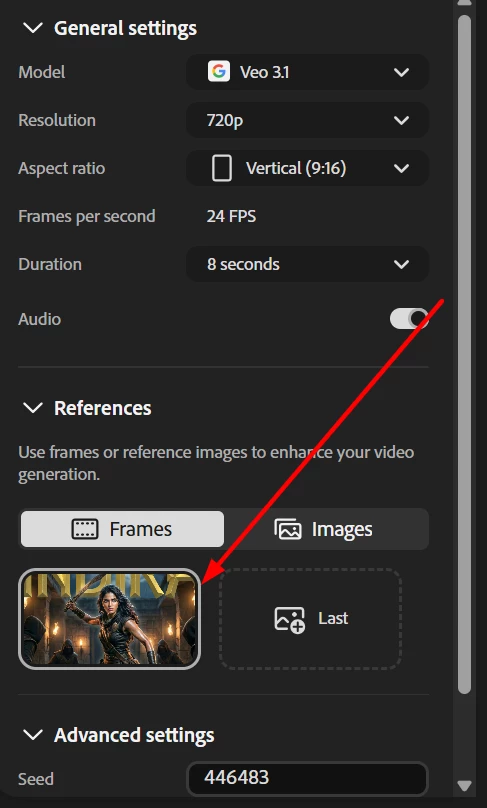
Generating video (9:16 aspect ratio) with Google Veo 3.1 at 720p/1080p at 24 FPS and duration 8 seconds with audio and 1 reference image, I receive the error `The selected aspect ratio isn't supported with reference images for this model.`

  • September 21, 2026
  • 1 reply
  • 22 views

There is nowhere that says what the desired reference image aspect ratio is. I've given 9:16 (900x1600), 16:9 (1600x900) and even square (1024x1024) and nothing got accepted. Please write better error messages.

Correct answer Kartika Rawat

Hi antonsynd!

This is expected behavior. Since you selected the vertical 9:16 format but uploaded a widescreen reference image, the aspect ratios don’t match, which causes the asset mismatch error. Try using a vertical reference image instead, or use Frames. I tested the image with Frames, and the video was generated successfully.

Let us know if you have any questions.

Thanks,

Kartika
 

1 reply

Kartika Rawat
Community Manager
Kartika RawatCommunity ManagerCorrect answer
Community Manager
September 21, 2026

Hi antonsynd!

This is expected behavior. Since you selected the vertical 9:16 format but uploaded a widescreen reference image, the aspect ratios don’t match, which causes the asset mismatch error. Try using a vertical reference image instead, or use Frames. I tested the image with Frames, and the video was generated successfully.

Let us know if you have any questions.

Thanks,

Kartika