Due to ongoing backend processing and system load, this behavior can occasionally happen. The generation history may take some time to fully load, or it might appear incomplete temporarily while the system catches up.
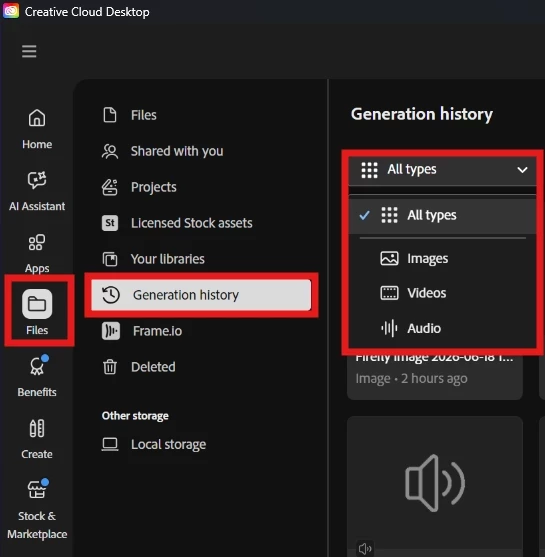
In the meantime, you can still access your generated outputs directly through the Creative Cloud Desktop app (different from Adobe Firefly webpage), or directly from https://www.adobe.com/home. Select Generation history under Files, this space saves all of your generated media (images, audio, and videos) and it allows you to access them (which consumes your allocated Adobe Cloud storage space)
Let us know if that helped you locate your output.
Mine tool! I was doing some maintenance and moving folders into project folders and was deleting a large number of things. because I had about 1600 total generations and i was notice the creative cloud standalone app was sluggish/non responsive and i couldnt batch process more than 20 items at a time otherwise it will just go into spinning forever. finally over 1300 items just straight dissappeared on me. Have had a ticket open for 2 days on this and hoping to hear back. Adobe still shows the right amount of data in use so I know the data is there somewhere but they seemed like there is major breakdown on the backend somewhere.
Due to ongoing backend processing and system load, this behavior can occasionally happen. The generation history may take some time to fully load, or it might appear incomplete temporarily while the system catches up.
In the meantime, you can still access your generated outputs directly through the Creative Cloud Desktop app (different from Adobe Firefly webpage), or directly from https://www.adobe.com/home. Select Generation history under Files, this space saves all of your generated media (images, audio, and videos) and it allows you to access them (which consumes your allocated Adobe Cloud storage space)
Let us know if that helped you locate your output.





 AdChoices