Mya+Peel
Participating Frequently
August 13, 2026
Answered

How do I check how many individual credits I have?

  • August 13, 2026
  • 4 replies
  • 190 views

I see this question as far back as 7 years, but even then the question did not get answered correctly. I have all the programs. I am told I have 4000 credits that re-generate monthly. But, there must be a quick link somewhere that shows how many I have left for each month, right?

Other than these directions (below) (which incidentally no longer work)… 

------------------------------

Checking how many generative credits you have left

To check how many generative credits you have left, use your Adobe account or the in-app credit view.

In your Adobe account:

  1. Go to your Adobe account page.
  2. Select Account in the upper-right corner.
  3. Select your profile icon to view your generative credit count, including the number left in the current billing cycle and the number included in your plan.

In the app:

  1. Open the product’s home screen and select your profile icon.
  2. Look for the credit counter.

Note: Generative credits do not roll over; your balance resets each month on your plan’s monthly reset date. If you use Photoshop, you can also use the Generative Credit Usage panel to review feature availability, credit requirements, and your balance. Hope this helps.

---------------

So, yeah… These directions (above) are out of date, because they don’t work. Could someone tell me where it says how many “CREDITS” I have left? Much appreciated. Thank you ai.


Moved to Adobe Firefly by a moderator Forum

 

    Correct answer yamato713108855

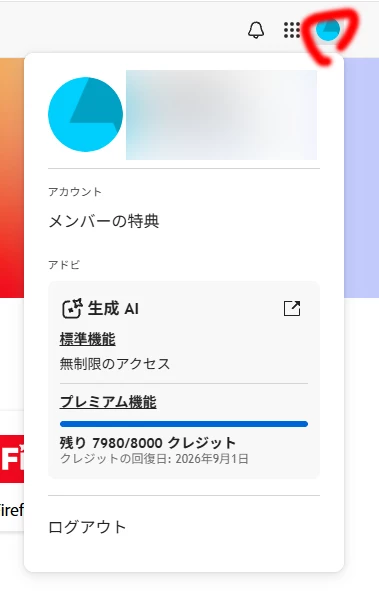
    To check your Firefly credits, simply click the profile icon in the top right corner.


    4 replies

    N8.
    Community Expert
    September 26, 2026

    ​@Mya+Peel 
    You can also open your Creative Cloud App. Press on your Icon in the top right corner.
    This maybe the fastest way to see your credits as the Creative Cloud App Icon is on my Desktop in the top right corner.
    Nate


    Mya+Peel
    Mya+PeelAuthor
    Participating Frequently
    September 25, 2026

    Thank you. I did find them. But only when I searched for them with all my heart. Now I can’t find them again. It’s almost as if you really need to use your mind to find them, and only when someone who is noticing that you are online on the Adobe website, and they see you searching frantically for something, do they open a link and viola, there it is. I guess I’ll just search with all of my heart - every time I need to see it. 

    droopydog500
    Community Manager
    Community Manager
    August 14, 2026

    Hi ​@Mya+Peel,

    There have been reports from a few people that the number of credits they had was not showing in the box that ​@yamato713108855 showed. If that is the case with you, please show us a screen shot, but black out your personal information in the upper right corner.

    Thanks,

        droopy

    Adobe Community Expert (not an Adobe employee)
    yamato713108855
    Community Expert
    yamato713108855Community ExpertCorrect answer
    Community Expert
    August 14, 2026

    To check your Firefly credits, simply click the profile icon in the top right corner.