
Participant
Dec 1, 2024 3:32 PM UTC
Question

How to improve the background colour for a pdf


Hello

Please is not there a program for improving pages background colour in the pdf file


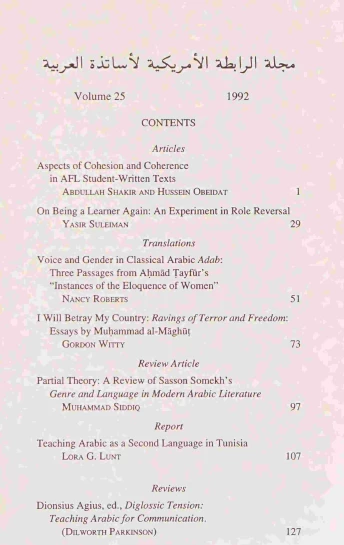
After I compressed one of my pdf files using a program named ( Systweak PDF Editor) installed in my computer desktop , the colour of all pages ( background ) changed as if it were freckles ( spotting)

By the way to get the minimum size for the pdf, I have chosen the highest compressing


So how can I change it to a usual colour ?

I hardly know something about the programs

Here is one page I upload    I use acrobat reader   ( Adobe Reader XI) 


4 replies

Monika Gause
Community Expert
Community Expert
Dec 1, 2024 4:50 PM UTC

That app made your PDF pixel based. Probably not what you want. Just don't do it.

Translate
Participant
Dec 1, 2024 5:42 PM UTC

Thank you @  Monika Gause  , but I did not find another program compressd file size better than this one.

The file size after I compressed in the site ( I love pdf ) I got it 202 megabytes , then after using : Systweak PDF Editor , I got it  66 megabytes , so the difference of size is huge. The file can be read without difficultly and nothing bad is with except in the freckles in background ( not normally colour or  having spots) 

By the way I tried some ways  : edit --- experience  ----accessibility --- check replace document colour --- costum colour  ( I changed the background for gray and the text to black ) the spots become lesser than the previous  But I still want it better . I also in the morning posted a message to the company of the program , yet no answer  comes to me. 

Translate
MMA
Participant
Dec 1, 2024 5:49 PM UTC

It is perhaps if I use another option  medium or low compression, the spots will not appear in the background, but the size will be larger  or too much larger. 

Translate
MMA