Dec 5, 2024 6:31 AM UTC
Answered

How to return to the original image generation screen after editing

Hello,

I am a beginner. I selected one of the four images that showed up in the generated results in fast mode and edited it. However, I cannot register the edited image as a favorite or return to the original screen where the four images were located. If I click on the back button at the top, https://firefly.adobe.com/upload/inpaint is opened and the original four images are lost. How can I go back to the original generation screen after editing?

Thank you.

This topic is closed to new replies. Start a new post to keep the conversation going.
droopydog500
droopydog500Correct answer
Community Manager
Dec 5, 2024 12:32 PM UTC

Hi @まゆみ354628237nax,


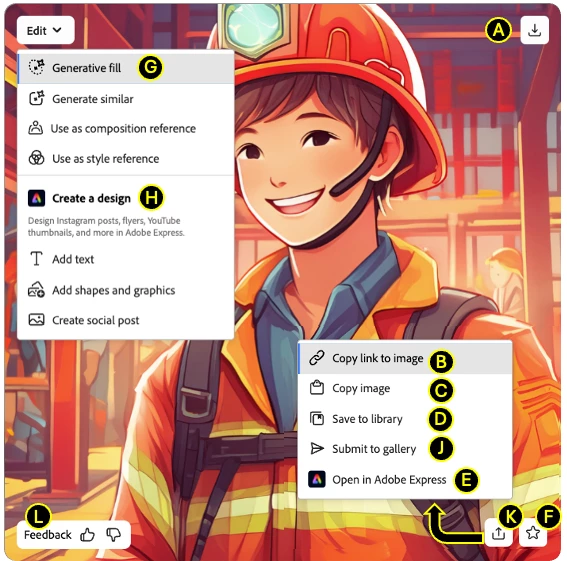
Using the back button does not always work. What I do for images I need to go back to is favourite them. Then if the borwser session is reset or I cannot get back, I can get there via the favourites.  You can do the same thing by copying a link to the image and saving that link. It is "B" on this diagram:


My best,

    droopy


Adobe Community Expert (not an Adobe employee)

4 replies

Kartika Rawat
Community Manager
Community Manager
Dec 5, 2024 11:52 AM UTC

Hi mochi_kou!

Sorry to hear that. If you're using text to image feature, you can use the History strip by clicking on the history button. Here's how: 


I hope this helps.


Thanks,
KR

Translate
Dec 5, 2024 12:22 PM UTC

Thanks for the reply.
But unfortunately your advice is not helpful. It goes back to the state where I just opened the application and there is no history.


I have now found a solution myself.
I was going back through the back button at the top in the app, but if I use the browser's back button, I can go back to the page with the image I had generated earlier.


Thank you so much.

Translate
droopydog500
Community Manager
droopydog500Community ManagerCorrect answer
Community Manager
Dec 5, 2024 12:32 PM UTC

Hi @まゆみ354628237nax,


Using the back button does not always work. What I do for images I need to go back to is favourite them. Then if the borwser session is reset or I cannot get back, I can get there via the favourites.  You can do the same thing by copying a link to the image and saving that link. It is "B" on this diagram:


My best,

    droopy


Translate
Adobe Community Expert (not an Adobe employee)